Right-Sizing RDS Instances: How to Stop Overprovisioning Your Databases
.png)
Introduction
Your AWS bill arrives. EC2 looks reasonable. S3 is fine. Then you scroll down to RDS — and that's where the money went.
Database compute is routinely the second or third largest line item on an AWS invoice, yet it's the one most teams leave untouched. The logic is understandable: nobody wants to touch a production database. Downsize it wrong and you're the person who caused the outage. So you leave it at db.r5.2xlarge "just to be safe," and the meter keeps running.
The problem is that "just to be safe" has a real price tag. According to the Flexera 2025 State of the Cloud Report, 27% of all cloud spend is wasted — and RDS overprovisioning is one of the biggest culprits. The Harness FinOps in Focus report puts it even more bluntly: 61% of developers never rightsize their instances, and it takes an average of 25 days to detect and correct an overprovisioned resource.
This guide walks you through exactly how to find overprovisioned RDS instances, which metrics actually matter, and how to downsize safely — without performance surprises on the other end.
Why RDS Overprovisioning Happens (and Why It Persists)
It usually starts at provisioning time. An engineer sizes an instance for a peak load estimate, adds a safety buffer, and ships it. The workload never actually hits that peak. The instance sits at 15% CPU, but nobody revisits it because:
- The application works fine, so there's no ticket
- Rightsizing databases feels risky compared to EC2
- CloudWatch dashboards are set up for alerting on high utilization, not low
The result is an R-family instance (8 GiB RAM per vCPU) doing the work of an M-family (4 GiB RAM per vCPU), or a db.m5.2xlarge handling a workload that a db.m5.large would serve comfortably. Every month that gap costs you money.
Understanding AWS RDS Instance Types
Before right-sizing anything, it helps to understand what you're choosing between. AWS RDS instance families map directly to cost and workload fit:
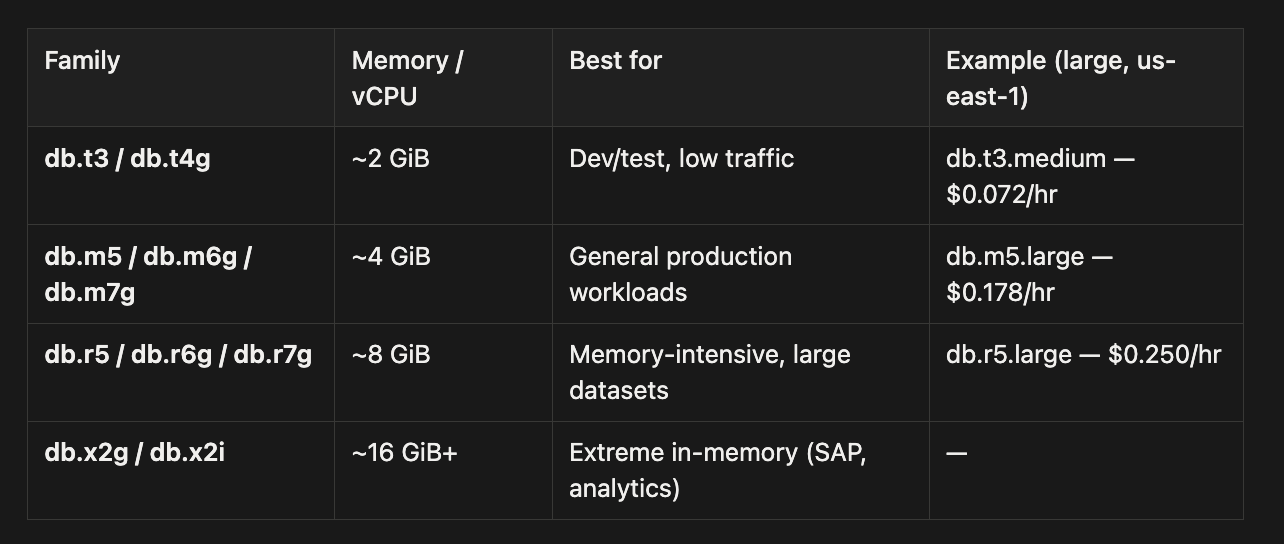
The most common and expensive mistake is running an R-family instance when an M-family would do the job. You're paying for double the memory per CPU core, and if your buffer cache hit ratio is already near 100%, that extra RAM is just sitting idle.
The Graviton Opportunity
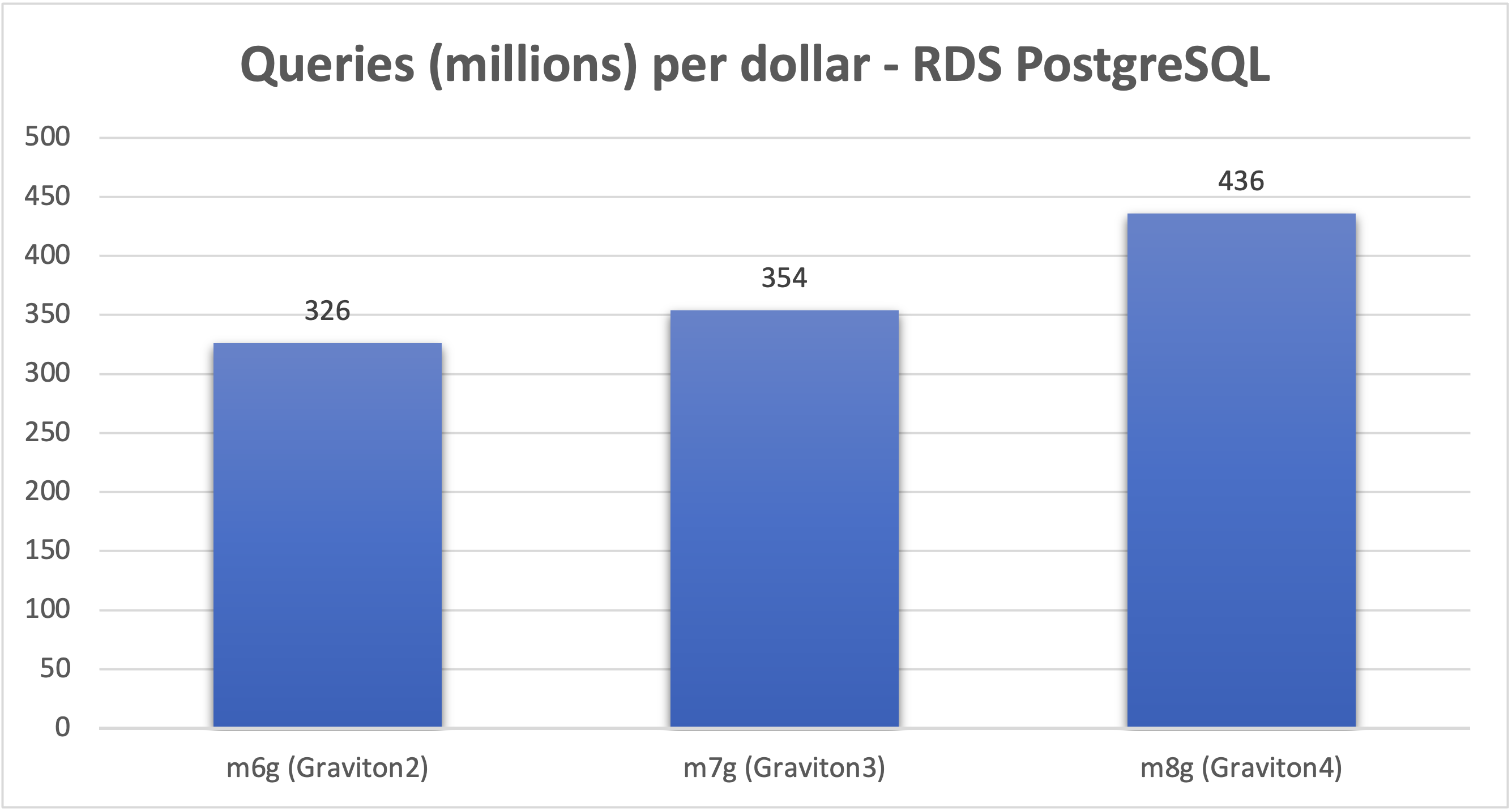
Switching from an Intel x86 instance to an AWS Graviton-based equivalent is one of the highest-return moves you can make — it requires no application changes and takes effect during a standard maintenance window.
AWS's own benchmarks show the gains compound across generations:
- Graviton2 (db.m6g, db.r6g, db.t4g): Up to 52% better price-performance vs prior Intel generations
- Graviton3 (db.m7g, db.r7g): 29% more queries per second and 22% more queries per dollar vs Graviton2
- Graviton4 (db.m8g, db.r8g): 41% higher throughput vs Graviton2, 23% vs Graviton3
Graviton is supported for MySQL, PostgreSQL, MariaDB, and Aurora. Oracle and SQL Server remain x86-only. If you're on db.m5 or db.r5 today, migrating to the Graviton equivalent is often the first step — cheaper instance, better performance.
Step 1: Find Your Candidates with the Right Metrics
The instinct is to open CloudWatch, look at CPUUtilization, and call it a day. That's a start, but it misses several signals that matter just as much.
The AWS right-sizing whitepaper gives you a concrete threshold to start with:
Identify instances with maximum CPU usage and memory usage of less than 40% over a four-week period. These are the instances you want to right-size.
Here are the CloudWatch metrics worth pulling for every RDS instance you're evaluating:

Important: Basic CloudWatch gathers CPU from the hypervisor at 1-minute intervals. AWS warns that "differences can be greater if your DB instances use smaller instance classes." Enable Enhanced Monitoring (1-second OS-level granularity) to catch sub-minute spikes that basic metrics would average away.
A Note on Memory Utilization
You cannot size down an RDS instance based on memory utilization numbers alone. Database engines intentionally consume most available memory. MySQL's InnoDB buffer pool defaults to 75% of instance memory (DBInstanceClassMemory * 3/4), so an idle MySQL instance still shows ~75% memory "used." This is expected and healthy behavior.
The real signal is SwapUsage. If swap is near zero and your cache hit ratio stays above 99.9%, the instance has adequate memory. If swap climbs, you've already pushed too far.
Step 2: Use AWS Compute Optimizer for RDS
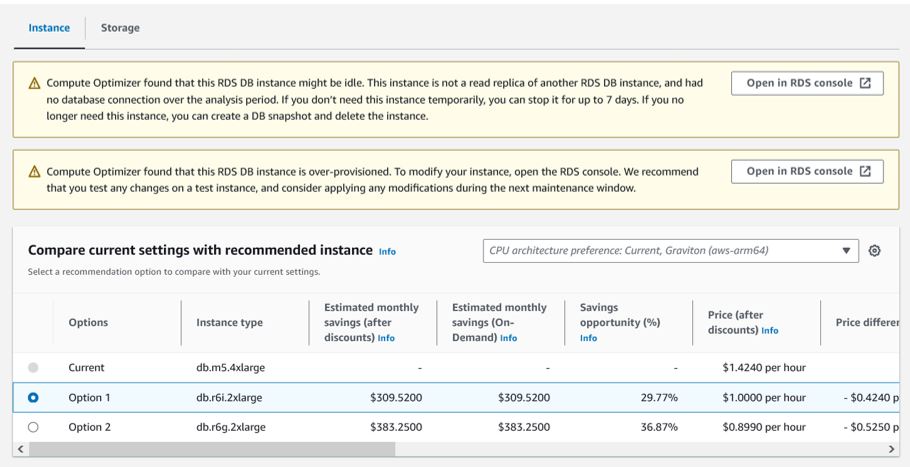
Manual metric analysis is useful for understanding what's happening. For fleet-wide recommendations at scale, AWS Compute Optimizer is the right tool.
As of mid-2024, Compute Optimizer supports right-sizing recommendations for RDS MySQL, RDS PostgreSQL, Aurora MySQL, and Aurora PostgreSQL — covering the engines used by the vast majority of teams.
Note: AWS Cost Explorer's built-in Rightsizing Recommendations covers EC2 only. For RDS, you need Compute Optimizer.
Compute Optimizer's ML model analyzes: CPUUtilization, DatabaseConnections, network throughput, EBS IOPS and throughput, I/O balance percentage, free storage space — and when Performance Insights is enabled, it also factors in DB Load (Average Active Sessions) and swap metrics for more accurate memory-aware recommendations.
Each recommendation is classified as:
- Over-provisioned — you're paying for more than you need
- Under-provisioned — you're at risk of a performance issue
- Optimized — instance size is appropriate
You get up to two alternative instance recommendations per DB instance — typically one x86 and one Graviton — with estimated monthly savings attached.
Lookback periods available:
- 14 days (default)
- 32 days (captures monthly batch cycles)
- 93 days (captures quarterly patterns — requires Enhanced Infrastructure Metrics)
Use the 32-day or 93-day lookback before acting. A 14-day window is easy to fool by a quiet week.
Step 3: How to Downsize Safely
Found your candidates. Have Compute Optimizer's recommendation. Now what?
The rule before you touch anything: right-size first, commit later. Buying a Reserved Instance for an overprovisioned database just "optimizes the cost of waste," as the AWS Database Blog puts it.
Here's a safe process:
1. Snapshot the instance before making any change. This is your rollback.
2. Test in non-production first. For Aurora, spin up a reader replica at the target instance size and route a portion of read traffic to it. Monitor cache hit ratios, latency, and connection behavior under real traffic.
3. Check your connection pool. MySQL's max_connections is calculated from instance memory: DBInstanceClassMemory / 12582880. A smaller instance means fewer allowed connections. If your DatabaseConnections peak exceeds 80% of max_connections, you need RDS Proxy or PgBouncer in place before downsizing — not after.
4. Schedule the change in a maintenance window. Instance class changes require a brief restart. For Multi-AZ deployments, AWS updates the standby first, then fails over — typically 60–120 seconds of downtime. Single-AZ restarts take longer.
5. Watch closely for 1–2 weeks post-change. Set CloudWatch alarms on CPUUtilization, FreeableMemory, SwapUsage, and DatabaseConnections. Don't declare victory after one quiet afternoon.
Common Mistakes That Will Bite You
Ignoring the IOPS ceiling. Even if you provision 25,000 IOPS on gp3 storage, a smaller instance type may only support 12,000 IOPS at sustained throughput. The instance becomes the bottleneck, not the volume. Check instance-level EBS bandwidth limits before sizing down.
Missing burst workloads. A 14-day CloudWatch window may miss month-end batch jobs or quarter-close reporting. Always look at at least a full month of data — ideally 90 days.
Underestimating Multi-AZ failover impact. AWS documentation notes: "Failover time can also be affected by whether large uncommitted transactions must be recovered; the use of adequately large instance types is recommended with Multi-AZ." A smaller instance may take longer to replay uncommitted transactions, extending your failover window.
Step 4: Lock in Savings with Reserved Instances
Once you've right-sized and you're confident in the instance size — now you commit.
RDS Reserved Instances offer significant discounts for 1-year or 3-year commitments:

For Aurora, MySQL, MariaDB, PostgreSQL, and Db2, RIs include size flexibility — discounts automatically apply across instance sizes within the same family in the same region. A 1-year RI for a db.m6g.large will partially cover a db.m6g.xlarge if you scale up, and vice versa.
In December 2025, AWS also launched Database Savings Plans — offering up to 35% savings with no upfront payment and flexibility across 9 database services including Aurora, RDS, DynamoDB, and ElastiCache. They cannot stack with RIs on the same workload, but can be layered: RIs for your stable baseline, Savings Plans for flexible overflow.
Making Right-Sizing a Habit, Not a Project
Right-sizing isn't a one-time cleanup. Workloads change, usage grows, new application features ship. The AWS right-sizing whitepaper states it directly: "right sizing should be an iterative, ongoing process."
A practical cadence:
- Monthly: Review Compute Optimizer recommendations for new "Over-provisioned" flags
- Quarterly: Pull 90-day CloudWatch metrics for your top 10 RDS instances by spend
- Annually: Reassess instance families — new Graviton generations arrive regularly and the performance gap vs prior-gen x86 keeps widening
Tag every RDS instance with owner, application, and environment. Untagged instances are invisible to cost attribution, and invisible resources don't get optimized.
Quick Reference: Right-Sizing Decision Checklist
Before downsizing any RDS instance, confirm:
- CloudWatch data covers at least 4 weeks (ideally 90 days)
- Max CPUUtilization was below 40% over the lookback period
- SwapUsage is consistently near zero
- DatabaseConnections peak is well below the
max_connectionslimit - No uncaptured burst workloads (month-end, quarter-close) in the window
- Snapshot taken before the change
- Tested at target size in non-production (or on an Aurora read replica)
- CloudWatch alarms configured for post-change monitoring
- Reserved Instances purchased only after size is validated
Summary
Database overprovisioning is quietly expensive because it hides behind "stability." The metrics to watch are straightforward: max CPU below 40% over four weeks, swap usage near zero, connections well below the ceiling. AWS Compute Optimizer now handles RDS MySQL and PostgreSQL recommendations natively, with Graviton migration suggestions included. Downsize in non-production first, protect your connection pool, respect the IOPS ceiling — and only then lock in savings with Reserved Instances or Savings Plans.
The RDS bill doesn't have to be a surprise. With the right instrumentation and a quarterly review habit, it becomes one of the most predictable and controllable lines on your AWS invoice.
Want to see which of your RDS instances are overprovisioned right now — without manually pulling CloudWatch data? Cloudchipr surfaces idle and oversized database resources automatically, across your entire AWS environment.