10 Best Alternatives to nOps
.png)
Introduction
Cloud cost management is no longer just about monitoring monthly bills. Organizations now require accurate cost visibility, automated savings mechanisms, and platforms that support collaboration between engineering, finance, and operations teams.
nOps is a well-known AWS-focused FinOps automation platform. While many companies adopt it to reduce AWS spend and automate commitment management, it may not be the right fit for every organization. Some teams look for alternatives due to multi-cloud requirements, reporting expectations, workload constraints, or governance needs.
This guide explains what nOps offers and outlines its reported limitations. It is designed to help you evaluate whether nOps aligns with your cloud cost optimization strategy.
This analysis is based on publicly available information, including customer reviews and feedback from platforms such as G2, along with product documentation and industry sources.
What is nOps?
nOps is a cloud cost optimization platform built primarily for AWS environments. It focuses on reducing AWS spend through visibility, automation, and structured reporting, with a strong emphasis on commitment management and optimization workflows.
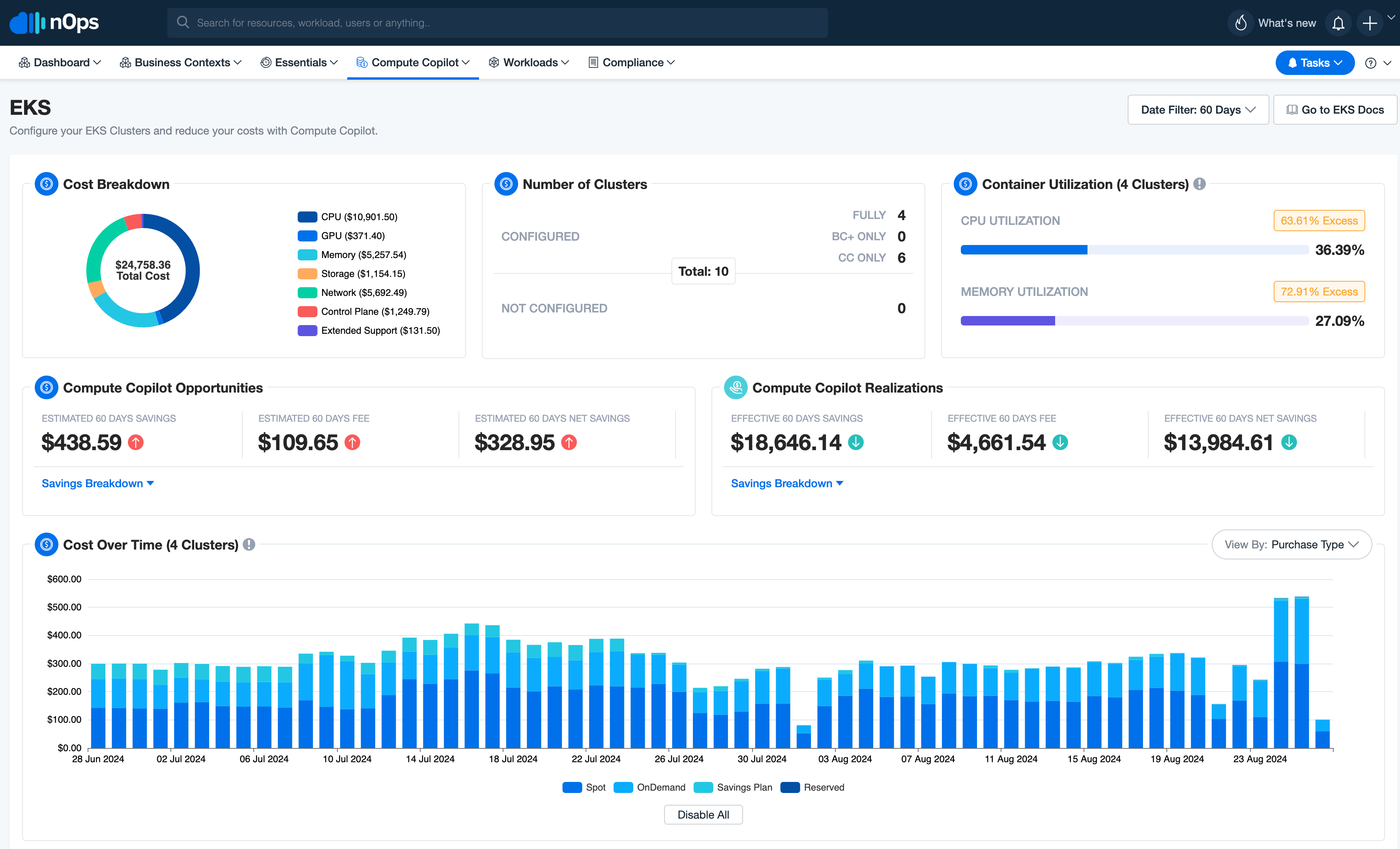
nOps Limitations
While nOps is strong in AWS automation, its scope is relatively specialized. Organizations with more complex cloud environments or advanced FinOps needs may encounter limitations.
Primarily AWS-focused
The platform currently supports only AWS environments. Organizations operating in multi-cloud setups, particularly those using GCP, cannot analyze or optimize those environments within nOps. This creates gaps for teams seeking unified cost visibility across providers.
Limited service coverage
Certain AWS services have limited or no optimization support. For example, RDS database services are not fully applicable within some optimization workflows. Serverless optimization options are also relatively limited compared to compute-focused features.
Not suited for all workload types
The platform may not be ideal for non-fault-tolerant applications or workloads that require strict stability controls. Automated optimization strategies may require careful oversight in highly sensitive production environments.
Dependence on commitment strategy
Because a core value driver is automated commitment purchasing, savings outcomes are closely tied to workload predictability. Highly volatile or experimental workloads may limit the effectiveness of automated commitment optimization.
Data latency
Cost data can lag behind AWS by approximately 24 hours due to reliance on the AWS Cost and Usage Report. This may limit near-real-time financial decision making.
Advanced reporting limitation
More advanced reporting capabilities may require additional service tiers. Without these, reporting and analytics can feel constrained for organizations that need deeper financial insights or governance frameworks.
Automation precision risks
In some cases, instance sizing or automation execution may require adjustments. Aggressive optimization strategies can occasionally result in misalignment before being corrected.
Feature maturity variation
Certain less frequently used tools may not be as polished as core optimization features. Ongoing feature releases may require users to stay updated to fully leverage new functionality.
Documentation clarity
Some documentation sections may lack clarity, which can introduce friction during onboarding or when implementing advanced features.
Platform availability considerations
There have been occasional reports of downtime. While not frequent, availability remains an important consideration for automation-driven platforms integrated into cloud operations.
Top nOps Alternatives
1. Cloudchipr
Cloudchipr is an enterprise-grade cloud cost management and optimization platform designed to help organizations allocate, manage, and reduce cloud spending.
Cloudchipr goes beyond reporting by connecting costs to business metrics, live resources, and automated actions. Users can track unit costs, manage commitments, identify waste, and automate workflows, all from one platform.
Below are the key features that make Cloudchipr a practical choice for continuous cloud cost control.
Dimensions
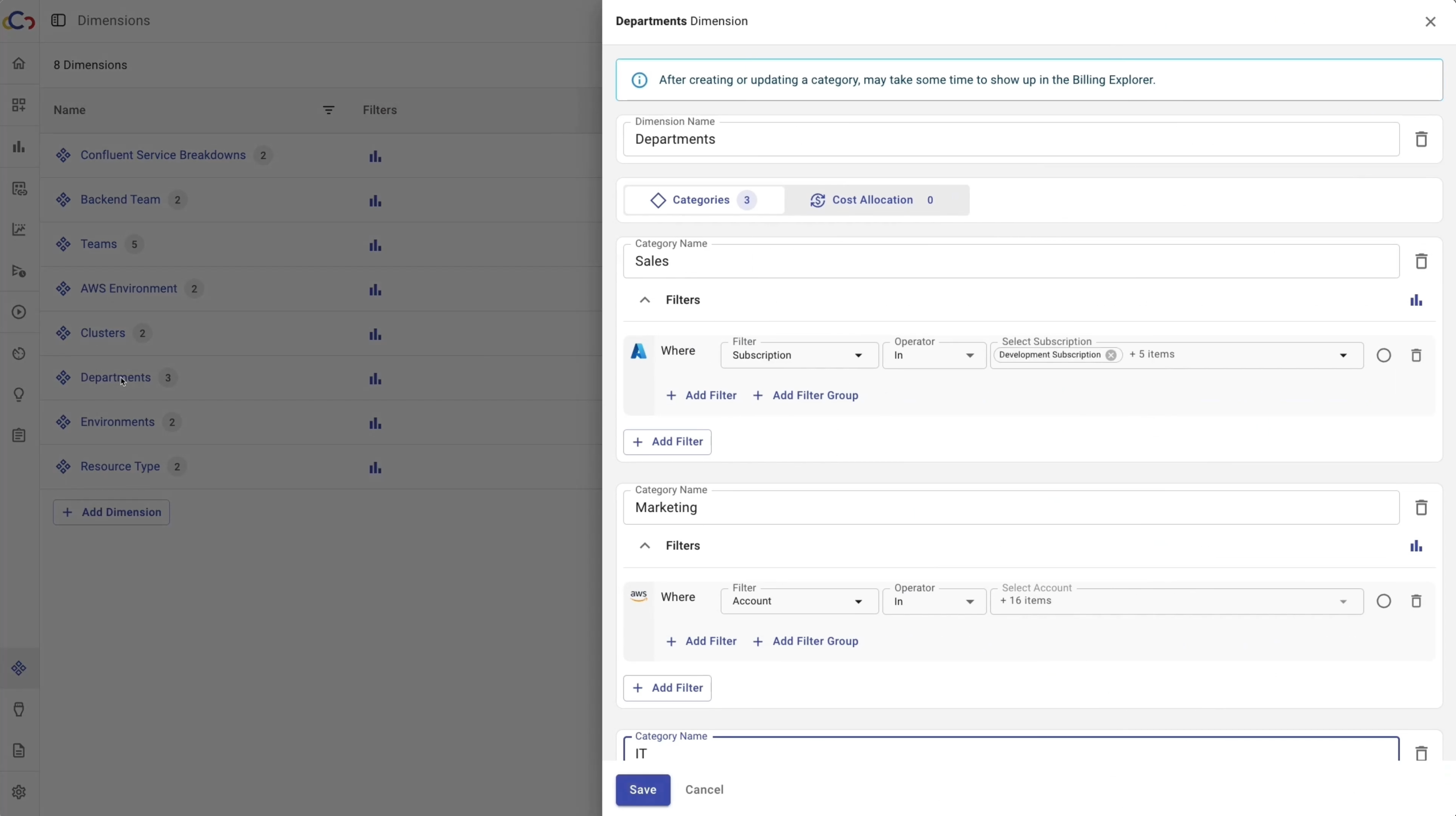
Dimensions allow teams to organize and analyze cloud costs in a way that matches how their business is structured. Each Dimension is made up of categories, which are groups of rules that act like virtual tags, grouping resources without requiring perfect tagging.
Categories use attributes to automatically place costs in the right group as environments change. This keeps cost views accurate and consistent without manual updates.
The Shared Cost feature then distributes shared expenses across teams or projects based on manual, even split, or telemetry allocation, ensuring complete and reliable cost attribution.
Telemetry Upload & Unit Cost Economics

Teams can upload their data, like users, customers, API calls, revenue, etc.
Uploaded data can be used for weighted-based cost allocation in Dimensions, allowing shared costs to be distributed based on usage instead of just percentages.
Teams can use uploaded data to calculate unit cost economics on the widget, which shows trends and forecasts over time, helping teams understand how cloud spend scales with growth.
Commitments
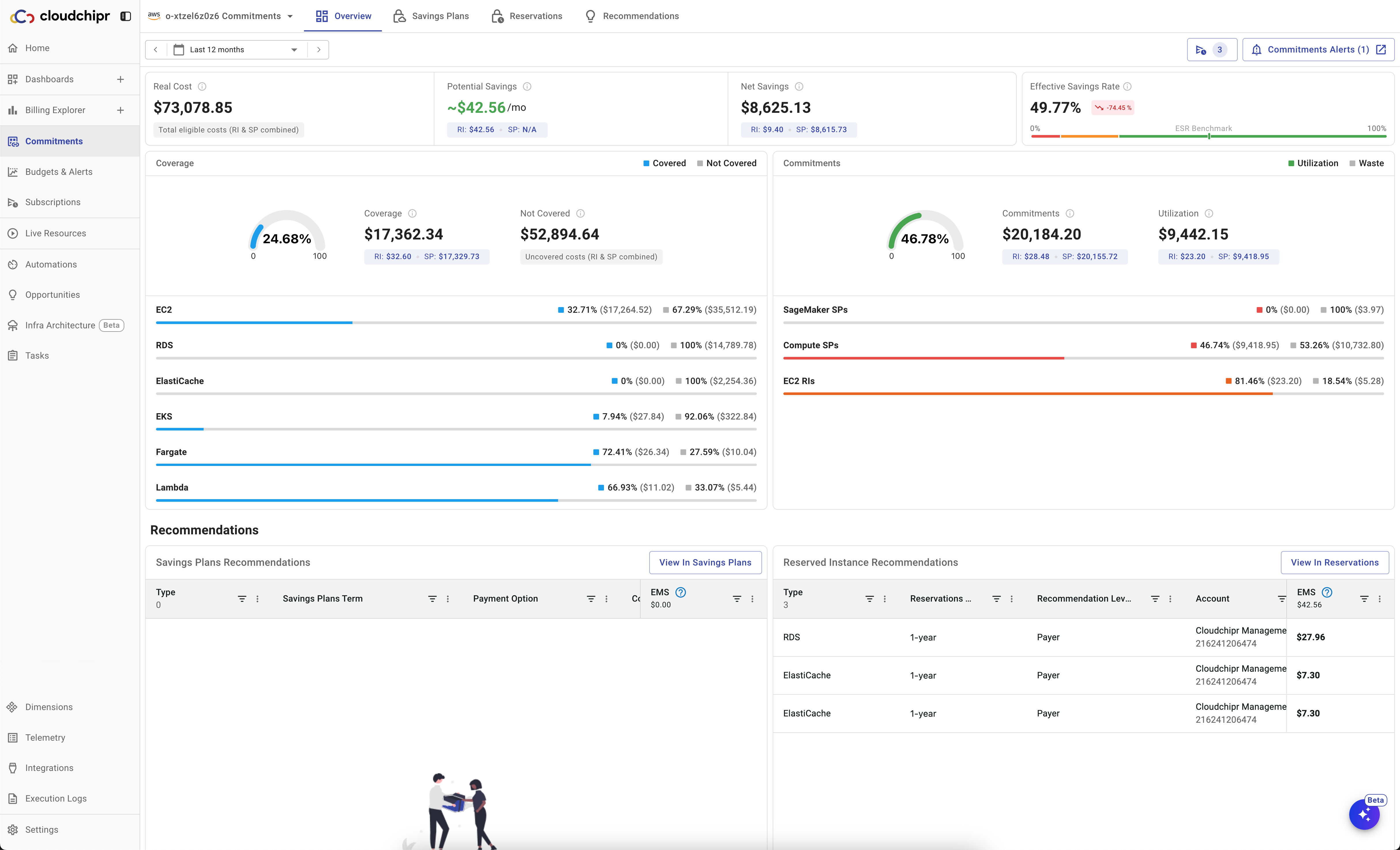
Cloudchipr provides a single, clear view of all cloud commitments, including Reserved Instances and Savings Plans, in one place. Teams can easily track coverage, utilization, real cost, net savings, and effective savings rate across selected time ranges.
Cloudchipr shows which resource types and accounts are covered, provides visibility into actual usage, and highlights where commitments are underutilized or missing.
Cloudchipr also provides AI recommendations to improve coverage and reduce on-demand spend.
Billing Explorer
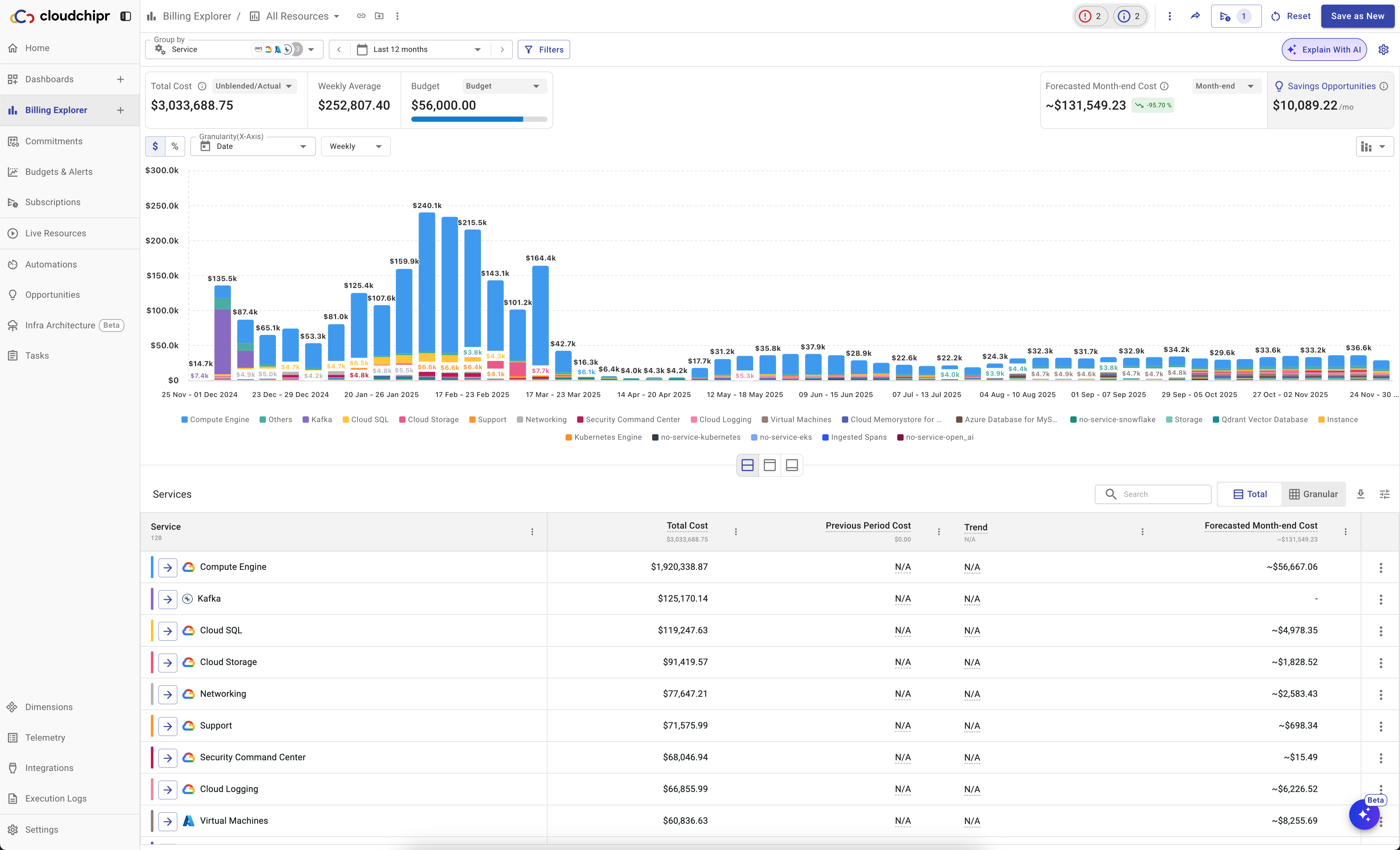
Cloudchipr’s Billing Explorer gives users a fast, flexible way to understand and manage multi-cloud costs in one place. It provides a complete view of cloud spend, including Kubernetes container costs, and allows users to group and filter data by account, service, region, tag, workload, or any preferred dimension.
From high-level reports, users can drill down to individual resources to see usage metrics, tags, and related savings opportunities, making it easy to understand what is driving costs and where action is needed.
Users can see forecasted costs, set budgets directly from reports, and get notified before limits are exceeded. AI-powered anomaly detection and plain-language explanations help quickly understand cost spikes without manual investigation.
Dashboards
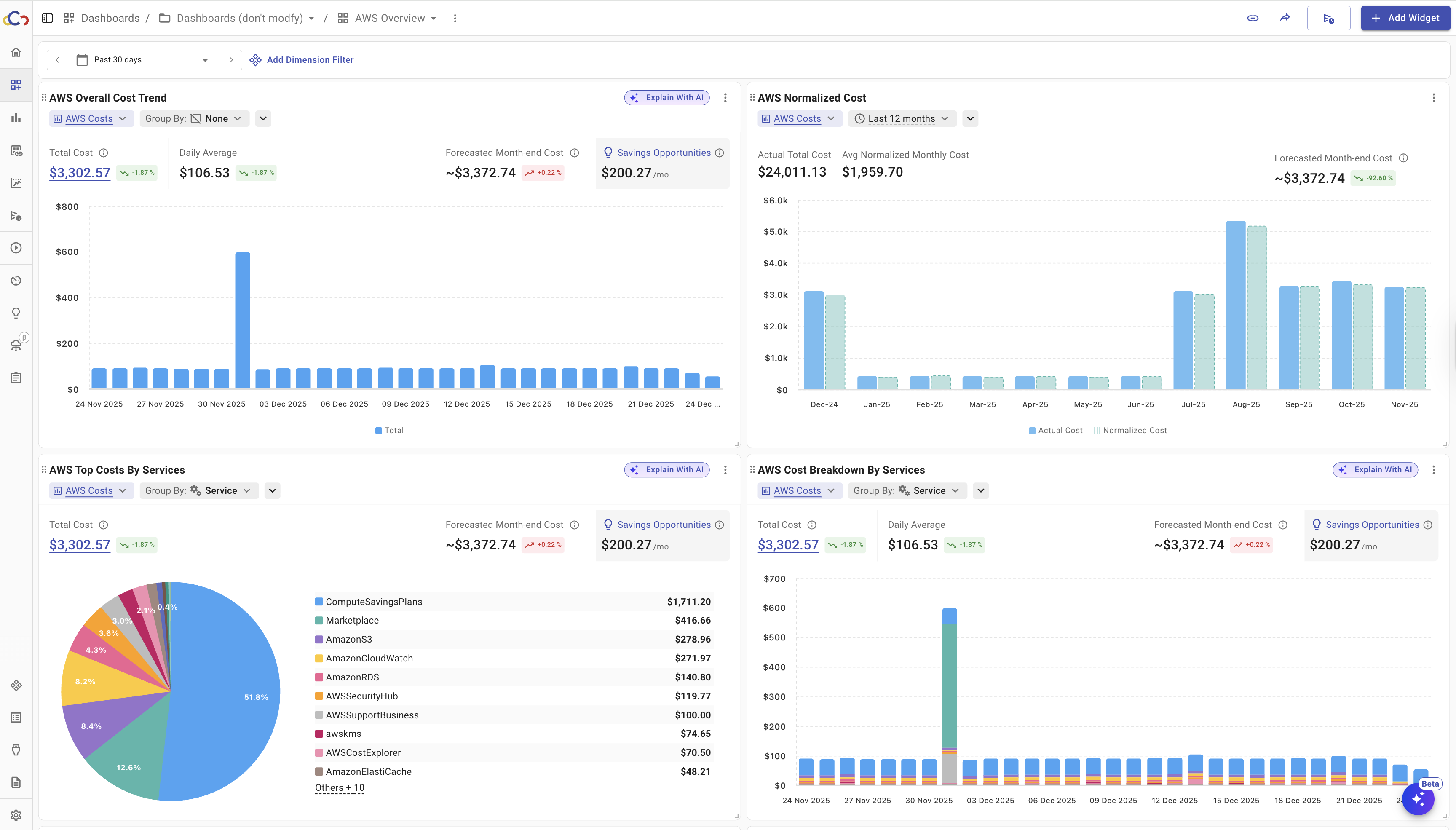
Users can create dashboards directly from billing reports or custom filters, making it easy to track key metrics over time and tailor views for different teams or stakeholders. Dashboards are fully customizable with a wide range of widgets, including Billing Explorer, Cost Anomalies, Commitment Utilization, Coverage, Normalized Cost, Savings Opportunities, Carbon Emissions, Unit Cost, and more, giving finance, engineering, and leadership clear visibility into the metrics that matter most.
Users can share dashboards across teams or subscribe to them, receiving scheduled updates automatically via email or Slack.
Budgets and Alerts
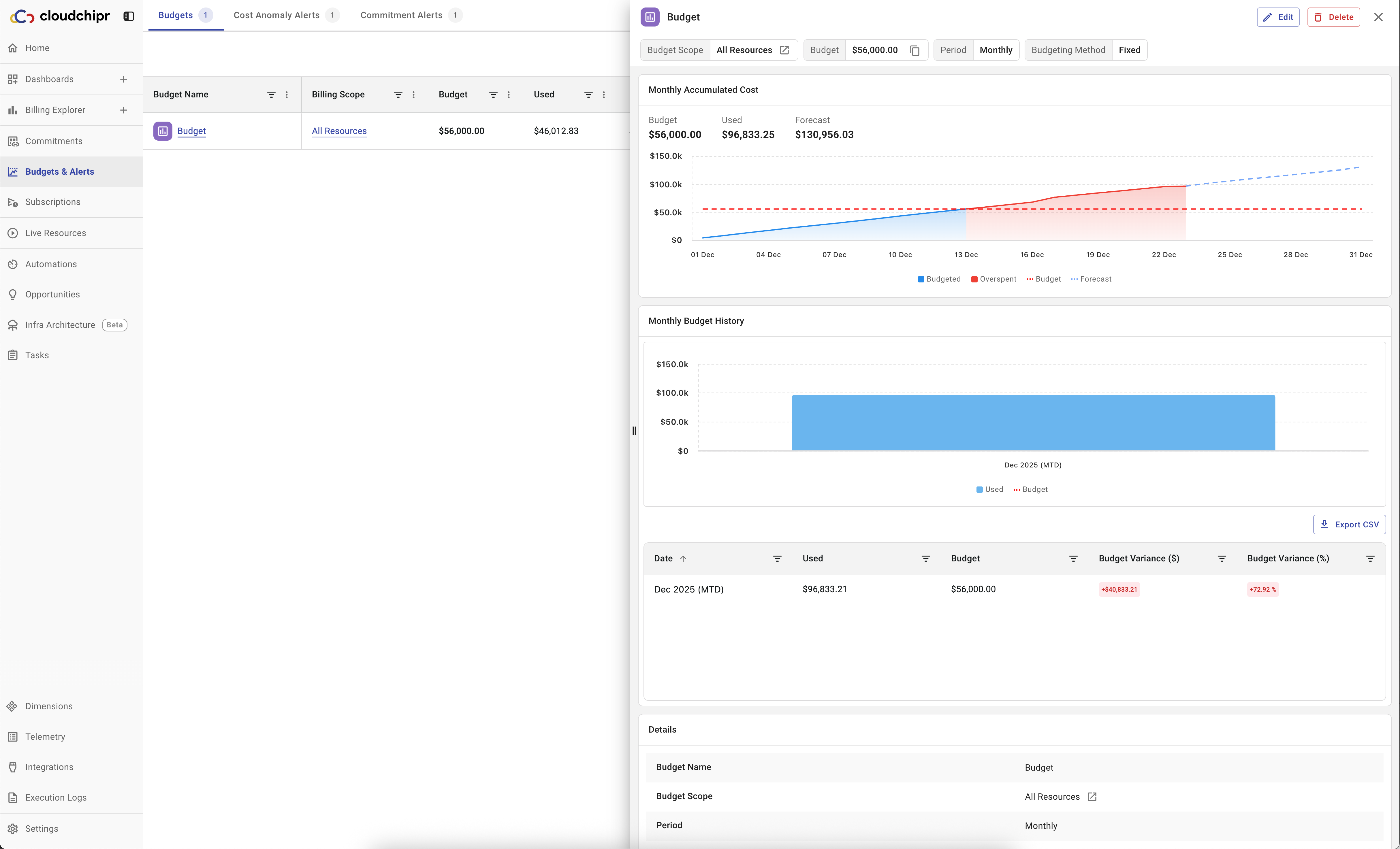
Cloudchipr provides powerful and flexible budgets and alerts that help teams stay in control of cloud spending before issues become problems.
Budgets can be created from billing reports or custom filters, aligning them with how cloud spend is organized across the environment. Users can track both actual and forecasted spend and receive alerts before limits are exceeded.
Anomaly alerts detect unusual changes by comparing current costs with previous periods. This helps teams quickly spot unexpected spikes and investigate issues before they grow into larger problems.
Commitment alerts monitor Reserved Instances and Savings Plans, sending early warnings to avoid underutilization, missed renewals, and unnecessary on-demand spend.
Live Resources
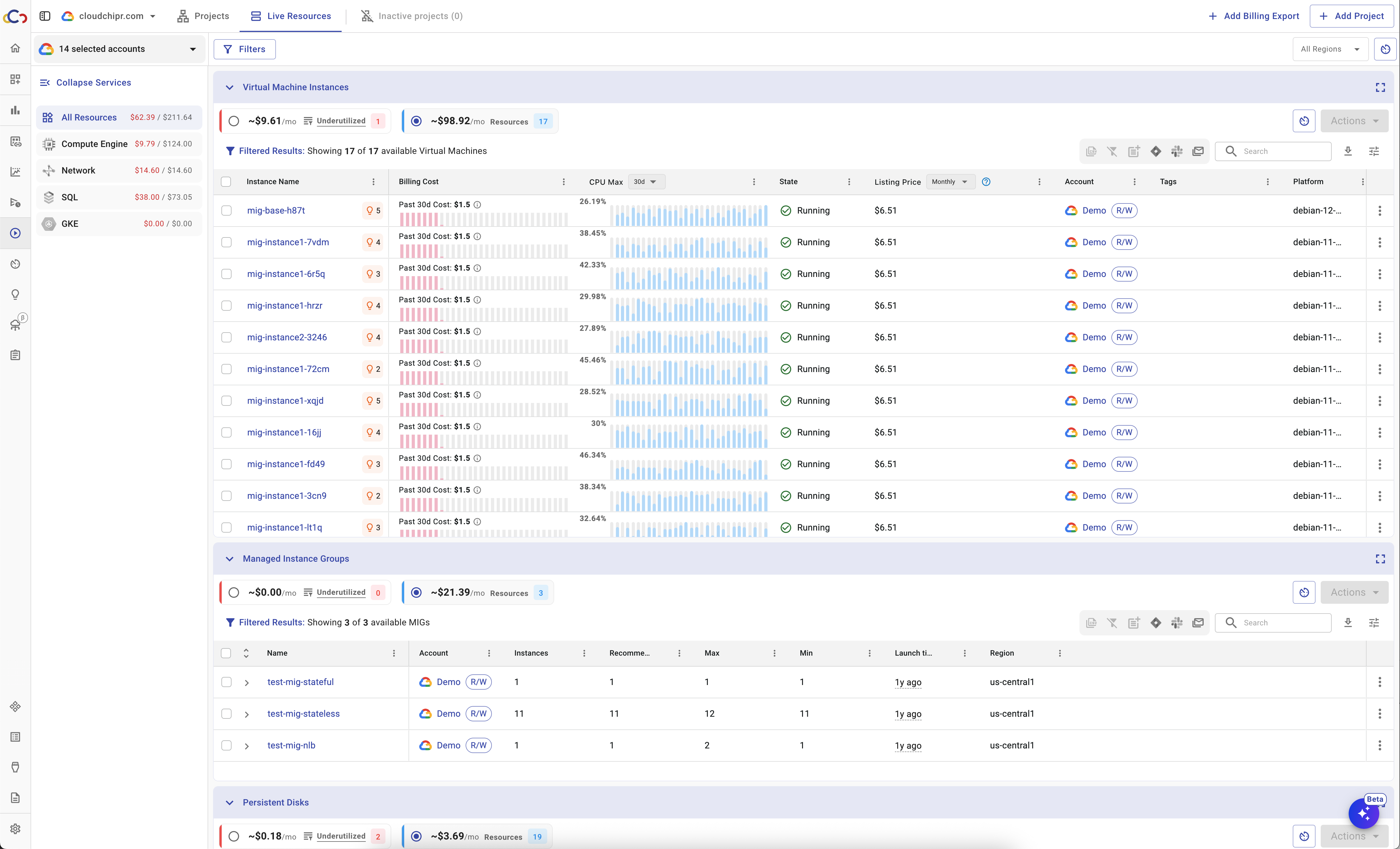
Cloudchipr’s Live Resources gives a real-time, unified view of all cloud resources across AWS, Azure, GCP, and Kubernetes. Users can see usage metrics in one place, without switching between cloud consoles. Each resource is fully actionable; users can stop, start, reboot, snapshot, delete, or protect resources, and see related costs, usage history, commitment coverage, and savings opportunities.
Live Resources also includes utilization policies that automatically identify idle or underutilized resources. Users can take action immediately, collaborate via Slack or tasks, or automate cleanups with workflows.
Kubernetes Cost Optimization
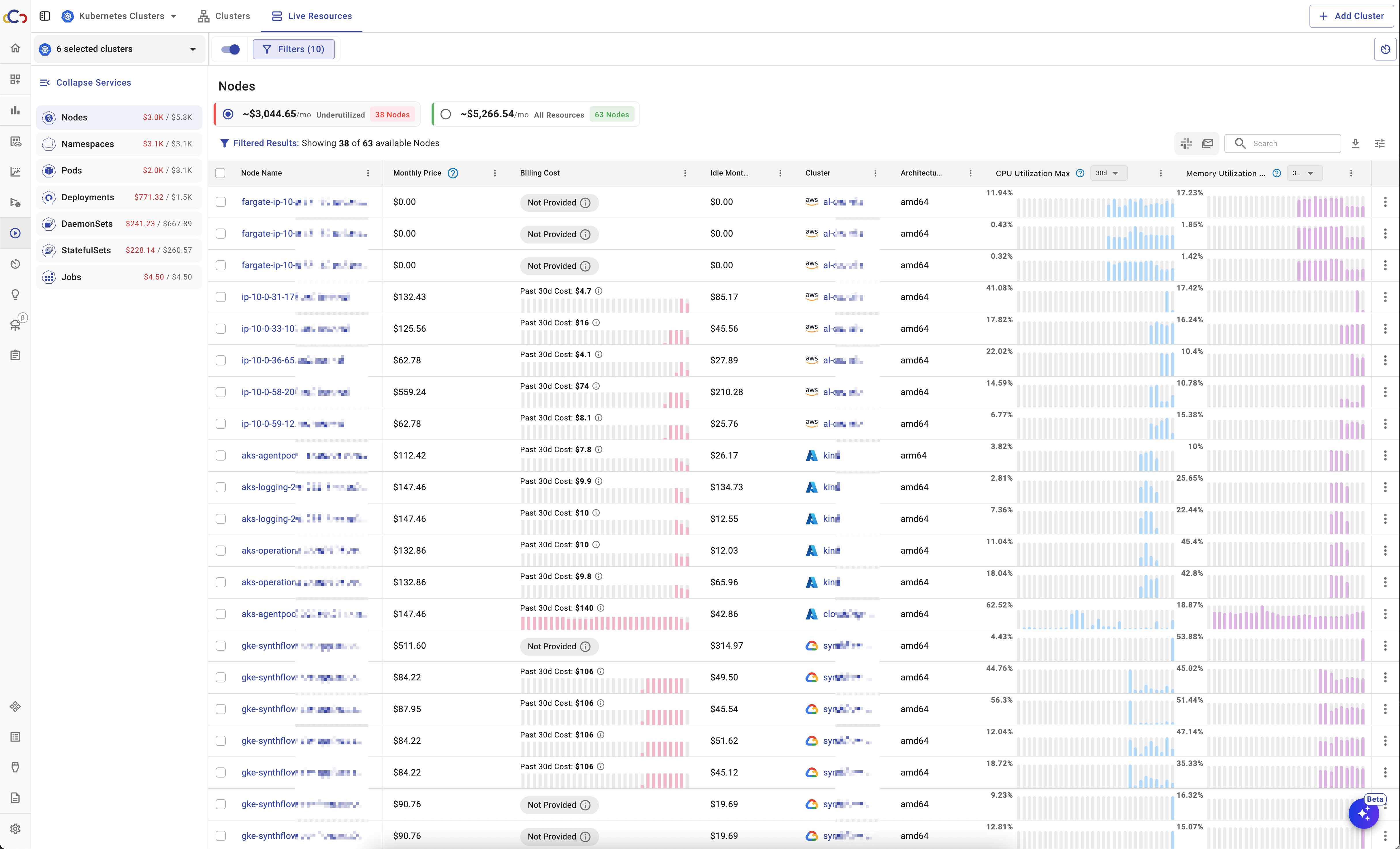
Cloudchipr provides deep visibility and optimization for Kubernetes across all major cloud providers. Users can monitor clusters, namespaces, nodes, pods, and workloads in real time, with clear views of CPU, GPU, and memory usage compared to what is actually consumed.
Cloudchipr highlights underutilized Kubernetes resources and delivers AI-powered optimization recommendations to reduce waste early.
Automation
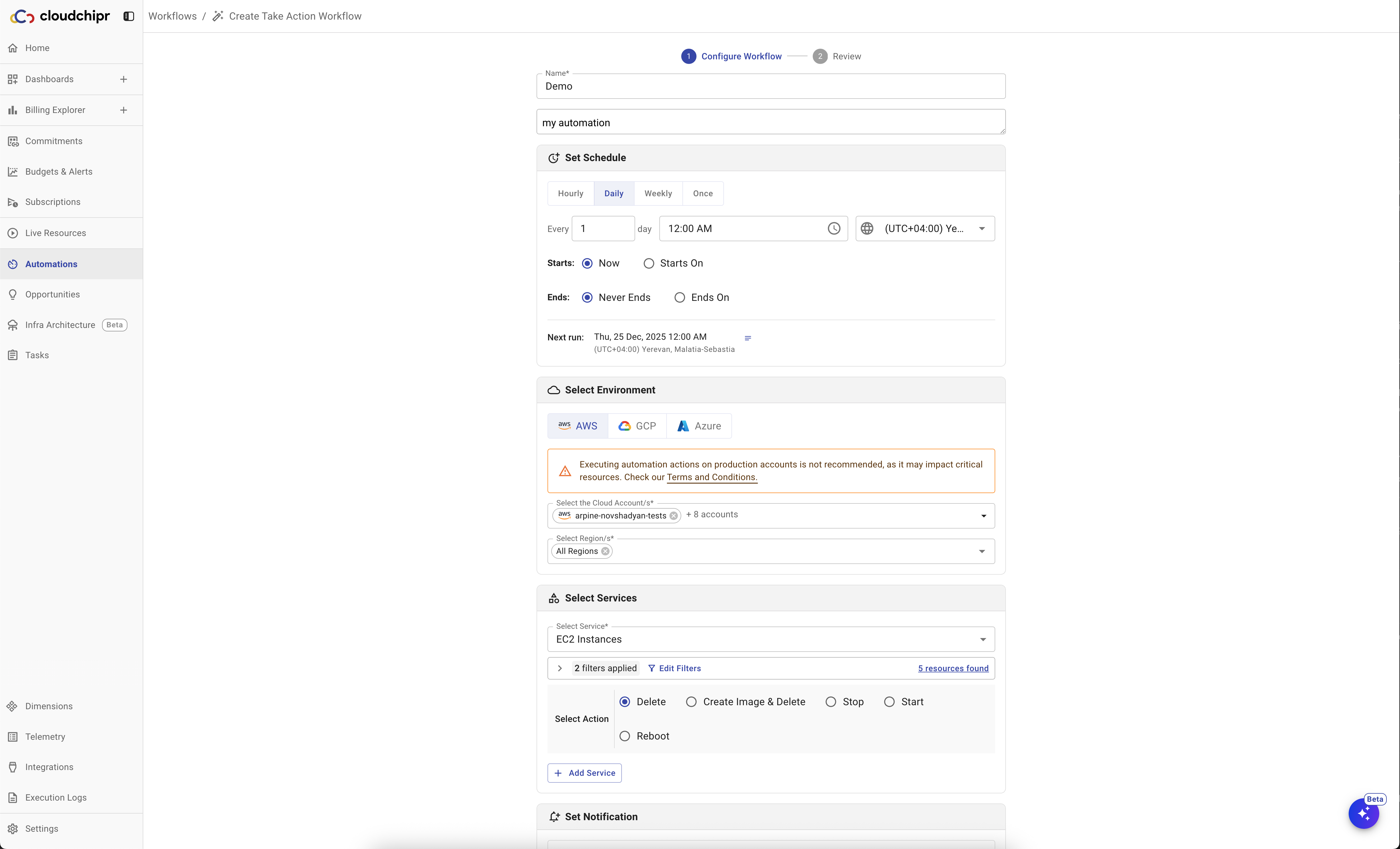
Cloudchipr helps companies automate cost-saving actions without writing code. It offers two types of automation: Workflows and Off-Hours. Workflows monitor resources and automatically take actions based on custom conditions.
Off-Hours automations schedule resources to stop and start at defined times to avoid paying for unused capacity outside business hours.
Cloudchipr AI Agents
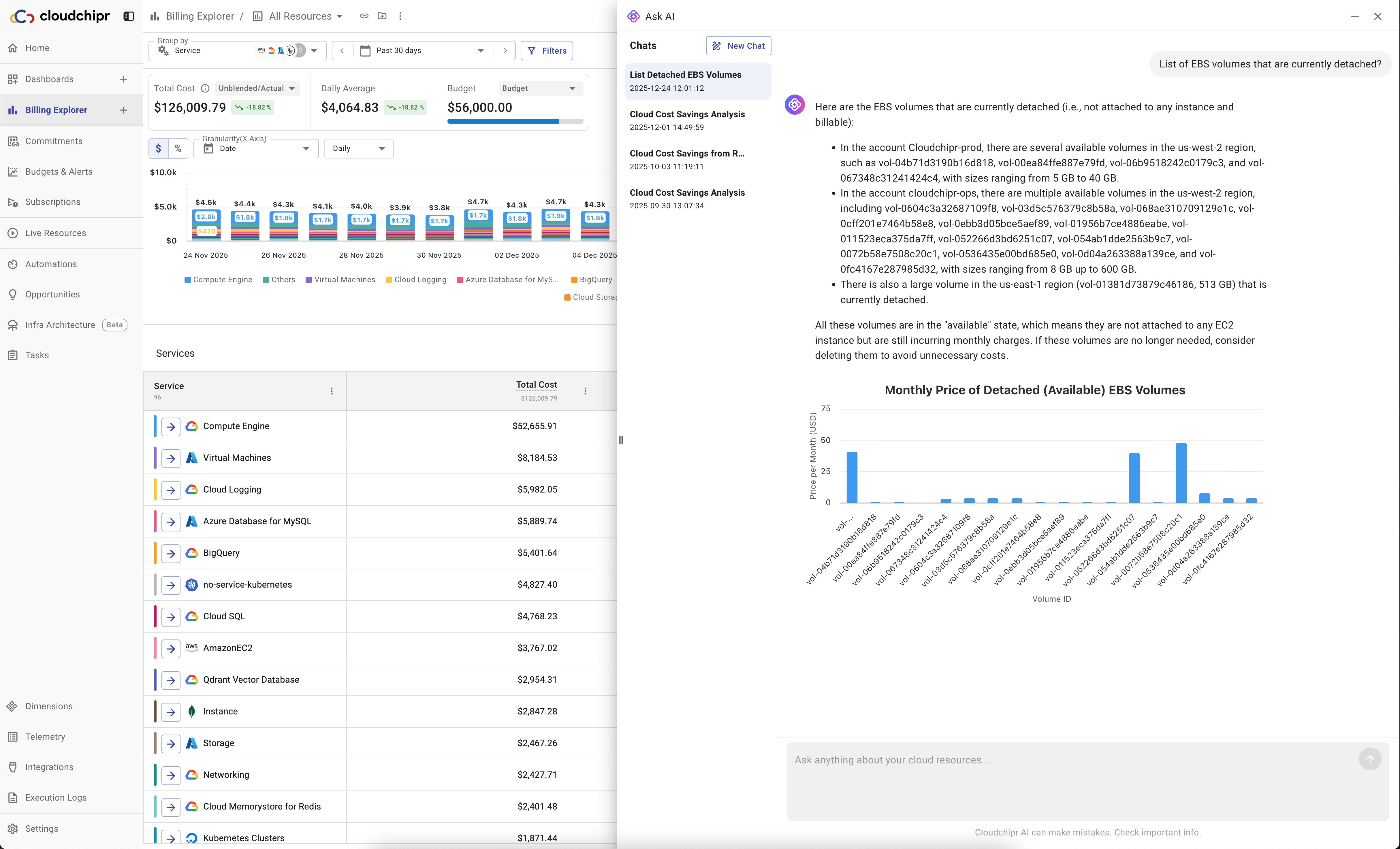
Cloudchipr AI Agents act as on-demand FinOps and DevOps experts inside the platform. Users can ask questions in plain language to understand costs, explain reports, analyze trends, and generate charts or reports.
Explain with AI highlights cost trends, top drivers, unusual spikes in any report and suggested next steps.
Built-in collaboration and task management
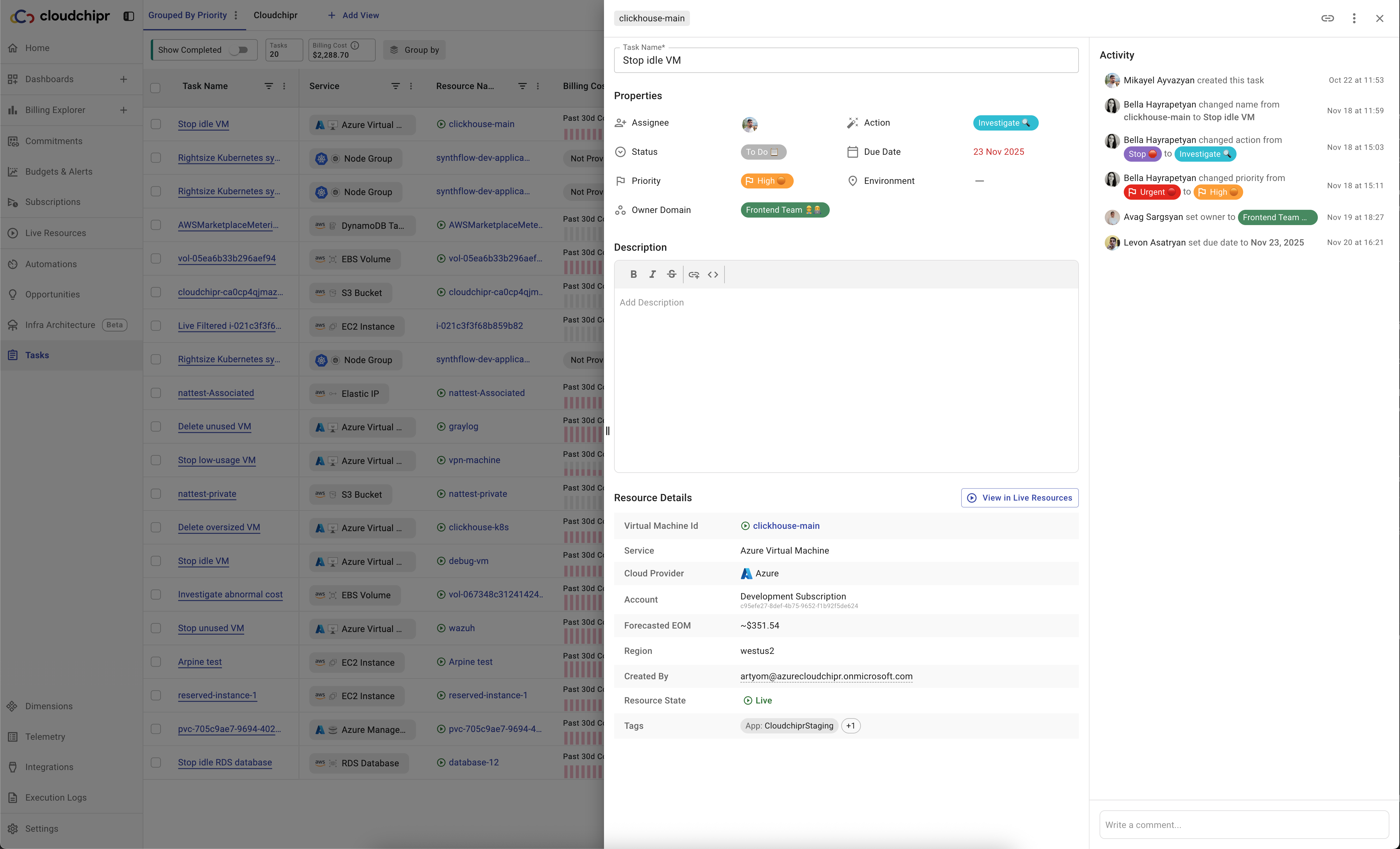
Cloudchipr treats cloud cost optimization as teamwork, not just a FinOps task.
When an issue is found, users can create tasks directly from live resources or savings opportunities, assign owners, give priorities and due dates, and track until completion. This makes it easy for teams to collaborate with clear accountability and shared visibility.
2. AWS Cost Explorer
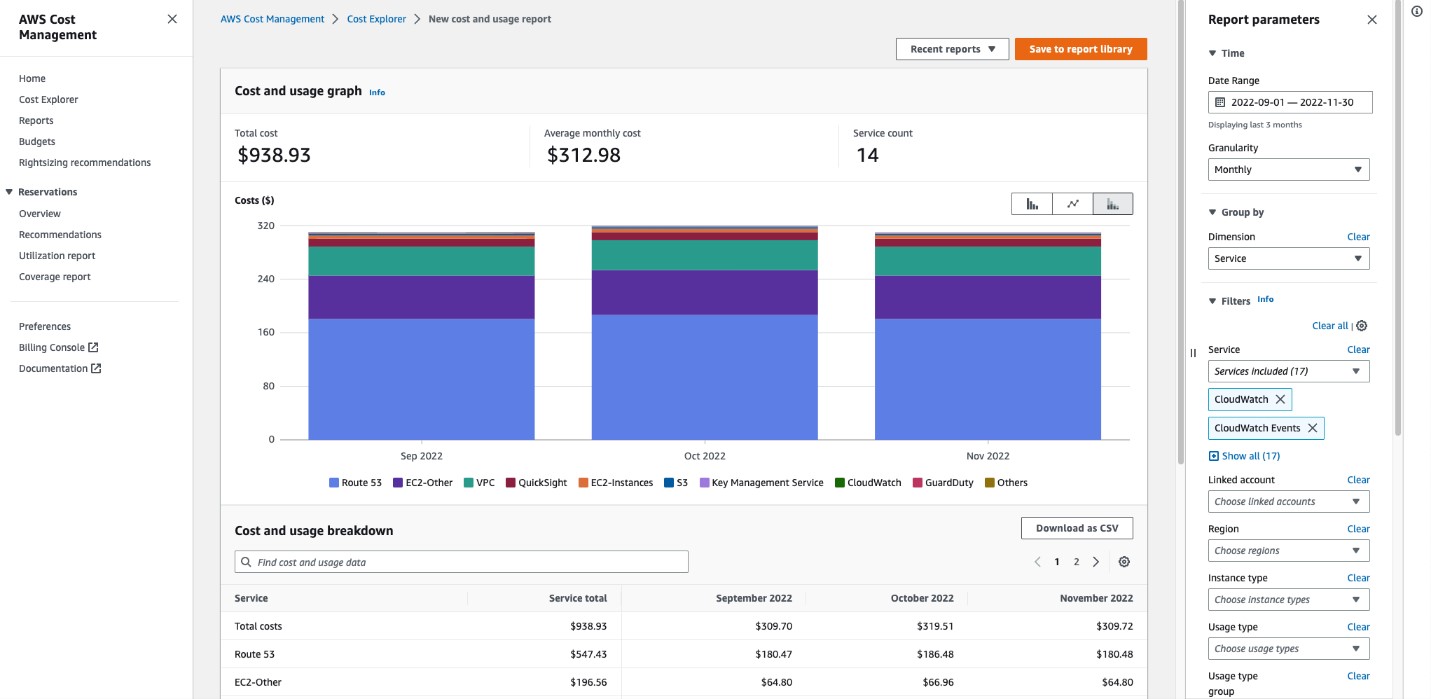
AWS Cost Explorer and Amazon CloudWatch are native AWS tools that provide basic visibility into cloud usage, costs, and performance. They are often the first tools organizations use when starting to track AWS spending.
AWS Cost Explorer focuses on cost analysis. It allows users to view AWS spend over time, analyze trends, group costs by service or account, and create basic forecasts based on historical data. It works well for simple AWS environments and provides useful insights without extra cost.
Amazon CloudWatch is primarily a monitoring and observability service, but it also includes basic cost-related features. Engineering teams often use CloudWatch to track resource usage, set alarms for cost spikes, and connect performance metrics with spending patterns. It provides near real-time data and is tightly integrated with AWS services.
Together, these tools can cover basic cost visibility and alerts for AWS-only environments. However, they are not full FinOps platforms. As infrastructure grows in size and complexity, many teams begin to see limitations around optimization depth, collaboration, and multi-cloud support.
Pros
- Native AWS tools with no additional setup
- No extra cost for basic usage (Cost Explorer included with AWS)
- Good starting point for AWS-only environments
- Basic cost trends, reports, and forecasts
- CloudWatch provides real-time metrics and cost-related alarms
Cons
- Limited to AWS (no multi-cloud or SaaS visibility)
- Basic cost allocation and FinOps capabilities
- Optimization recommendations cover only simple scenarios
- Cross-account management can be complex
- Interfaces are functional but not designed for full FinOps workflows
- Collaboration, execution, and savings tracking are limited
Best For
Teams running primarily on AWS that need basic cost visibility and alerts, and want to avoid third-party tools. Organizations with growing cloud complexity or multi-cloud environments often outgrow these tools as their FinOps practice matures.
3. Azure Cost Management
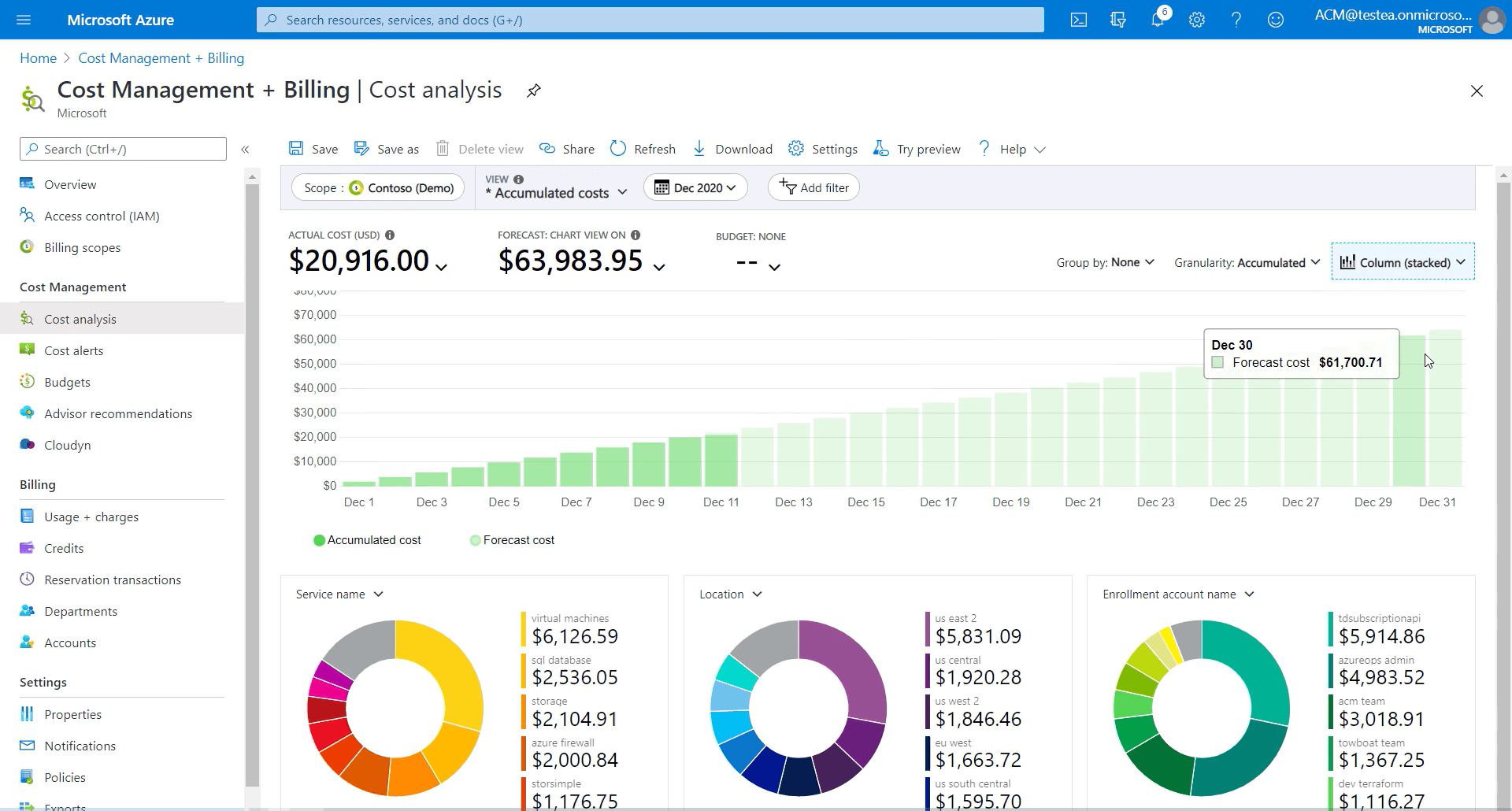
Azure Cost Management is Microsoft’s native cost management tool for Azure. It is included with Azure subscriptions and provides basic visibility into cloud usage, costs, budgets, and invoices directly inside the Azure portal.
For organizations running mainly on Azure, this tool is often the first step toward cost awareness. It allows teams to track spending, create budgets, set alerts, and allocate costs across subscriptions.
While Azure Cost Management covers the basics well, it is not designed for advanced FinOps practices. Cost analysis options are limited, data updates are not real-time, and optimization recommendations focus mostly on obvious savings. As environments grow more complex, many organizations find the tool lacks the depth, flexibility, and multi-cloud support needed for continuous optimization.
Pros
- Included with Azure at no extra cost
- Native integration with Azure billing and subscriptions
- Supports budgets, alerts, and basic cost allocation
- Unified view of Azure costs across multiple subscriptions
Cons
- Limited advanced cost analysis and reporting
- Optimization recommendations are surface-level
- Data updates lag behind real-time
- Not built for mature FinOps workflows or execution
Best For
Organizations that run primarily on Azure and need basic cost tracking, budgets, and alerts without using a third-party FinOps platform.
4. Datadog
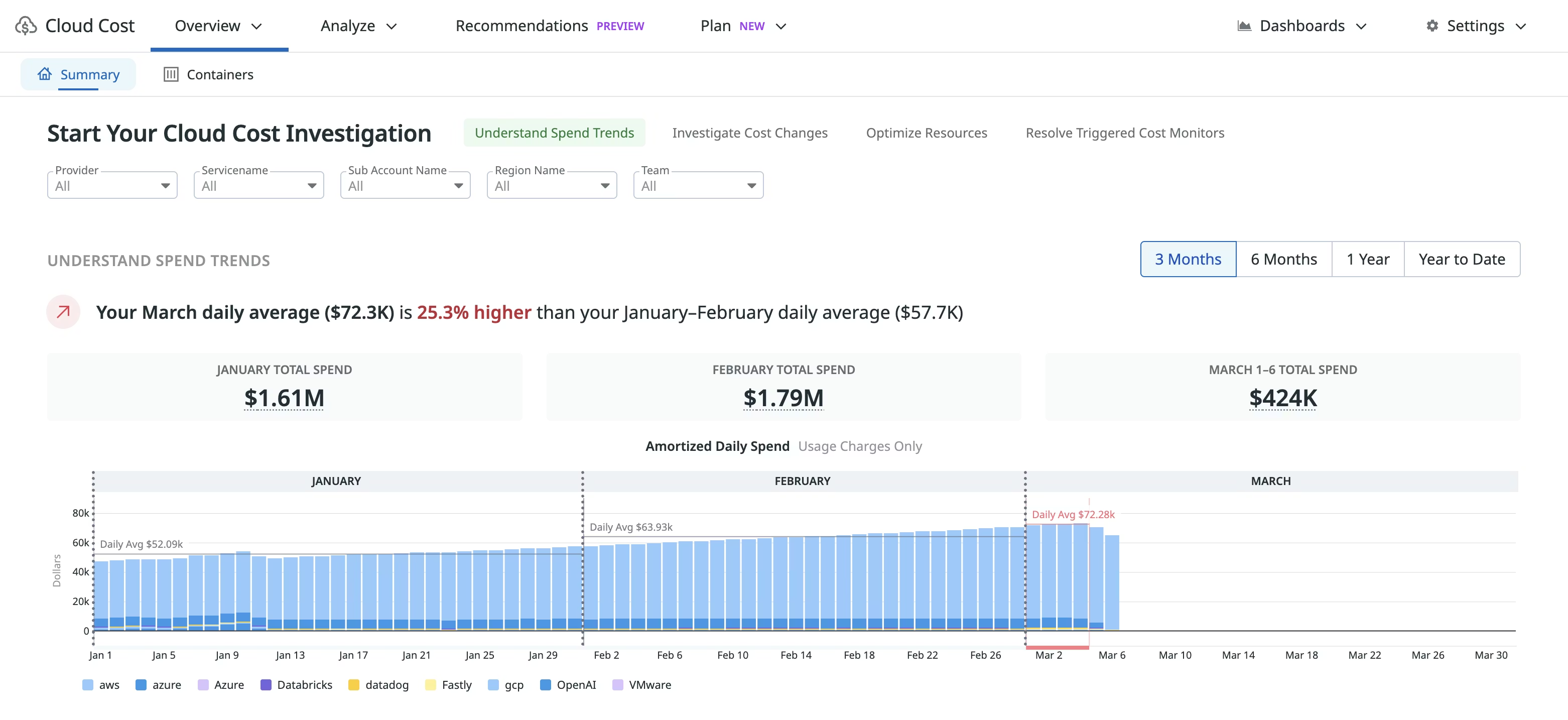
Datadog is a comprehensive observability and monitoring platform that unifies metrics, logs, traces, and application performance monitoring (APM) in a single interface. It provides real-time visibility across infrastructure, applications, and microservices architectures. The platform integrates seamlessly with major cloud providers and supports container-based, server-based, and web-based applications.
Datadog also includes a Cloud Cost Management module, which allows teams to view cost data alongside performance metrics.
Pros
- Combines observability and cost data in one platform
- Easy to link cost changes with performance issues
- Strong Kubernetes and container-level cost visibility
- Built-in anomaly detection and cost alerts
- Works well for engineering-led teams already using Datadog
Cons
- Cost management features are secondary to monitoring
- Limited FinOps workflows, budgeting, and forecasting
- Optimization and execution capabilities are basic
- Pricing grows quickly as data ingestion increases
- Overkill for teams that need only cloud cost management
Best For
Organizations already using Datadog for observability and wanting basic cost visibility inside engineering workflows.
5. CloudKeeper
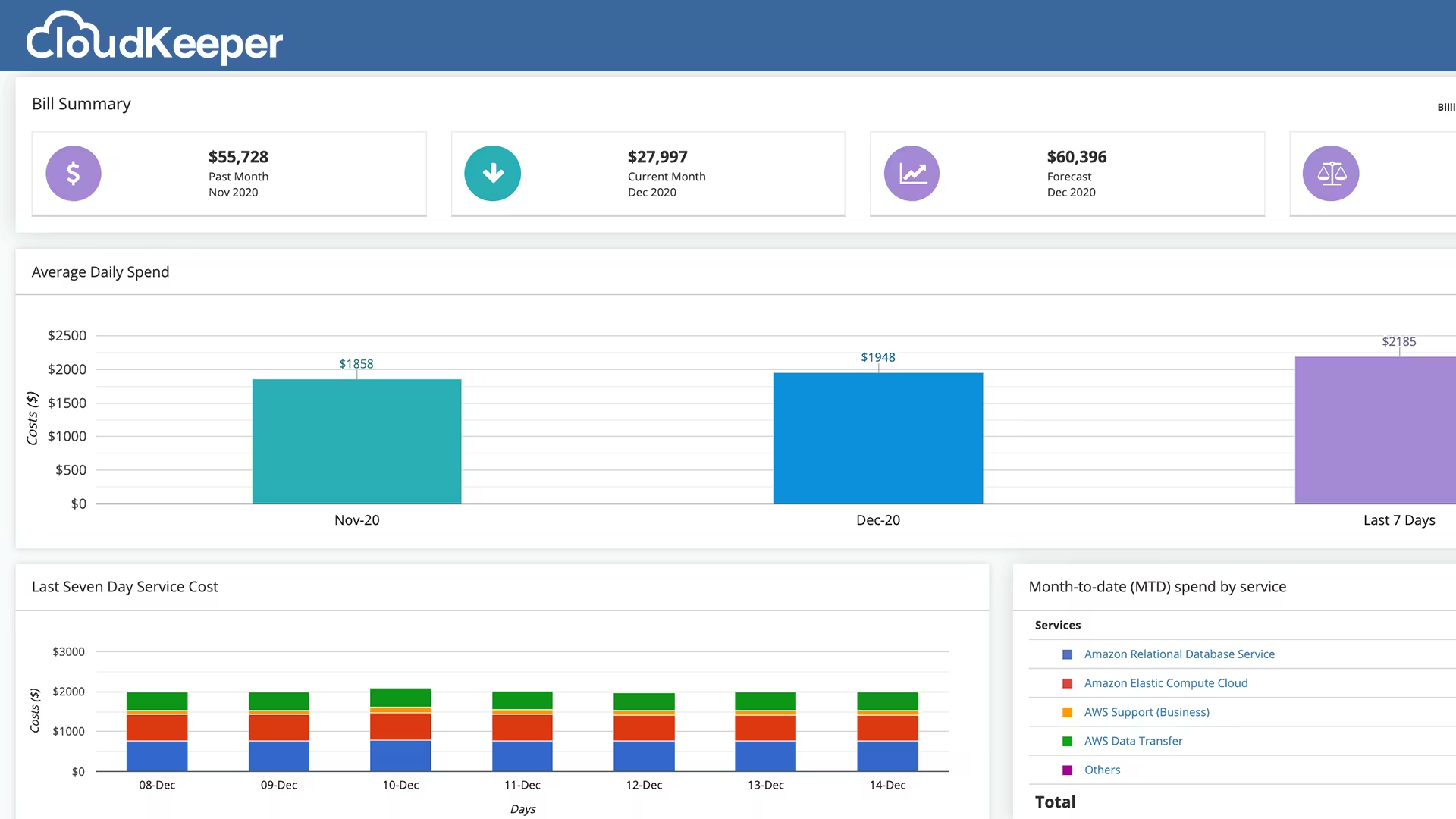
CloudKeeper is a cloud cost optimization partner that combines a software platform with hands-on cloud expertise. It focuses mainly on AWS and Google Cloud and helps organizations reduce cloud spend through discounts, commitment management, cost optimization insights, and ongoing support.
Many teams use CloudKeeper not just as a tool, but as an extension of their cloud or FinOps team. In addition to dashboards and cost visibility, CloudKeeper provides guidance, technical help, and billing support, making it easier for teams to manage cloud costs without deep in-house FinOps expertise.
Pros
- Focus on cost savings, including commitment-based discounts
- Good visibility into AWS usage and spending
- Optimization recommendations for unused or underutilized resources
- Responsive support team
- Helpful for billing, invoicing, and cost justification
Cons
- Primarily focused on AWS and Google Cloud, with limited broader multi-cloud support
- Execution of recommendations often requires manual effort
- Dashboards and reports have limited customization
- Optimization recommendations cannot always be filtered or dismissed
- UI and reporting experience can be improved
- Initial setup may feel complex without guidance
Best For
CloudKeeper is best suited for organizations that want hands-on support, especially teams running mainly on AWS.
6. Zesty
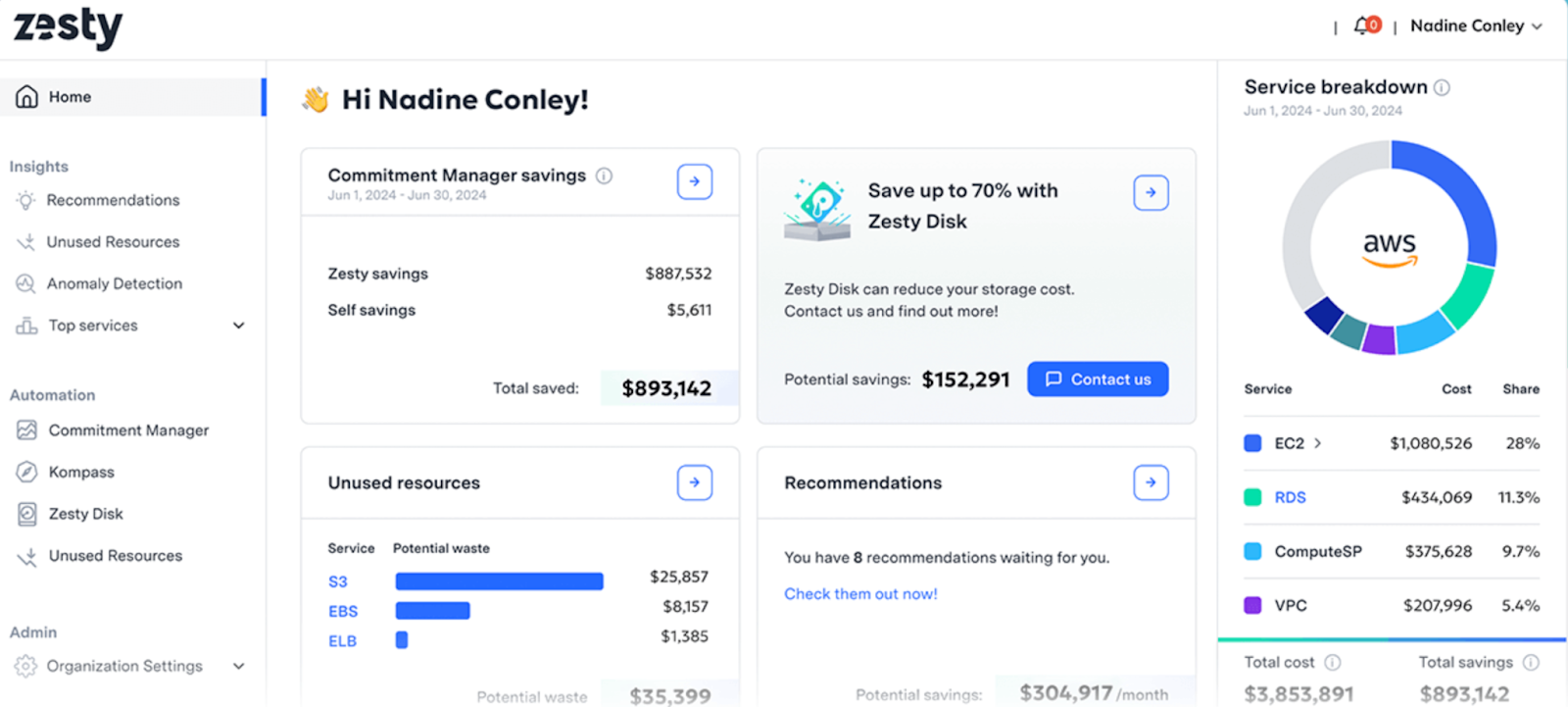
Zesty is a cloud cost optimization platform focused mainly on AWS compute savings. Its core strength is automated commitment management, especially for EC2 Reserved Instances. Zesty uses machine learning to automatically buy, sell, and manage commitments on behalf of customers, helping them reach high coverage without long-term lock-in.
While Zesty delivers strong results for commitment optimization, it is not a full FinOps platform. Cost visibility, reporting, and broader optimization workflows are more limited compared to end-to-end cloud cost management tools.
Pros
- Automation for EC2 Reserved Instance management
- Minimal ongoing effort after setup
- Responsive customer support
- Clear value for AWS compute-heavy workloads
- Complements existing Savings Plans well
Cons
- Focused mainly on AWS compute, with limited support for other services
- Limited visibility into overall cloud spend and cost drivers
- Dashboards and reporting lack depth and customization
- Little support for budgeting, forecasting, or collaboration
- Not designed for multi-cloud environments
Best For
Zesty is best suited for AWS-focused organizations that want to maximize EC2 savings with minimal effort.
7. CloudCheckr
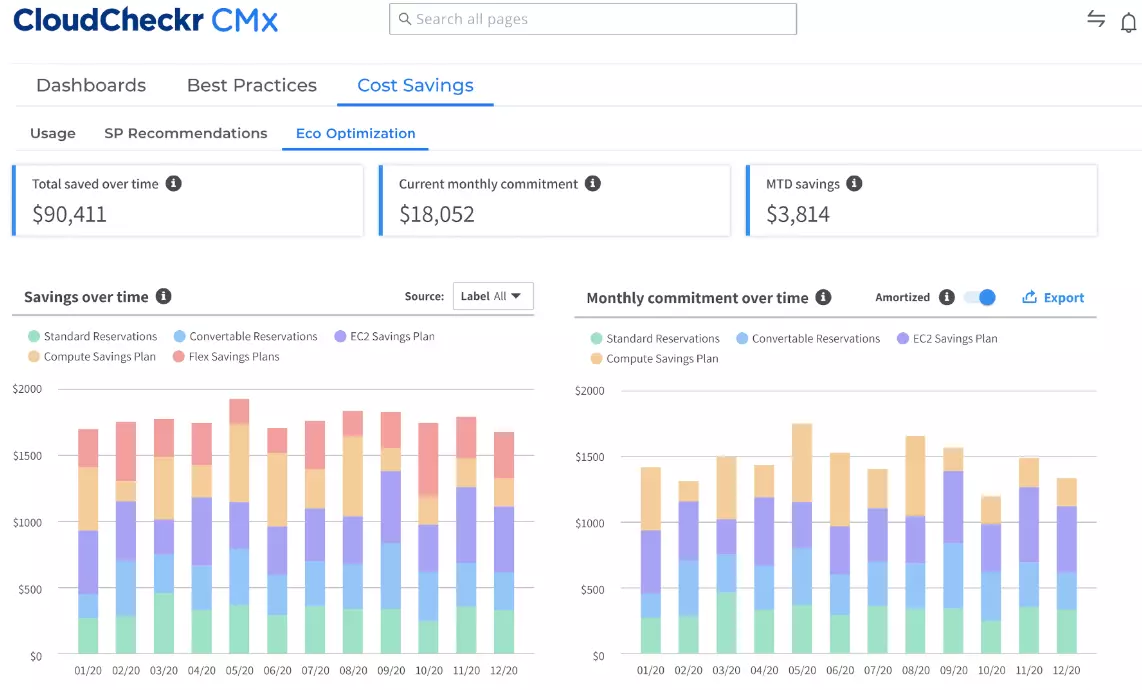
CloudCheckr is an enterprise-focused cloud governance and optimization platform designed to help organizations manage cloud costs, security, compliance, and resource efficiency across AWS, Azure, and Google Cloud. It is now part of the Flexera / Spot FinOps portfolio and is widely used by large enterprises, public sector organizations, and managed service providers.
CloudCheckr combines cost optimization with policy-driven governance. It identifies idle resources, supports rightsizing, manages commitments, and enables automated remediation for security and compliance issues. The platform includes a large set of built-in best-practice rules, detailed reporting, and cross-account visibility, making it suitable for complex and regulated environments.
Pros
- Multi-cloud visibility across AWS, Azure, and GCP
- Broad cost optimization features, including idle resource detection and rightsizing
- Automated remediation for security and compliance issues
- Supports many compliance frameworks and audit requirements
- Combines cost, security, and governance in one platform
Cons
- Steep learning curve due to the number of features and options
- Navigation and UI are often described as hard to use or slow
- Setup and configuration require time and process
- Automated rightsizing and commitment calculations are not always precise
- Can feel like overkill for small or fast-moving engineering teams
Best For
CloudCheckr is best suited for large enterprises, public sector teams, and MSPs that need strong governance, compliance, and standardized cost controls across multi-cloud environments.
8. Anodot
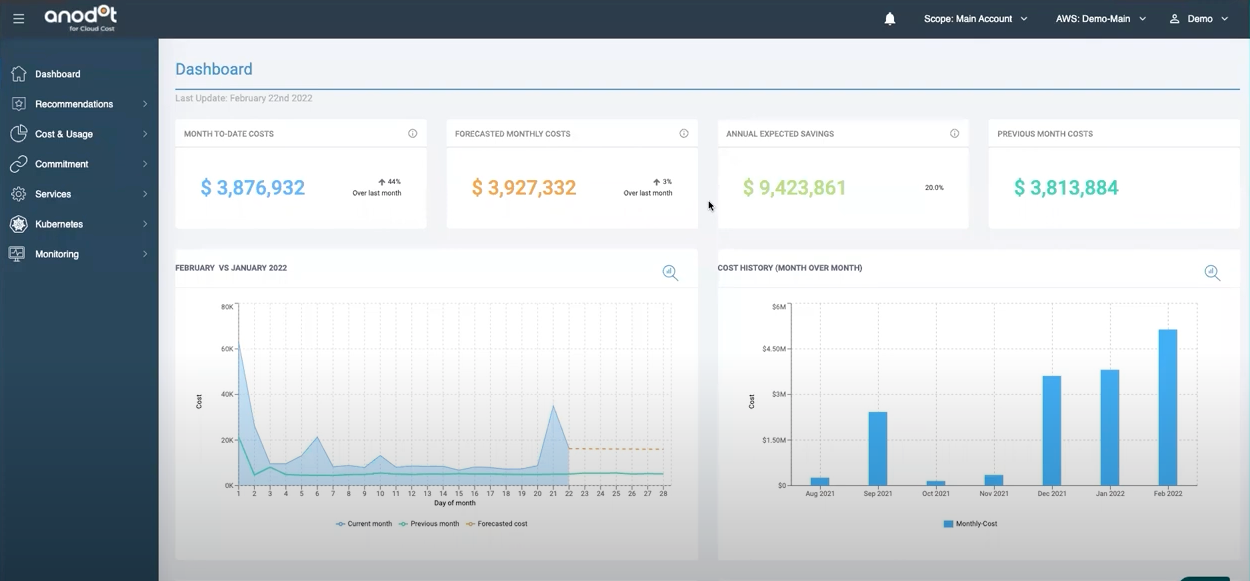
Anodot is an AI-driven analytics and cost management platform that focuses on real-time anomaly detection, forecasting, and alerts. It analyzes metrics and cost data to detect unusual behavior and notify teams before issues grow into larger problems.
In cloud cost management, Anodot provides visibility into cloud spend, usage, and trends across multiple cloud providers, Kubernetes environments, and some SaaS tools.
Pros
- AI-based anomaly detection for costs and metrics
- Real-time alerts that help teams catch issues early
- Multi-cloud visibility
- Forecasting and trend analysis capabilities
- Recommendations for identifying waste and inefficiencies
- Helps reduce manual monitoring effort
Cons
- User interface can feel complex or cluttered, especially for new users
- Steep learning curve for non-technical users
- Limited role-based access control and governance features
- Custom alert configuration can be restrictive
- Pricing can be high for smaller teams
- Execution and automation of cost optimization actions are limited
- Better at detection than at driving cost-saving actions to completion
Best For
Anodot is best suited for organizations that need advanced anomaly detection and real-time monitoring of cloud costs and business metrics. It works well for teams that want to detect cost spikes, usage changes, or unusual patterns quickly and rely on AI-driven insights.
9. Cast.ai
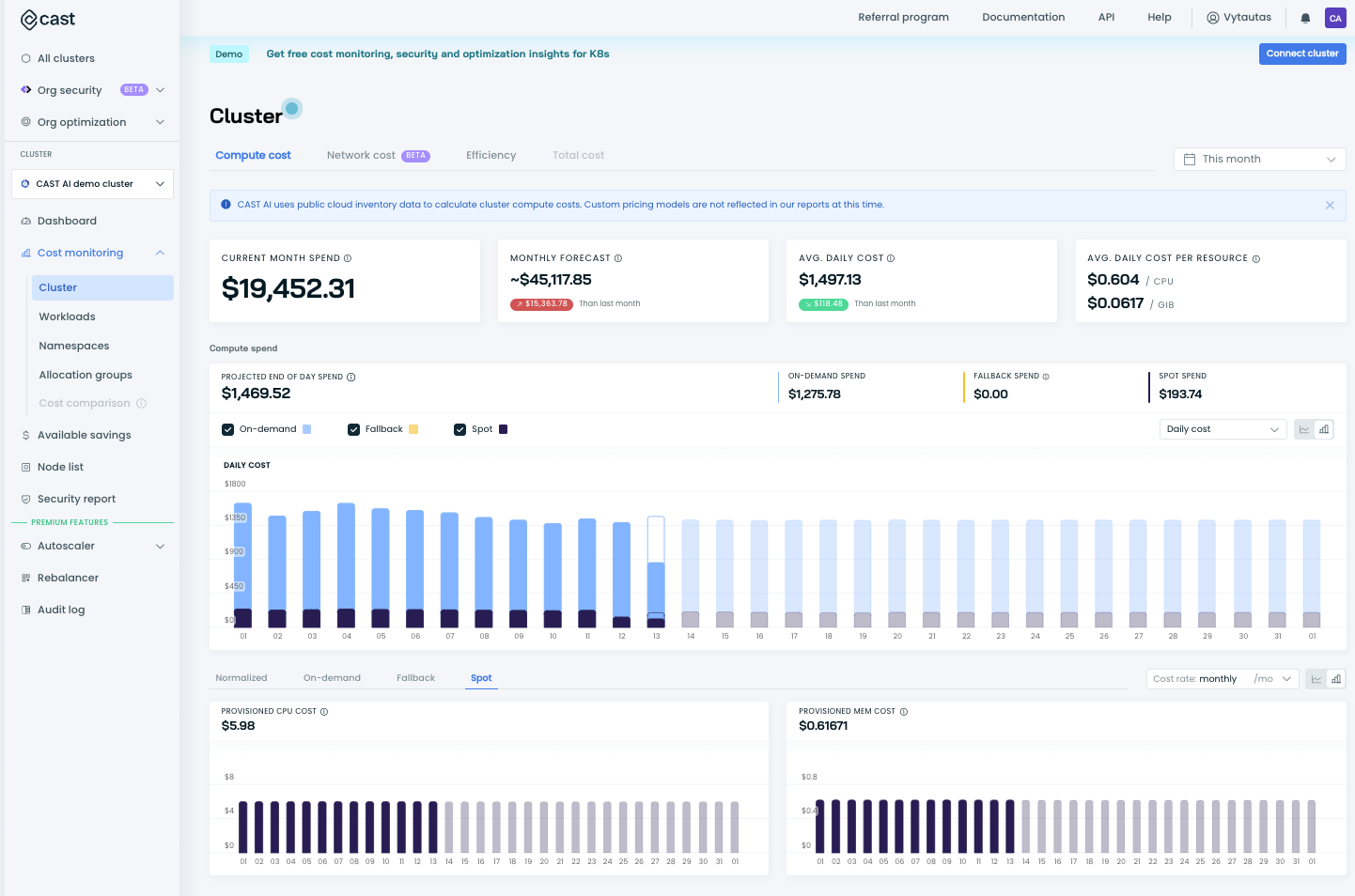
CastAI is a Kubernetes automation and cost optimization platform focused on reducing cloud costs while improving cluster efficiency. It automatically manages node provisioning, autoscaling, rightsizing, and Spot Instance usage across Kubernetes clusters running on AWS, Azure, and Google Cloud.
Instead of only showing recommendations, CastAI actively takes control of cluster optimization. It analyzes workloads in real time and replaces nodes, rebalances clusters, and selects the most cost-effective instance types without manual intervention.
Pros
- Automation for Kubernetes cost optimization
- Automatic node selection, scaling, and rebalancing in real time
- Supports AWS EKS, Azure AKS, and Google GKE
- Works with Infrastructure as Code tools like Terraform and Helm
- Visibility into Kubernetes costs at cluster, namespace, and workload level
- Built-in security scanning and policy controls
Cons
- Focused almost entirely on Kubernetes, not full cloud cost management
- Initial setup and governance features can have a learning curve
- Policy configuration and permissions are limited for large, shared environments
- UI and reporting can feel basic for financial or executive users
- Pricing may feel high for small clusters or teams
- Less suitable for organizations that want manual control instead of automation
Best For
CastAI is suited for Kubernetes-heavy organizations that want hands-off, automated cost optimization without managing cluster scaling and node selection manually.
10. ProsperOps
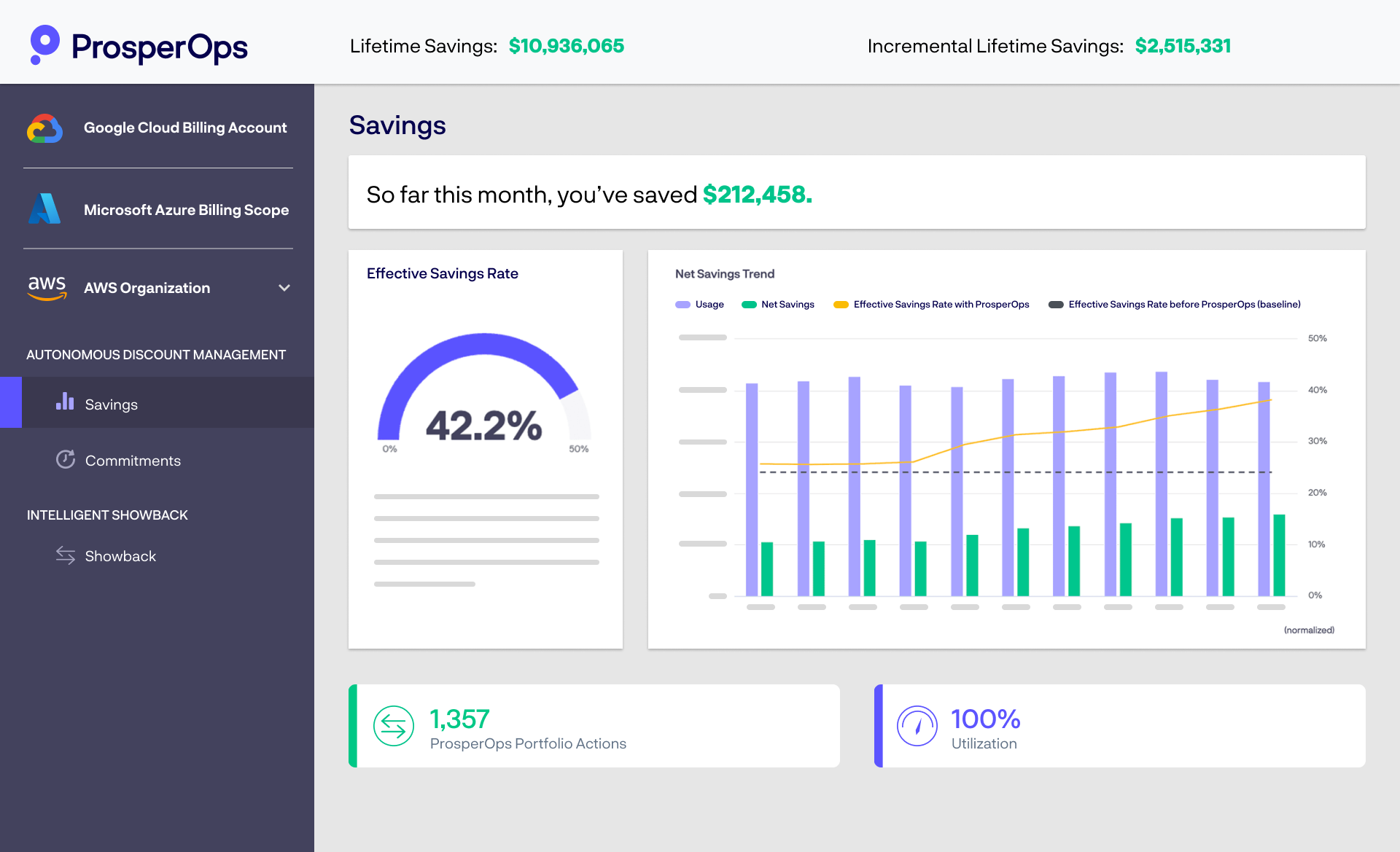
ProsperOps is a cloud cost optimization platform focused almost entirely on management of AWS Reserved Instances and Savings Plans. Its goal is to remove the manual effort and risk involved in commitment purchasing by letting algorithms make decisions automatically.
The platform continuously adjusts commitment coverage based on real usage, using techniques like Adaptive Laddering and its Effective Savings Rate (ESR) to reduce over-commitment and wasted spend. ProsperOps also supports optimization for some additional AWS services such as RDS, Redshift, ElastiCache, and OpenSearch.
Pros
- Automated management of AWS Reserved Instances and Savings Plans
- Delivers consistent and measurable EC2 cost savings
- Helpful for teams without dedicated FinOps resources
- Easy integration and onboarding
- Saves time by removing manual commitment analysis and laddering
Cons
- Narrow focus limited mainly to AWS commitment optimization
- Works as a supplementary tool, not a full FinOps platform
- No broad cost visibility, budgeting, or forecasting
- Black-box approach makes it hard to inspect or control decisions
- Percentage-based pricing creates ongoing costs for commitment optimization
- Limited control can raise governance concerns for some organizations
Best For
ProsperOps is best suited for AWS-centric organizations that want completely hands-off management of Reserved Instances and Savings Plans. It works well for teams that mainly care about maximizing discounts on EC2 and related services.
Conclusion
The alternatives covered in this guide address different needs, from basic native tools to specialized platforms for commitments, Kubernetes, or anomaly detection. Choosing the right solution depends on your cloud complexity, FinOps maturity, and how proactively you want to manage costs.
For teams looking to move beyond reporting and toward continuous cost control, platforms like Cloudchipr offer a more complete approach, combining visibility, allocation, forecasting, alerts, and automated actions in a single workflow.