Best Cloud Cost Optimization Tools [Complete list for 2026]
Introduction
Cloud spending continues to surge, making effective cloud cost optimization tools indispensable for businesses. Global cloud spend is projected to reach over $700 billion by 2025, yet an estimated 20–35% of that spend is wasted on idle or oversized resources. This has driven many companies to adopt cloud cost optimization software in line with FinOps (Cloud Financial Operations) best practices to regain control of budgets. In this cloud cost optimization tools comparison for 2026, we'll explore the best cloud cost optimization tools – highlighting their pricing, FinOps alignment, and automation features – to help you optimize cloud costs with less effort.
Why Cloud Cost Software Matters: Modern cloud cost optimization platforms do far more than tally your AWS or Azure bill. They provide real-time visibility into spend across services and teams, allocate costs to business units or products, and recommend optimizations (like rightsizing or buying reserved instances). Crucially, many tools now embed automation and even AI – for example, detecting anomalies or automatically shutting down unused resources – so you can optimize cloud costs continuously. While basic tools from cloud providers (like AWS Cost Explorer, Azure Cost Management, or GCP Billing reports) offer a starting point, enterprises often outgrow them. That's where third-party solutions come in, offering multi-cloud support and advanced features to implement FinOps best practices.
FinOps Alignment: A number of the best cloud cost optimization software options are built with FinOps principles (Inform, Optimize, and Operate) in mind. They enable cost visibility (detailed dashboards and showback reports), cost optimization (recommendations and automation to eliminate waste), and governance (budget alerts, policies, and integrations that foster collaboration between finance and engineering). Some platforms are even FinOps Foundation certified, demonstrating a commitment to capabilities like allocation, anomaly detection, and forecasting that FinOps teams demand.
Below, we compare 12 top cloud cost optimization tools (in no particular order), ranging from established enterprise platforms to newer AI-driven solutions. We've woven in key details on pricing models, notable features (like automation or AI), and the ideal use cases for each.
Cloudchipr – AI-Powered All-in-One Cost optimization

Cloudchipr is a cloud cost-optimization platform built for automation and simplicity. It consolidates cost and live resource data across AWS, Azure, Google Cloud, and even SaaS/Kubernetes environments into a single pane – making it an "all-in-one" choice for teams that want quick results without juggling multiple tools. Cloudchipr stands out for its no-code automation workflows and AI features:
- Automation & Optimization: Users can easily set up workflows to shut down idle resources, resize underutilized instances, clean up old snapshots, etc., on schedules or triggers. This automation enforces cost savings continuously without manual intervention. Cloudchipr also analyzes usage to suggest optimal commitment purchases (e.g. AWS Reserved Instances or Savings Plans) across clouds, even auto-calculating the best mix for multi-cloud environments.
- AI Cost Insights: Cloudchipr offers an "Explain-It-To-Me" FinOps AI agent. You can ask questions in plain language – like "Why did our EC2 costs spike this month?" – and the AI will analyze your data to explain the cause of cost spikes or anomalies and suggest next steps. This puts instant cloud cost insight at your fingertips without needing to dig through reports.
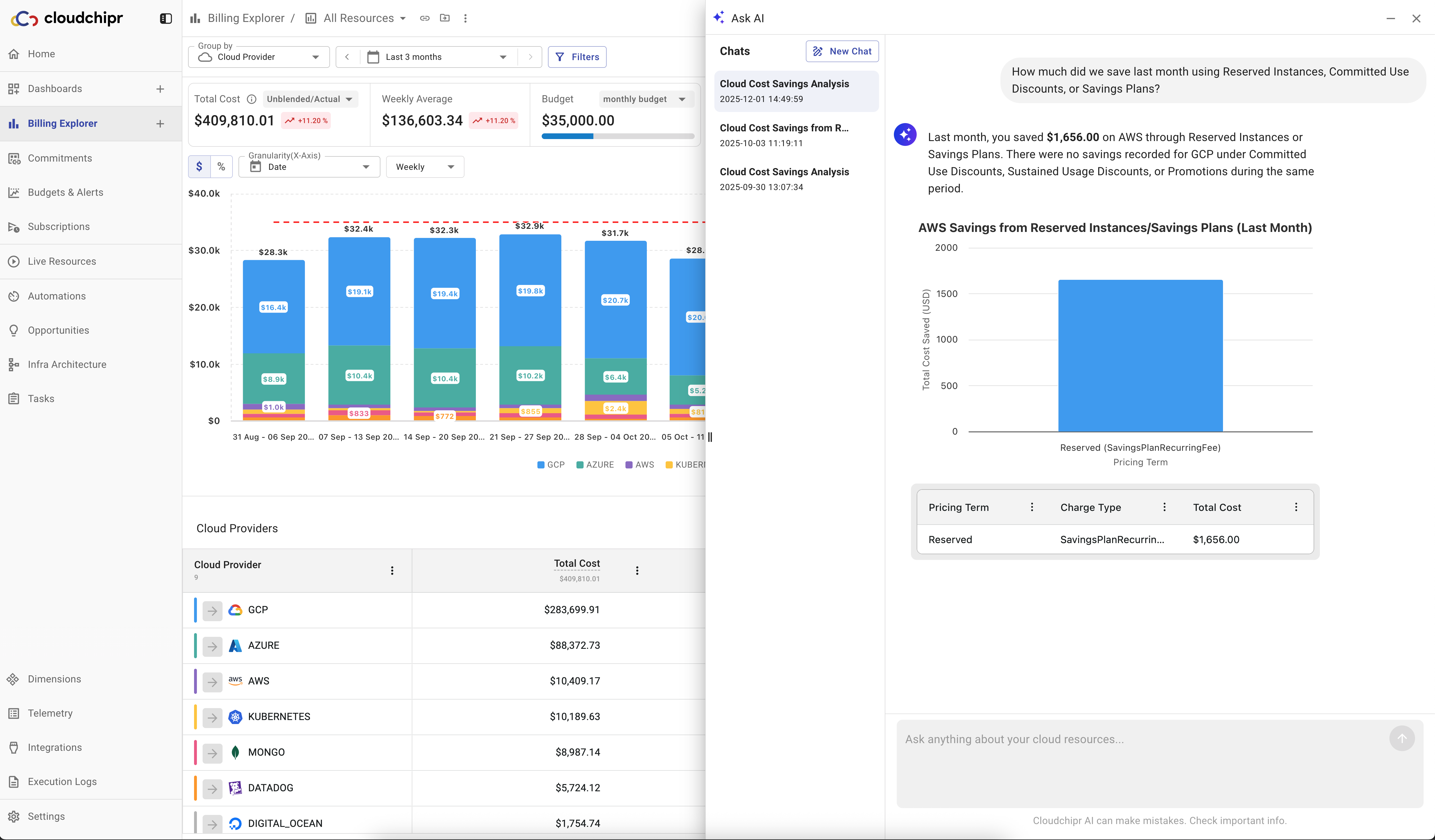
- FinOps and Ease of Use: The platform covers the gamut of FinOps needs (budget tracking, anomaly alerts, forecasting, etc.) in one place. It's designed for fast onboarding – ideal for small FinOps teams or startups that need savings quickly without hiring dedicated specialists. For larger organizations, Cloudchipr even offers white-glove support (an optional dedicated DevOps expert to help with custom policies and integrations).
Pricing: Cloudchipr is relatively accessible. It uses a tiered subscription based on your cloud spend, with plans starting at $49/month for up to $5k monthly cloud spend (billed monthly, cancel anytime) – a low entry point for SMBs. Higher tiers scale to $189/month (covering $25k cloud spend), $445/month for the Pro plan ($25k - $100k monthly cloud spend), and beyond. For Enterprise pricing (cloud bills above $100k+), you'll need to contact sales. There's a 14-day free trial and no long-term contract required, unlike many legacy tools. This straightforward pricing (essentially a small fixed fee per month) contrasts with older enterprise tools that often charge a percentage of cloud spend.
CloudHealth by VMware
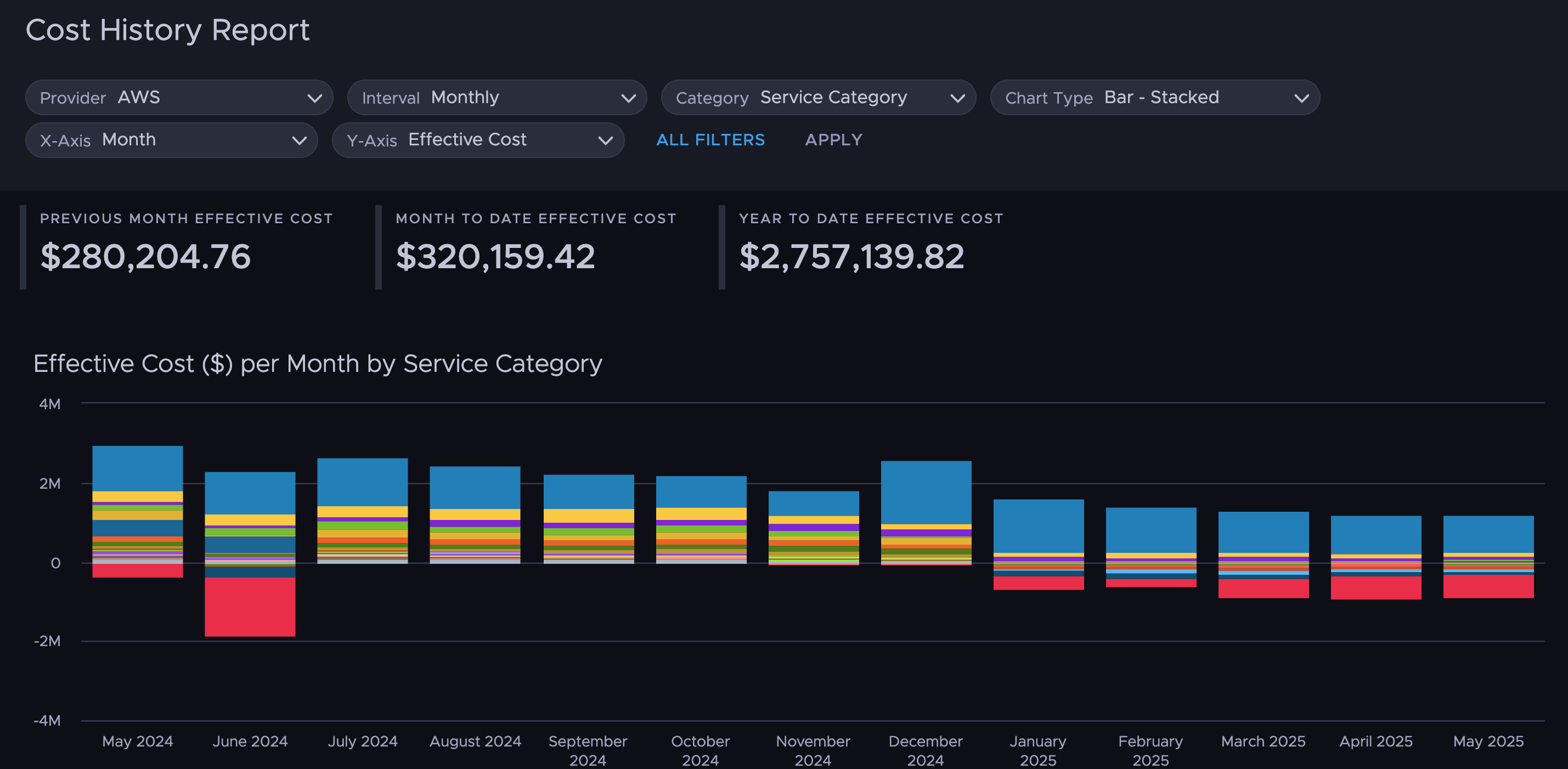
CloudHealth is one of the pioneering cloud cost optimization tools, widely used by large enterprises and cloud Managed Service Providers. Now owned by VMware (Broadcom), CloudHealth provides a comprehensive suite for multi-cloud cost control, governance, and security. It offers detailed cost analytics across AWS, Azure, GCP (and even on-prem VMware environments) with policy-driven automation and integrations for enterprise workflows. Key highlights:
- Governance & Policy Automation: CloudHealth excels at enforcing budgets and policies at scale. For example, you can set rules to alert or automatically shut down resources if spend exceeds a threshold or if an instance is idle. It's often used to implement chargeback/showback in large organizations – mapping cloud costs to teams/projects and ensuring accountability.
- Integration and Reporting: Being an enterprise-focused tool, CloudHealth integrates with ITSM and monitoring tools and allows custom reports for different stakeholders (detailed drill-downs for engineers vs. summaries for executives). This flexibility has made it a go-to for organizations with complex cloud setups and strict compliance needs.
Pricing: CloudHealth is commonly sold via contract with spend-based tiers rather than transparent list pricing. In AWS Marketplace, the annual contract options are structured around a monthly AWS spend cap—for example, $45,000/year to manage up to $150K/month, $90,000/year up to $300K/month, and $150,000/year up to $500K/month. Spend above the contracted threshold is billed as overage at $0.03 per unit (effectively ~3% of incremental spend). Multi-year terms can reduce the effective cost (the 36-month option shows up to ~12% savings). This model generally fits organizations with sustained high cloud spend, while the minimum annual commitment can be hard to justify for smaller teams.
Apptio Cloudability
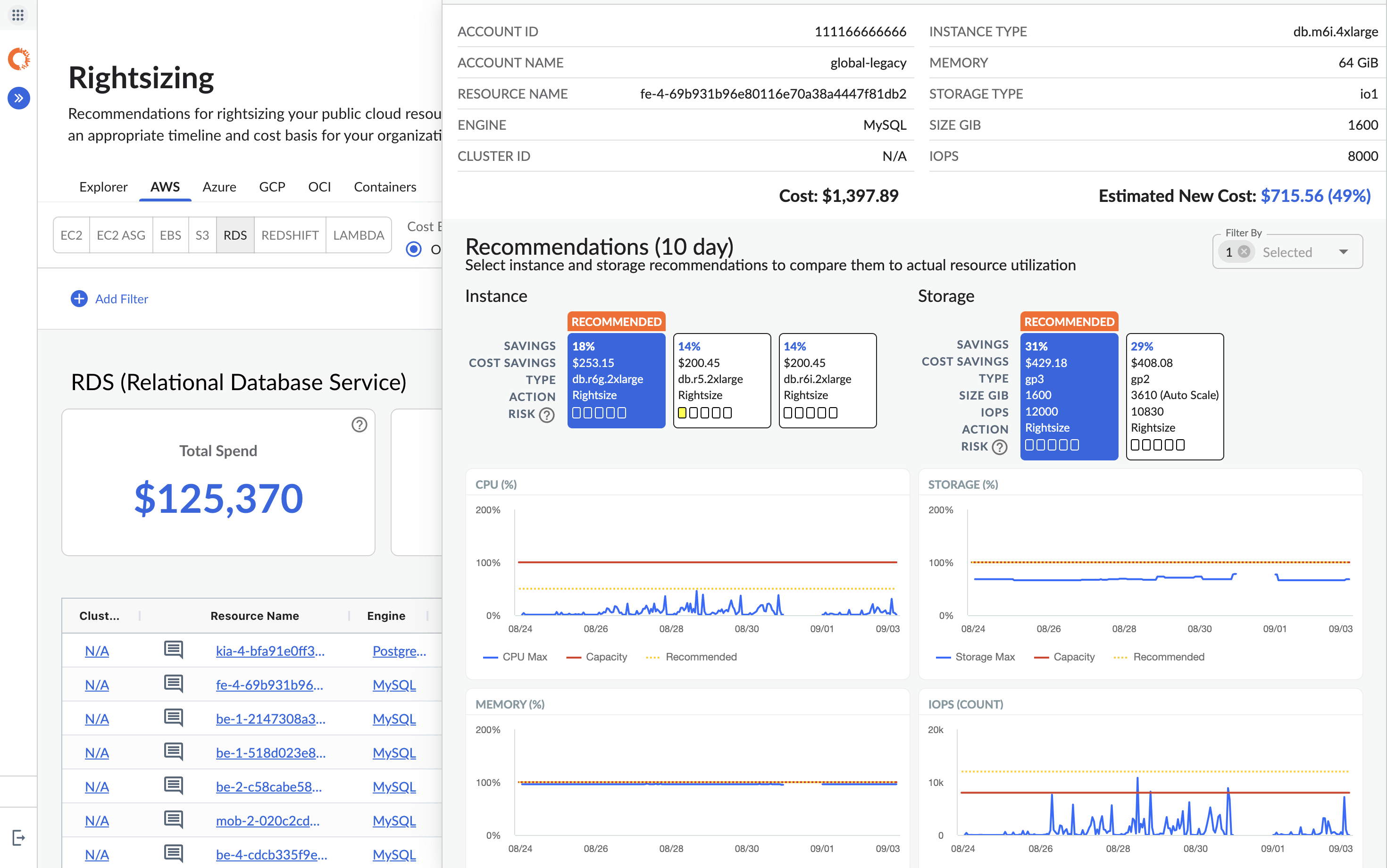
Cloudability (acquired by Apptio, now part of IBM) is another veteran cloud cost optimization software solution known for robust financial reporting. It supports AWS, Azure, and GCP and is favored by enterprises that need to allocate every cloud dollar to the right department or project. Cloudability's strengths include:
- Financial Planning & Chargeback: It offers sophisticated cost allocation, budgeting, and forecast modeling capabilities. Companies with complex org structures appreciate Cloudability's ability to map cloud costs to business units, projects, or applications with custom rules. This makes internal chargeback (or showback) much easier, turning cloud bills into meaningful P&L line items.
- Recommendations & Integration: Cloudability provides rightsizing recommendations and analyzes commitment usage (Reserved Instances/Savings Plans) to ensure you're not overpaying. It also integrates with corporate financial systems (leveraging Apptio's IT financial optimization background) for end-to-end IT cost visibility. With IBM's backing post-acquisition, Cloudability can pair the software with consulting services to help implement FinOps best practices at scale.
Pricing: Cloudability is an enterprise multi-cloud financial optimization platform best suited for medium to large enterprises with substantial cloud spend across two or more clouds (AWS, Azure, GCP).
- Cloudability utilizes custom pricing, operating on a pay-as-you-go SaaS model. Potential customers must request a custom quote.
- The pricing model is characterized as often being based on a percentage of cloud spending under optimization.
- Capterra claims pricing begins at $499 per feature per month.
- Tiered examples from June 2022 on the AWS Marketplace indicate significant costs:
- Managing $150,000 per month in AWS spend starts at $54,000.
- For the largest organizations, the platform can cost up to $5.4 million to manage $15 million in cloud spending.
This high investment is justified by the platform's comprehensive FinOps capabilities, including Cloudability TotalCost allocation, budgeting and forecasting, resource rightsizing, and cost anomaly detection. It also includes professional support services like onboarding and training. Cloudability is suitable for organizations with dedicated cloud optimization staff.
Flexera One
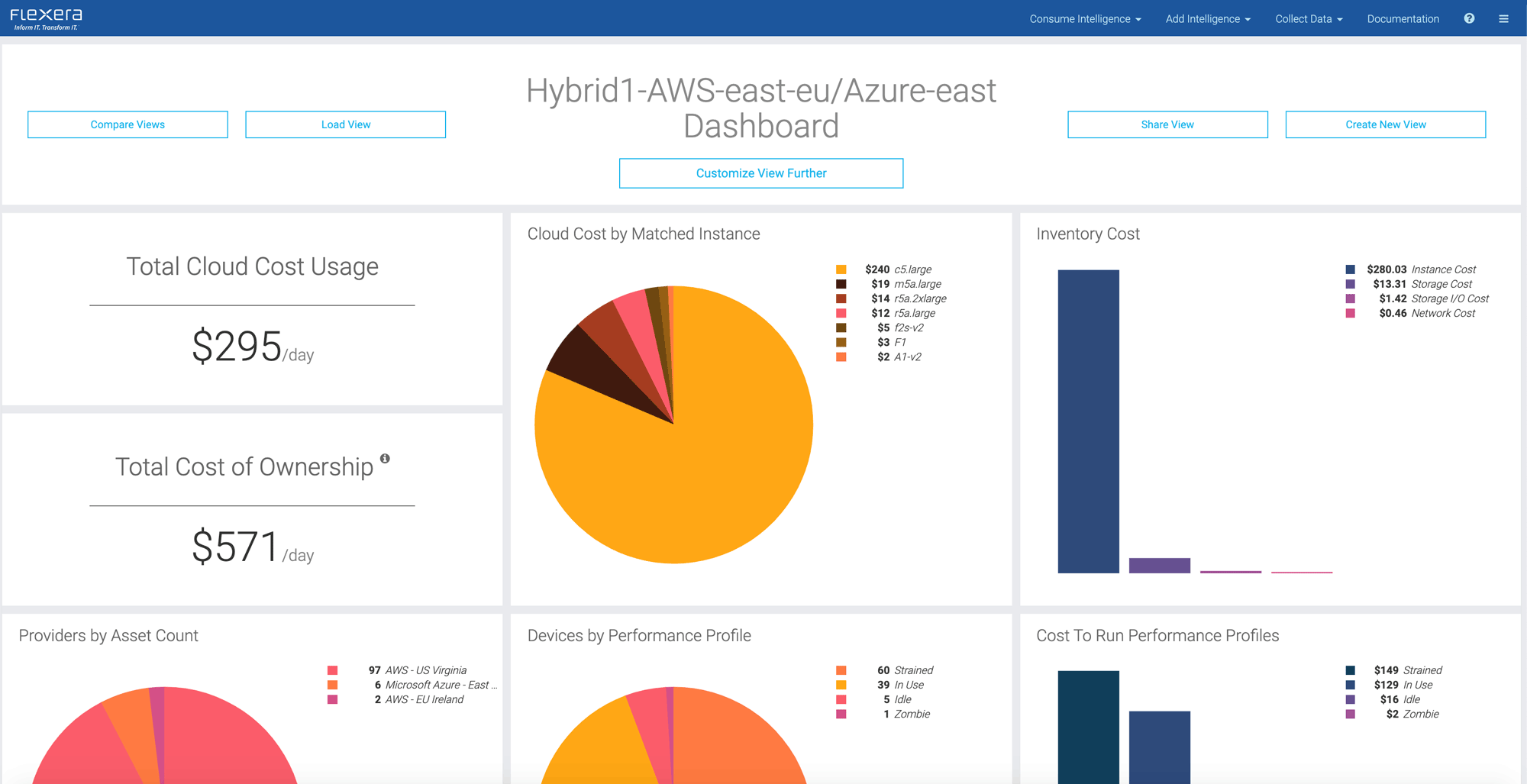
Flexera One (formerly Flexera Optima, built on the RightScale heritage) is a cloud cost optimization and IT asset management platform aimed at large enterprises, especially those with hybrid cloud and on-premises infrastructure. Flexera's unique value is providing a holistic view of all IT spend:
- Hybrid IT & License Integration: Flexera aggregates costs across all major clouds (AWS, Azure, GCP, IBM, Oracle) and even SaaS subscriptions and on-prem data center resources. This means you can see your total IT expenditure in one place. It also links cloud usage with software licenses (for example, tracking how much Oracle license cost is associated with an Oracle DB running on an AWS VM). For organizations looking to calculate a true Total Cost of Ownership (TCO) for applications, Flexera is invaluable.
- Governance & Compliance: Flexera comes from an IT governance background, so it includes strong capabilities for enforcing tagging policies, lifecycle management (e.g. automating deletion of old resources), and ensuring compliance. It's often used by Cloud Centers of Excellence that need both cost optimization and governance in tandem.
Pricing: Flexera CCO is an expensive enterprise FinOps platform that operates under a rigid contract model. Pricing is based on a significant percentage of tracked cloud spend.
Key Pricing Characteristics:
- Effective Rate: Flexera effectively charges a high percentage of cloud spend, often cited as 5% of annual cloud spend at the starting tier.
- Minimum Commitment: The platform requires significant upfront costs, with a minimum annual commitment of $50,000. This high minimum makes the platform prohibitive for SMBs.
- Contract Requirements: Users must commit to long-term contracts spanning 12, 24, or 36 months. There are no apparent cost advantages for choosing longer contract terms.
- Tiered Costs (Up to $1,000,000 USD in yearly cloud spend):
- A 12-month contract costs $50,000.00.
- A 24-month contract costs $100,000.00.
- A 36-month contract costs $150,000.00.
- Overage Fees: If cloud spend exceeds the contracted limit (e.g., $1M/year), an overage charge of $0.01 per dollar is applied to the excess amount.
The high investment is generally justified for companies that require broad IT Asset Management capabilities, including specialized features like On-premise cost monitoring (Hybrid cost optimization support) and Software License Optimization across multi-cloud environments (AWS, Azure, Google Cloud).
CloudCheckr
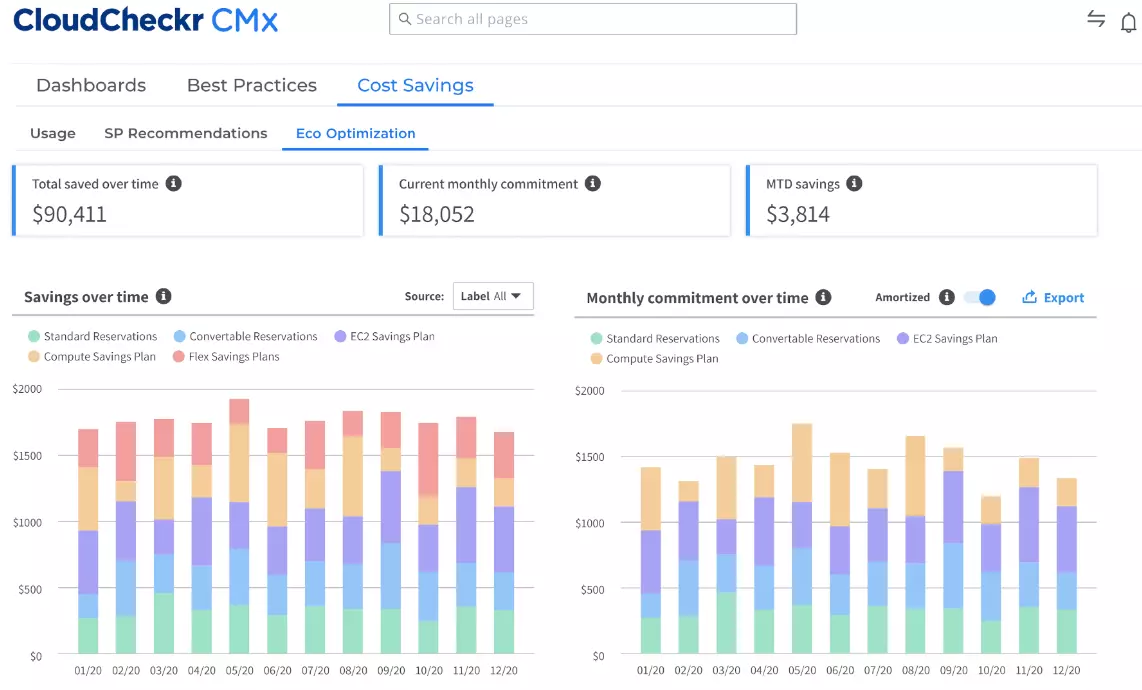
CloudCheckr is a well-known cloud cost optimization and governance tool that was acquired by Flexera as part of the Spot by NetApp portfolio acquisition. Historically, CloudCheckr was popular among AWS-focused organizations and Managed Service Providers for its detailed billing analysis and cost governance features. Notable aspects:
- Detailed Billing & MSP Features: CloudCheckr provides extremely granular cost breakdowns and has strong support for resellers/MSPs managing multiple client accounts. It can produce detailed chargeback reports and even identify obscure cost leakages (like unused Elastic IPs or orphaned snapshots). This attention to billing detail made it a favorite for those who needed to account for every penny in AWS bills.
- Compliance and Security Checks: In addition to cost, CloudCheckr includes many compliance checks (e.g. AWS Well-Architected reviews, security best practices audits). This blend of cost and security ensures that cost optimizations don't violate compliance. Post NetApp acquisition, some CloudCheckr capabilities are offered alongside Spot's automation tools (e.g. managing spot instances for savings).
Pricing: Public pricing for CloudCheckr is limited, and most buyers should expect contract-based terms (often negotiated) rather than a simple list price. The AWS Marketplace listing provides one concrete reference point: CloudCheckr SaaS is described as 3.5% of cloud spend with a $500/month minimum, with an overage rate of $0.035 per unit. Marketplace also shows both 1-month and 12-month contract options, with the 12-month term advertised as offering significant savings versus month-to-month. Outside of Marketplace, Spot/NetApp may package CloudCheckr within broader agreements, so final pricing can vary depending on scope, term length, and bundled services.
CloudZero
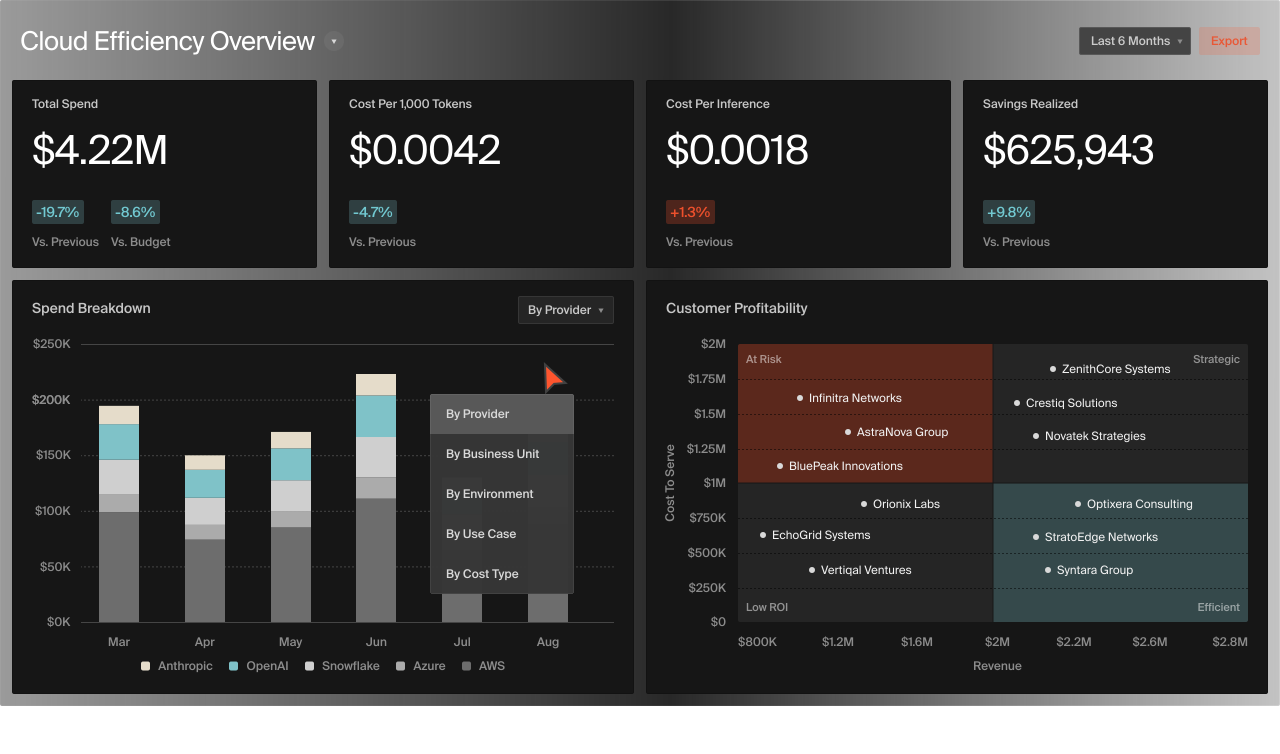
CloudZero is a newer entrant that frames itself not just as cost optimization, but as "cloud cost intelligence". It emphasizes unit economics and tying cloud spend to business metrics. CloudZero helps transform cloud costs from an opaque IT expense into business-relevant insights – like cost per customer, cost per product feature, or per deployment. Key features:
- Business Mapping of Costs: CloudZero allows you to define custom dimensions (via tags or mappings) to slice costs by things like product feature, team, or customer. For example, a SaaS company can see exactly how much it costs to serve one customer or to support a specific feature in real time. This is hugely valuable for decision-making (engineering can correlate features with costs, finance can calculate margins by product, etc.).
- Real-Time Anomaly Detection: The platform provides anomaly alerts and integrates with Slack/Jira, so engineers get notified quickly if, say, a deployment causes an unexpected cost spike. By focusing on real-time and granular data, CloudZero supports an engineering-led FinOps culture where developers are aware of the cost impact of their work.
Pricing: Public pricing for CloudZero is fairly limited, and most customers should expect a negotiated contract. That said, the AWS Marketplace listing gives a clear spend-based reference point: CloudZero On Demand is “sold in units of $1K/month AWS spend,” priced at $19 per unit per month on a 1-month term (with slightly lower effective rates on longer commitments). Overage is also listed as $19 per additional $1K/month of AWS spend above the contracted amount, charged monthly.
As a quick way to estimate from Marketplace: take your monthly AWS spend, divide by $1,000 to get the number of units, then multiply by $19. For example, $1M/year (~$83K/month) is ~83 units, which pencils out to roughly $1.6K/month at the Marketplace on-demand rate (before any contract discounts). Marketplace also shows a separate “CloudZero Custom / CloudZero Platform” line item with large contract totals, which suggests enterprise/custom packaging beyond the simple unit model.
Finout
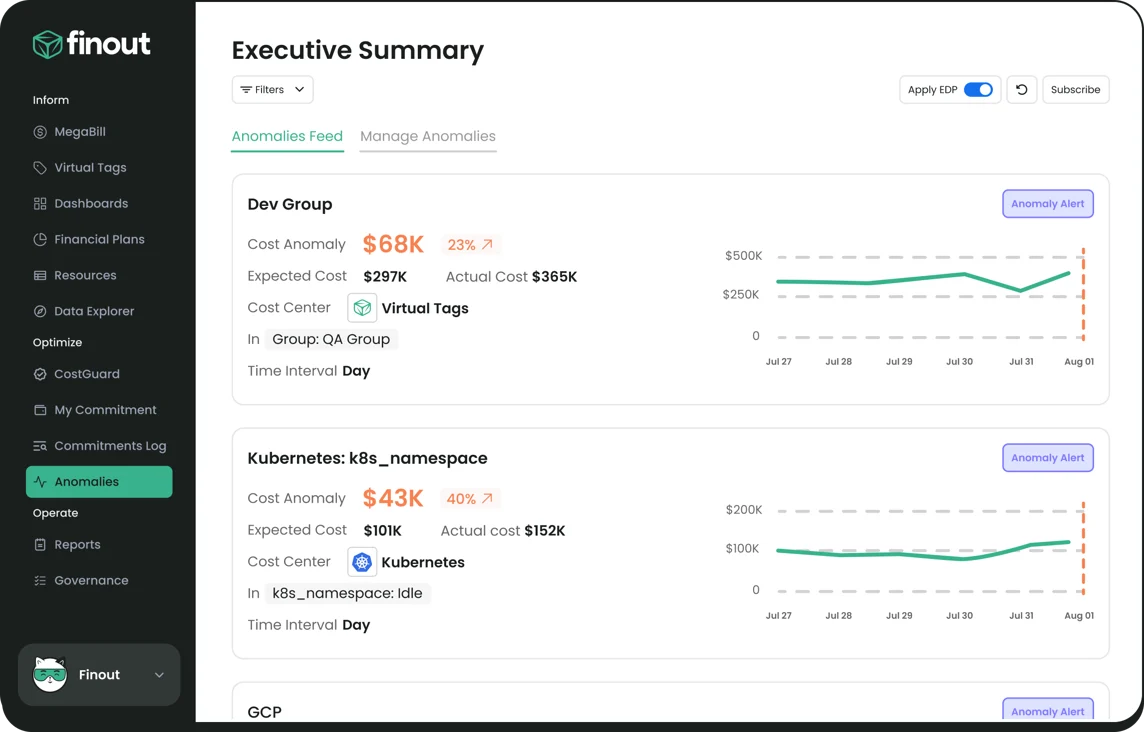
Finout markets itself as a "Cost Observability" platform and is known for its "MegaBill" – a single, unified view of all your cloud and SaaS costs. It's designed to achieve 100% cost allocation across even messy, multi-cloud environments. Highlights:
- Unified Multi-Source Cost Visibility: Finout aggregates AWS, Azure, GCP, Kubernetes, and even SaaS (Snowflake, Datadog, etc.) into one dashboard. Instead of toggling between different portals, you see everything together, normalized. This is great for companies with sprawling cloud usage plus third-party services – Finout becomes your one-stop cost hub.
- Virtual Tagging: One of Finout's standout features is the ability to retroactively tag or allocate costs for untagged resources via a "virtual tagging" layer. In essence, Finout can apply rules to assign costs to the right owner even if engineers forgot to tag things in the cloud. This ensures no spend goes unallocated, solving a common FinOps headache of "mystery" costs.
- Anomaly Detection and Alerts: Like others, Finout includes anomaly detection (they call it CostGuard) to catch spend spikes and notify owners with context. It's about turning raw cost data into actionable intelligence, bridging gaps between finance and engineering.
Pricing: Finout provides an enterprise-grade FinOps solution using a transparent, fixed subscription model based on an organization's annual cloud spend limit. The model is designed to provide cost assurance by covering all features in the chosen plan and avoiding surprise costs.
Key Pricing Tiers (12-Month Contracts):
Finout offers three main plans, all featuring unlimited users:
- Business Plan: Costs $6,000.00 to manage up to $500,000 in annual AWS spend.
- Pro Plan: Costs $12,000.00 to manage up to $2 million in annual AWS spend.
- Enterprise Plan: Requires contacting sales for a private, custom offer to accommodate unlimited or specific needs.
Additional Cost Factors:
- Longer contracts (annual or multi-year) may be eligible for cost benefits or discounts.
- The advanced Cost-Per-Customer feature incurs an additional charge of $250 for the Business plan and $500 for the Pro plan (it is included in the Enterprise plan).
Finout consolidates costs across multiple providers (MegaBill) and claims to help organizations reduce cloud costs by 30% over a year.
Kubecost – Kubernetes Cost Optimization (Open Source)

Kubecost is an open-source tool (with a commercial version) tailored specifically for Kubernetes cost monitoring and optimization. As companies deploy more on Kubernetes (EKS, AKS, GKE, or on-prem k8s), cloud bills often lack visibility into which microservice or namespace is driving costs. Kubecost fills this gap:
- Kubernetes-Native Visibility: Kubecost installs into your clusters and provides real-time cost breakdowns by namespace, deployment, service, and even pod. It translates CPU, memory, and storage usage in the cluster to actual cloud dollar costs. This means a dev team can see, for example, how much a particular microservice or feature branch is costing in a multi-tenant cluster – something cloud provider billing alone can't show.
- Optimization and Alerts: Kubecost offers rightsizing recommendations for Kubernetes resources (e.g. if a deployment consistently uses only 50% of its requested CPU, it will suggest lowering the request to save cost). It also supports alerting – e.g. notify if a team's namespace spend jumps over a threshold. Because it leverages Kubernetes labels and metadata, it doesn't require extensive tagging like cloud VMs do.
Pricing: The core Kubecost is open source and free to install, which is great for evaluation or smaller teams. They make money through an Enterprise version (with advanced features, support, and integrations) and hosted offerings. Kubecost Enterprise pricing typically depends on the scale (number of Kubernetes nodes or spend monitored). Many users start with the free version and only later consider paid support. In essence, Kubecost can be a zero-cost solution if you have the expertise to run it, making it very popular among startups and mid-size tech companies concerned with container costs.
Harness Cloud Cost Management
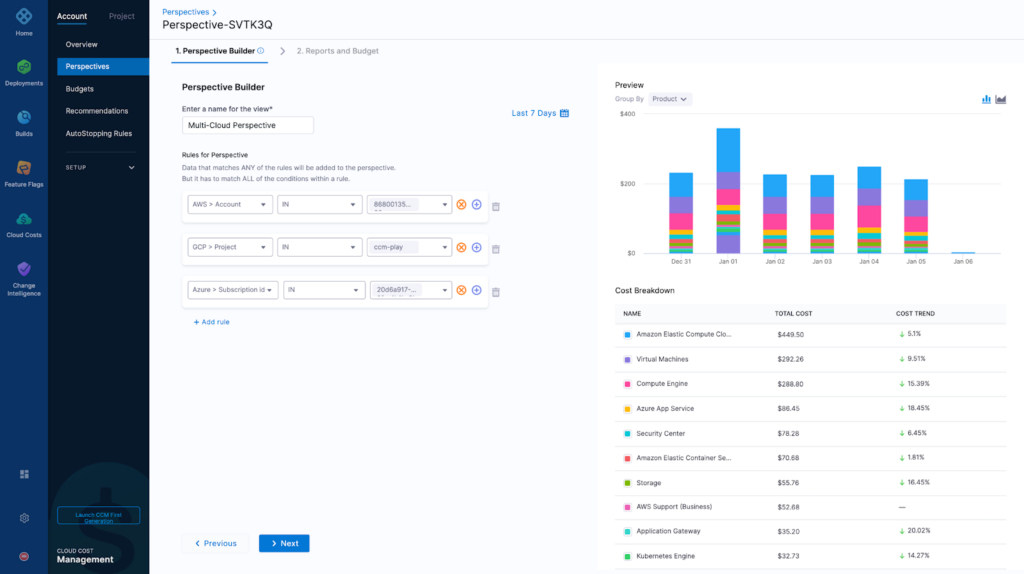
Harness CCM is the cloud cost optimization module of the Harness platform (Harness is known for CI/CD and DevOps automation). It's a FinOps Certified Platform that integrates cost optimization into the software delivery lifecycle. Notable features:
- DevOps Integration: Because Harness CCM is part of a broader CI/CD toolchain, it can inject cost awareness into deployment workflows. For example, Harness can automatically shut down idle non-production environments on off-hours (their "Cloud AutoStopping" feature), saving up to 60–70% on dev/test infrastructure. It can also block or warn on deployments that would exceed budget, adding a governance checkpoint in the pipeline.
- Kubernetes and Automation: Harness, like Kubecost, provides granular Kubernetes cost visibility without requiring tags. It goes further by offering automation such as a "Commitment Orchestrator" that manages AWS Savings Plans and RIs on your behalf. Essentially, Harness not only flags cost issues but can act on them (stop, resize, purchase commitments) automatically, aligning with its automation DNA.
Pricing: Harness pricing is modular. Most modules use the Developer 360 experience, based on the number of developers. The Cloud Cost Management (CCM) module is billed separately using a Cloud Spend Model (a percentage of cloud spend).
Key Pricing Tiers:
- Community Plan: Free, open-source for essential features.
- Free Plan: $0 per month for small teams, includes 2,000 monthly Cloud Credits and limited CCM functionality.
- Startup Plan: $57 per developer per month. Eligibility requires fewer than 500 employees or less than $5M in annual cloud spend.
- Enterprise Plan: Uses custom pricing and requires negotiation with sales, designed for large organizations needing unlimited developer access.
Pricing is negotiable based on specific needs and contract duration. The investment is justified by comprehensive capabilities across multi-cloud environments (AWS, Azure, GCP), including AI-powered insights for forecasting and anomaly detection.
nOps

nOps is a cloud cost optimization tool focused primarily on AWS (with recent support for Azure). It brands itself as automated FinOps "on autopilot." nOps continuously scans your cloud environment for savings opportunities and compliance with best practices:
- Automated Cost Savings: nOps can automatically implement certain optimizations via its nSwitch feature, which schedules resources off during non-peak hours (saving money by turning off dev instances at night, for example). It also identifies idle or underutilized instances for rightsizing or termination, unattached volumes to delete, etc., and can clean them up with minimal user intervention.
- Anomaly Detection & Alerts: The platform uses machine learning to detect cost anomalies (spend spikes or unusual usage) and alerts you in real time. It aligns with AWS's Well-Architected Framework, meaning it checks your setup against AWS's own recommendations for cost optimization and security. MSPs and AWS-centric teams often use nOps to keep costs in check continuously.
Pricing: nOps offers a 14-day free trial and has a couple of pricing models. For direct customers, nOps pricing can be a percentage of savings or a percentage of cloud spend (common in this space). They have advertised a model where they share the savings they achieve, which can be attractive as it means no upfront cost – if nOps doesn't find waste to cut, you don't pay. Typically, nOps might charge around 15% of the savings it realizes, or if using spend-based, roughly 1–2% of AWS spend for their service. For exact numbers, you'd get a custom quote, but the goal is that nOps "pays for itself" out of the waste it helps eliminate.
ProsperOps

ProsperOps is a specialized cloud cost tool laser-focused on optimizing AWS reserved instances and savings plans. For companies that have significant AWS workloads, buying the right mix of long-term commitments (RIs/SPs) can save 30%+ but is complex to manage – ProsperOps automates this:
- AI-Driven Commitment optimization: ProsperOps uses algorithms to continuously adjust your portfolio of RIs and Savings Plans. It will purchase, modify, or sell RIs on the AWS marketplace and manage Savings Plans to maximize your discounts, all behind the scenes. Essentially, it guarantees you always have the optimal coverage for your usage, even as your resource needs change.
- Set-and-Forget Savings: The platform provides a dashboard of your effective savings and coverage, but the heavy lifting is automated. It's particularly useful for enterprise FinOps teams that want to offload the micromanagement of AWS commitments. ProsperOps has reported achieving very high coverage (and thus savings) for customers without human intervention.
Pricing: ProsperOps is primarily results-based for its rate-optimization offering (Autonomous Discount Management / ADM). Instead of charging as a percentage of cloud spend, ProsperOps takes a small share of realized savings.
ProsperOps also has a second pricing motion for workload optimization (Autonomous Resource Management / ARM): a flat fee per managed resource per month (i.e., price-per-resource, not spend-based). They additionally advertise a free savings analysis to quantify potential outcomes with minimal setup.
In practice, ProsperOps is often used alongside a broader cost visibility/chargeback tool: one system for dashboards and allocation, and ProsperOps specifically to automate and maximize discount coverage and savings outcomes.
Conclusion
These are among the leading cloud cost optimization tools available in 2026, and each takes a slightly different approach to visibility, allocation, governance, and optimization. There isn’t a single “right” choice for every organization. A fast-moving, cloud-native team may prioritize quick time-to-value, intuitive workflows, and automation, while a larger enterprise may care more about governance, controls, reporting depth, and integration with existing finance and procurement processes. Newer platforms continue to iterate on usability and pricing transparency for mid-market teams, and open-source projects can also play a valuable supporting role—for example, showing cost impact during Infrastructure-as-Code changes or enforcing cost-related policies as code.
In the end, a comparison like this comes down to your priorities and operating model. Some teams start by strengthening visibility and allocation so costs can be tied to products, environments, and owners. Others begin with governance and reporting to standardize controls and improve forecasting. Many focus on optimization automation—rightsizing, commitment optimization, scheduling, and waste reduction—once the data foundation is in place. Kubernetes-heavy environments may also benefit from tools that understand container and cluster dynamics, while AWS-centric organizations should consider native AWS tooling as a baseline and layer on additional capabilities as requirements grow.
Often, the answer is not a single tool, but a combination: one for reporting and allocation, another for automation, and possibly a specialized solution for Kubernetes or commitments. With the right fit—and a consistent FinOps practice behind it—teams can improve cost accountability, reduce waste, and make cloud spend a deliberate input to engineering and business decisions rather than a monthly surprise.
FAQ: Cloud Cost Optimization Tools
What is a cloud cost optimization tool?
A cloud cost optimization tool (or cloud cost management software) is a platform that helps monitor, report, and optimize your cloud computing expenses. These tools aggregate billing data from cloud providers and turn them into insights – showing you where money is being spent, by whom, and on what resources. They typically provide dashboards for visibility, alerts for budget spikes, and recommendations (or automation) to reduce waste. In short, a cloud cost management tool gives finance and engineering teams visibility and control over cloud spend that is often hard to achieve with native cloud consoles alone.
How do cloud cost optimization tools help control costs?
They help in several practical ways:
- Visibility: They break down cloud bills into understandable units (e.g. cost by service, team, project). This transparency helps identify unexpected expenses or underutilized resources quickly.
- Cost Allocation: Good tools map cloud costs to business dimensions (applications, departments, customers) so you know which areas drive your cloud spend. This accountability often motivates teams to optimize their usage.
- Optimization Recommendations: Most tools will highlight savings opportunities – for example, suggesting a smaller instance size for an underused VM, or recommending a discount program like AWS Savings Plans when it would cut costs. Some platforms go further and automate these actions, like turning off VMs after hours or rightsizing databases automatically.
- Budgeting & Alerts: You can set spending budgets or thresholds and get alerted (or trigger actions) if you approach them. Real-time anomaly detection will warn you of cost spikes (e.g. a misconfigured script launching dozens of servers) before it wrecks your monthly budget.
- Multi-cloud Management: If you use multiple cloud providers, these tools provide a unified view. You can manage AWS, Azure, GCP, and more from one place – something that's impractical to do manually with disparate native tools.
By combining these capabilities, cloud cost optimization tools can typically save 10–30% (or more) of your cloud bill by eliminating inefficiencies, while reducing the manpower needed to hunt down cost issues.
Do I need third-party cost optimization software if I use AWS/Azure's built-in tools?
Cloud vendors offer basic cost management features – AWS Cost Explorer, AWS Budgets, Azure Cost Management (originally Cloudyn), Google Cloud's cost tools – which are a good starting point. They let you see your spending and set simple alerts within that single cloud. However, companies often outgrow the native tools because:
- They might lack advanced features like cross-cloud views, detailed chargeback reports, or automated optimizations. AWS Cost Explorer, for instance, provides data and some recommendations, but it doesn't automatically shut down idle instances or purchase RIs for you.
- Multi-cloud and SaaS costs aren't unified. If you're only on AWS, Cost Explorer can work, but many businesses use multiple clouds and services. A third-party tool brings all costs together for apples-to-apples comparison.
- Customization and integrations: Third-party tools often integrate with external systems (like Slack, Jira, ServiceNow) and allow custom tagging schemas, whereas native tools are more rigid.
- Scalability and granularity: For large environments, generating insights (like detailed cost per product or per Kubernetes namespace) is easier with specialized platforms designed for that level of analysis.
In essence, AWS/Azure's free tools are adequate for basic monitoring in a single cloud. But if your cloud footprint is growing, or you want to practice serious FinOps with continuous optimization, investing in one of the best cloud cost optimization tools can pay for itself by uncovering greater savings and saving your team time.
How should I choose the best cloud cost optimization software for my needs?
Choosing the right solution depends on your environment and goals. Here are a few considerations:
- Cloud Environment: Are you single-cloud or multi-cloud? If you primarily use one cloud, a vendor-specific tool or smaller solution might suffice. Multi-cloud (or cloud + on-prem) pushes you toward more robust platforms like CloudHealth, Flexera, or others that handle heterogeneity well.
- Organization Size & Spend: Some tools are geared for enterprise scale (handling millions in spend with fine-grained controls – e.g. Cloudability, Flexera) while others cater to SMBs/startups (quick deployment, lower cost – e.g. Cloudchipr, Vantage). Also consider your spend – a tool that charges % of spend might be fine at $100k/month but could be pricey at $1M/month.
- Key Features Needed: Identify your priorities. If you need deep financial reporting and integration with ERP systems, consider Apptio Cloudability or CloudHealth. If automation is top priority (e.g. auto-stop resources, manage commitments), look at Harness, Spot, or ProsperOps. For Kubernetes cost tracking, Kubecost or Harness are strong. Make sure the tool covers your must-haves (be it anomaly detection, chargeback reports, or real-time data).
- Ease of Use vs. Flexibility: Some platforms have a learning curve but offer extensive customization (e.g. Flexera, Cloudaware). Others are more plug-and-play with opinionated designs (e.g. CloudZero's focus on product costs, or nOps's autopilot approach). Decide if you have FinOps expertise in-house – if not, a simpler interface or even a managed service might be better.
- Pricing Model: Understand how each tool charges and align it with your preferences. Fixed subscription vs. % of cloud spend vs. % of savings can result in very different costs. For example, a performance-based model (like ProsperOps' share of savings) means you pay only when you actually save, whereas an upfront subscription is a fixed cost to budget for. Some tools also offer free tiers or trials – take advantage of those to evaluate ROI.
Ultimately, involve both engineering and finance stakeholders in the evaluation. A cloud cost optimization tools comparison should include trialing a couple of platforms with your own data if possible. See which tool surfaces the most useful insights and fits your workflows. The best choice will be the one that helps your team actually use the insights to reduce spend, not just produce pretty graphs. All the top tools can show you data; the right one will integrate into your processes (or automate them) to drive real savings and efficiency.
Can cloud cost optimization tools really save us money automatically?
Yes – to a point. Many modern tools have automation features that can directly cut costs:
- They can automatically shut down or scale down resources that are detected as idle (especially non-production workloads). For example, turning off dev/test servers on nights and weekends can yield significant savings without affecting users.
- Some tools will auto-rightsize instances or containers – meaning if your VM is oversized, the tool can recommend and even execute switching to a smaller instance type.
- Commitment optimization: Tools like ProsperOps or Zesty will automatically manage discount instruments (Reserved Instances, Savings Plans, spot instances) to get you the best rates without you manually forecasting and buying those commitments.
- Anomaly response: If an unusual spike is detected, tools can be configured to take action – for instance, alerting an on-call engineer or even disabling a runaway cloud function that's racking up costs.
However, automation has limits and needs governance. Most platforms won't delete something unless you allow it – there's risk in automatically shutting off resources that might be important. So, typically, teams start with automation in low-risk areas (like development environments or obvious waste) and still have humans review big changes. The true value is when the tool handles the easy savings automatically, and your team can focus on higher-level optimizations. In practice, organizations that effectively use these tools and follow FinOps processes do achieve 20-30% or more savings on their cloud bills – through a combination of automatic actions and informed human decisions driven by the tool's insights.