Best FinOps Tools For Cloud Cost Management [2026 Edition]
.png)
Cloud financial operations (FinOps) has become essential as companies seek to rein in ballooning cloud costs. Yet even in 2025, cloud cost management remains a top challenge. Many organizations still waste a significant chunk of their cloud budgets. The FinOps Foundation’s latest survey showed that “workload optimization and waste reduction” is the #1 FinOps priority, cited by 50% of practitioners. Why is it so hard to keep cloud spending under control? In short, cloud environments are growing more complex (think multi-cloud, Kubernetes, and AI workloads), and traditional cost tools haven’t fully kept up. FinOps teams need better solutions to gain visibility and take action on cloud spend in real time without slowing down innovation.
In this comprehensive guide, we’ll explore the best FinOps tools and platforms of 2026. We’ll highlight each tool’s key features, ideal use case, pricing model, and where it stands out – as well as where traditional tools fall short.
Limitations of Traditional Cloud Cost Visibility Tools
If your cost management toolkit consists solely of native cloud billing consoles or basic reports, you’re likely familiar with their drawbacks. Traditional visibility tools often provide delayed or siloed insights that make proactive management difficult:
- Delayed cost data: Cloud provider billing data is usually not truly real-time. For example, Google Cloud recently improved its billing export latency by 30%, but practitioners still only get “accurate real-time data in 24 hours” – meaning there’s at least a day lag on cost info. In fast-scaling environments, a lot of waste can accumulate in 24 hours. AWS and Azure have similar delays for detailed cost reports, so you’re often looking in the rear-view mirror.
- Limited scopes (single-cloud focus): Native tools like AWS Cost Explorer or Azure Cost Management each cover their own cloud. If you use multiple providers or services (AWS, Azure, GCP, plus maybe Snowflake or Datadog), you end up juggling separate reports. This makes it hard to get a unified view of total spend or to allocate costs across a hybrid environment.
- Heavy reliance on tagging: Many cost tools require consistent resource tags to break down spend by team, app, or environment. AWS Cost Explorer, for instance, “relies heavily on tagging” for accuracy. In practice, perfect tagging is rarely achieved – especially in multi-tenant or shared resource scenarios – leading to “unknown” costs. Traditional tools have little ability to auto-allocate costs that lack tags.
- Manual optimization effort: Perhaps the biggest limitation is that visibility alone doesn’t save money – you must take action. Classic cloud cost management tools might identify an oversized VM or recommend purchasing a Savings Plan, but engineers have to implement those changes. This manual rightsizing and purchasing is time-consuming and often falls to the bottom of the priority list, allowing waste to continue. In other words, older tools are reactive; they show you the problem but don’t fix it.
- Lack of real-time enforcement: Even when you set budgets or alerts in native tools, they typically notify you after you breach a threshold – they don’t automatically stop the bleeding. There’s a gap between insight and enforcement. For example, Azure’s cost alerts or GCP’s budget notifications might email you about an overspend, but they won’t shut down a runaway process in the moment. That falls to human intervention, which may come too late.
Due to these gaps, many organizations still struggle to prevent bill shock or effectively optimize costs at scale with traditional tools alone. This has paved the way for more advanced FinOps platforms and solutions. Below, we review the top cloud cost management tools in 2026 – including both cloud-vendor-native tools and innovative third-party FinOps platforms – and how they address these challenges.
Top Cloud Cost Management Tools (2026 Edition)
In this section, we compare some of the best FinOps tools for cloud cost management available in 2026. These include the native cost tools from AWS, Azure, and Google Cloud, as well as leading third-party FinOps platforms. We’ll deep-dive into each solution with an overview, key features, ideal use cases, pricing, methodology, standout strengths, and limitations.
1. Cloudchipr

Cloudchipr is an AI-powered, enterprise-grade FinOps platform built for cloud optimization and real-time observability. It was designed to be a one-stop solution for FinOps teams to see and control costs across multiple clouds and services in real time. Cloudchipr’s core philosophy is automation-first: it uses intelligent agents and workflows to not only surface insights but also take action (with zero downtime). In other words, Cloudchipr aims to eliminate the heavy lifting of manual cost management, letting teams focus on higher-level strategy.
Key Features:
- Unified Multi-Cloud Reporting: Cloudchipr integrates with all major cloud providers (AWS, Azure, GCP) as well as Kubernetes and popular services like Snowflake and Datadog. It consolidates spend from these sources into a single view. Dynamic cost attribution allows for automatic allocation of costs to teams, projects, or environments without requiring explicit tags. This virtual tagging capability ensures precise showback even if your tagging isn’t perfect.
- Real-Time Insights and Anomaly Detection: The platform offers granular, real-time cost visibility through customizable dashboards and proactive alerts. It continuously monitors usage and uses machine learning to detect anomalies or upward spend trends, so you can respond immediately. Forecasting tools (with AI/ML) help predict future costs and budget needs, aligning with FinOps best practices of forward-looking planning.
- Automation Workflows & Live Resource Management: Where Cloudchipr really shines is turning insight into action. It provides action-oriented workflows and policies to optimize resources automatically. For example, Cloudchipr can identify an underutilized AWS EC2 instance and rightsizing it or schedule it to shut down on nights/weekends according to policies you set.
- AI Agents and Collaboration: Cloudchipr includes built-in FinOps AI agents that can interact with users and data. These agents can automatically send cost reports to stakeholders, explain anomalies (“why did our cost spike yesterday?”), and even assist in cost analysis via chat interfaces. The platform also has team collaboration features – think of it as having a FinOps co-pilot that can create tickets or recommendations for engineers and track optimization tasks. This bridges the gap between finance and engineering teams. (In fact, Cloudchipr even offers “DevOps as a Service” for organizations that want expert help implementing FinOps actions.)
- Policy-Driven Governance: To enforce cloud cost hygiene, Cloudchipr lets you define policies (like budget limits, or rules such as “any dev VM over $X should auto shut off after 8pm”). The platform’s automation can then enforce these in real time. This ensures governance is not just a monthly report but a continuous guardrail.
Best For: Cloudchipr is ideal for mid-size to large organizations (and cloud-native companies) that operate across multiple clouds or complex Kubernetes environments and want hands-off, continuous optimization. It’s a strong fit for FinOps teams who need real-time control and are striving for advanced maturity (Operate phase FinOps). Companies with rapidly changing workloads, such as SaaS providers, AI/ML platforms, or any business with dynamic cloud usage, can benefit from Cloudchipr’s autonomous optimization to avoid overspend. It’s also useful for organizations lacking large FinOps engineering teams, since Cloudchipr automates many tasks that would otherwise require significant engineering effort (e.g. writing scripts to scale resources).
Pricing: Cloudchipr is relatively accessible. It uses a tiered subscription based on your cloud spend, with plans starting at $49/month for up to $5k monthly cloud spend (billed monthly, cancel anytime) – a low entry point for SMBs. Higher tiers scale to $189/month (covering $25k cloud spend), $445/month for the Pro plan ($25k - $100k monthly cloud spend), and beyond. For Enterprise pricing (cloud bills above $100k+), you'll need to contact sales. There's a 14-day free trial and no long-term contract required, unlike many legacy tools. This straightforward pricing (essentially a small fixed fee per month) contrasts with older enterprise tools that often charge a percentage of cloud spend.
2. AWS Cost Explorer
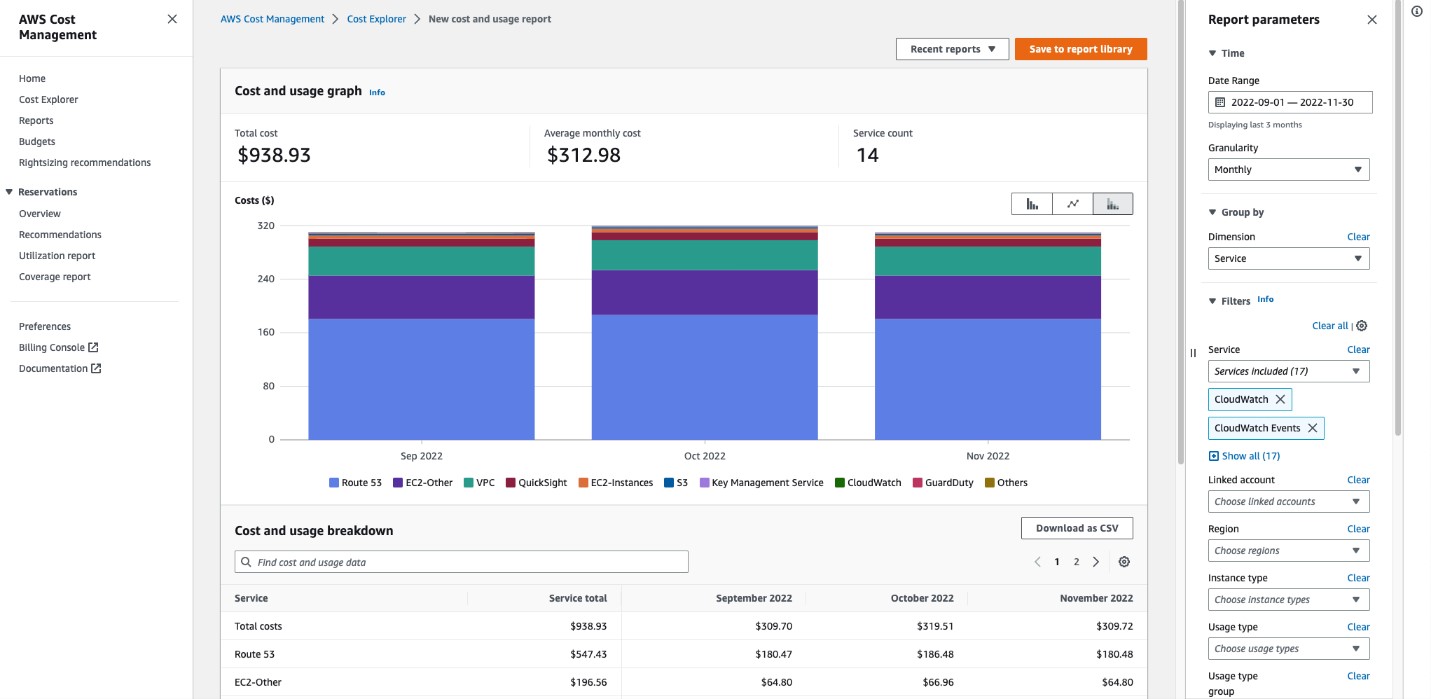
AWS Cost Explorer is Amazon’s built-in tool for basic cloud cost analysis and reporting. Introduced in 2014, Cost Explorer became AWS’s answer to customers’ complaints about confusing cloud bills. It provides AWS users with an interface to visualize costs, usage trends, and some recommendations within the AWS Management Console. For many AWS-only organizations, Cost Explorer is the starting point for FinOps, offering a no-frills way to track spending.
Key Features:
- Cost & Usage Reports: Cost Explorer lets you generate customized reports of your AWS spending over time. You can slice costs by service, account, region, etc., and view data hourly, daily, or monthly. It retains up to 12 months of historical data, which is useful for trend analysis and year-over-year comparisons . For example, you can quickly see if this month’s EC2 spend is trending higher than last month’s, or which AWS services are driving the bulk of your costs.
- Filtering and Grouping: The tool provides filters to drill down on particular accounts or tags. If you tag AWS resources (e.g., by team or project), Cost Explorer can group costs by those tags to show, say, cost per project. However, it relies heavily on proper tagging for such breakdowns – otherwise costs fall into “unallocated” buckets .
- Savings Recommendations: AWS Cost Explorer includes a couple of recommendation features. It has a Rightsizing Recommendations tab that identifies underutilized EC2 instances (based on CloudWatch metrics) and suggests resizing or changing instance types to save money. It also integrates with AWS’s Reservations and Savings Plans recommendations – showing potential savings if you purchase Reserved Instances or Savings Plans for consistent usage. These recommendations can be helpful for cost optimization planning.
- Cost Anomaly Detection: In recent years, AWS added Cost Anomaly Detection which can monitor for unusual spend patterns and alert you if costs spike unexpectedly (though setting this up involves AWS Budgets and anomaly monitors). Still, it provides basic anomaly alerting by email, helping catch things like a sudden cost surge in a service.
- Reports & Forecasting: You can view forecasts in Cost Explorer, which use historical data to project future spend (e.g., it might predict next month’s cost if trends continue). While not highly sophisticated, it gives a rough idea for budgeting. You can also set up AWS Budgets from the Cost Management suite – to receive alerts when certain spend thresholds are crossed.
Best For: AWS Cost Explorer is best for teams just getting started with cloud cost management or with relatively simple AWS environments. Small companies or startups running on AWS often use it to get basic visibility into their monthly bills. It’s also suitable for organizations that have a single-cloud (AWS-only) footprint and want a cost tool with zero extra cost. If your cost management needs are primarily viewing trends, tracking budget vs actual, and getting high-level recommendations within AWS, Cost Explorer does the job. In short, it’s best for companies with basic cloud cost analysis needs on AWS and those not yet ready to invest in a more advanced FinOps platform.
Pricing: Cost Explorer is free for all AWS users. There is no additional charge to enable it and use its features in the AWS Console. (The detailed Cost and Usage Reports it relies on are also free to generate, though storing them in S3 incurs minimal storage costs.) AWS’s cost management suite (Budgets, Cost Explorer, basic anomaly detection) is generally provided at no cost, making it an attractive starting point from a budget perspective.
Related article: The Ultimate Guide to AWS S3 Pricing 2026
3. Azure Cost Management and Billing
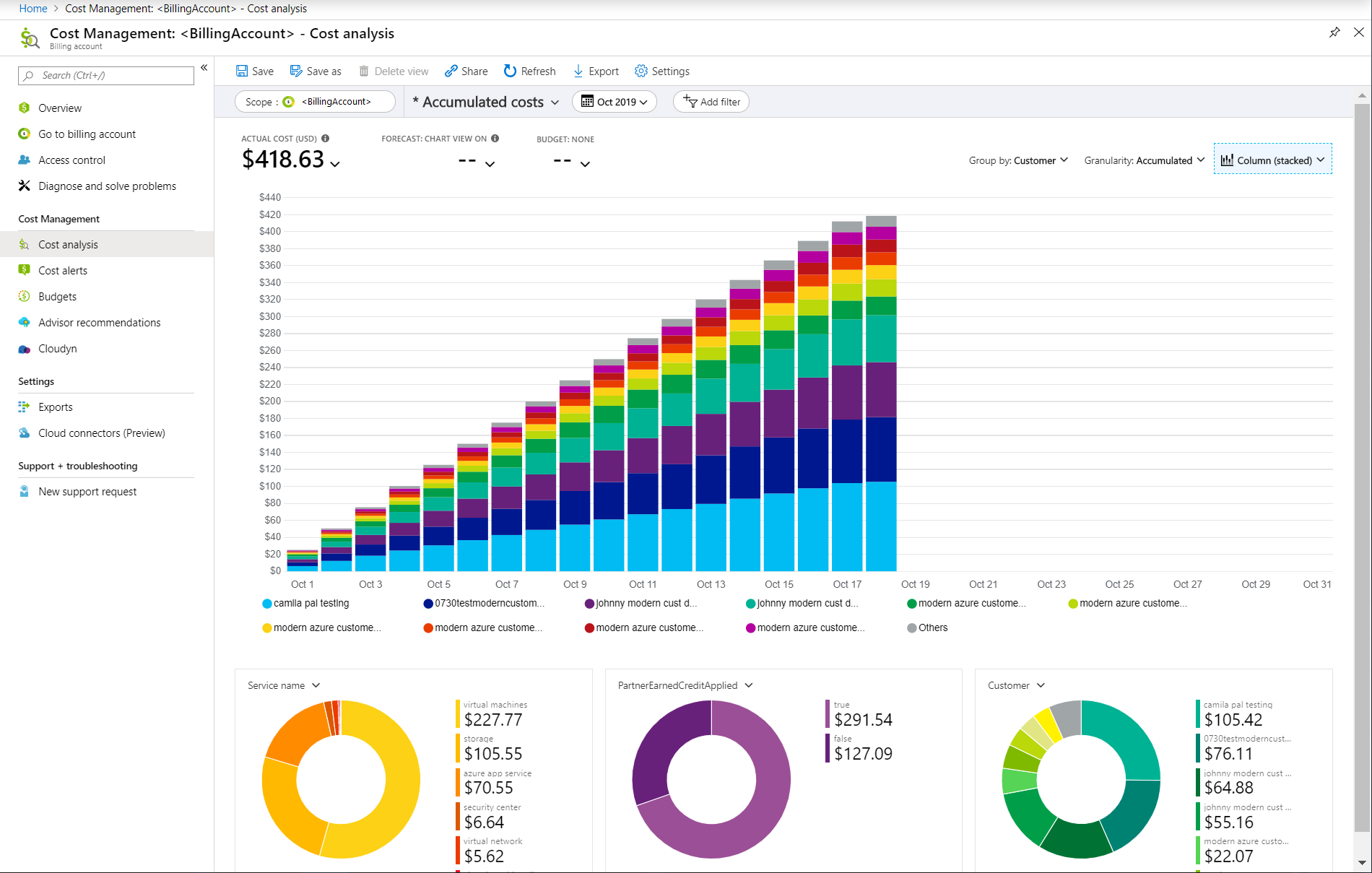
Azure Cost Management + Billing is Microsoft’s native solution for tracking and optimizing costs across Azure (and even other clouds). Rather than a single tool, it’s a suite of FinOps tools presented in the Azure Portal . This includes Azure Cost Analysis, Azure Budgets, Azure Reservations recommendations, and more. Notably, Azure Cost Management can also ingest AWS costs via a connector, providing a unified view for organizations using both Azure and AWS. In 2022, Microsoft rebranded and expanded these capabilities, underscoring their commitment to FinOps on Azure.
Key Features:
- Cost Analysis and Reports: Azure Cost Management provides detailed spending insights for your Azure usage. You can analyze costs by various dimensions – subscription, resource group, service, location, etc. The interface allows filtering and grouping similar to AWS’s, but within Azure’s context (e.g., view cost by Azure resource tag or by service like Azure SQL vs VMs). It includes visual charts for cost trends and can break down costs for Azure Marketplace items as well.
- Budgeting and Alerts: You can create budgets on Azure subscriptions or resource groups and get alerted as you approach or exceed those budgets. This helps enforce cost accountability. Budgets can send email alerts or even trigger action groups (like webhooks or Azure Functions) to take custom actions when thresholds are hit.
- Optimization Recommendations (Azure Advisor): Azure Cost Management integrates with Azure Advisor, which provides recommendations to optimize resources. This includes identifying idle or underutilized Azure VMs, suggesting purchasing Azure Reserved Instances or Savings Plans for consistent workloads, and rightsizing recommendations. These are auto-generated by Azure’s analysis of your usage patterns.
- Forecasting with Machine Learning: Microsoft has built forecasting into Cost Management – using machine learning algorithms to project future cloud costs based on historical trends. For example, it might forecast next quarter’s spend on Azure given current growth. This is useful for FinOps planning and ensuring you allocate budget appropriately.
- Multi-Cloud Support (AWS integration): A standout feature is the ability to connect AWS accounts to Azure Cost Management. Microsoft acquired Cloudyn (a multi-cloud cost tool) in 2017, and those capabilities now allow Azure users to bring in AWS Cost & Usage data. The AWS Connector (generally available since 2020) lets you see AWS costs alongside Azure costs in one dashboard. AWS costs are tagged as such, and you can group by provider to compare Azure vs AWS spend. This is handy for organizations with hybrid cloud strategies.
- Cost Allocation and Chargeback: The tool supports tagging and cost allocation similar to others. It allows exporting cost data (e.g., to CSV or Power BI) for chargeback reporting. You can also view costs by Azure tag or resource group to map to business units.
- Integration & APIs: Azure Cost Management has REST APIs and can integrate with Power BI for custom dashboards. This enables building tailored reports or combining cost data with other business data.
Best For: Azure Cost Management is best for organizations using Azure Cloud as a primary cloud, especially those who want to leverage a native tool with tight Azure integration. If you have significant Azure workloads, this tool provides detailed cost control without needing a third-party product. It’s also useful for MSP (Managed Service Provider) scenarios or enterprises managing many subscriptions, as it plugs into Azure’s management groups for consolidated views. Additionally, if you have some AWS on the side, Azure Cost Management can handle basic AWS cost visibility – so it’s good for Azure-centric shops dabbling in multi-cloud. In summary, it’s ideal for companies that rely on Azure services and want an integrated cost solution (and potentially those with AWS+Azure who want a single pane for both) . Companies at an intermediate FinOps maturity (doing budgets, some optimization) can utilize these built-in tools before possibly outgrowing them.
Pricing: Microsoft Cost Management is free for Azure customers – there’s no additional charge to use any of its features for Azure cost analysis. For AWS linked accounts, Microsoft currently charges a fee equal to 1% of the AWS managed spend (after a free trial period). In practice, this means if you manage $100k of AWS spend through Azure Cost Management, Microsoft would bill $1k for that integration. (They had offered the connector free for the first 90 days , then 1% after.) This fee might be acceptable for those who want convenience of single-dashboard, but large AWS users often stick to AWS’s own tools or third-party solutions to avoid the surcharge. Importantly, all Azure-facing functionality is free of cost.
Related article: Azure Blob Storage Pricing Breakdown: What You Need to Know
4. Google Cloud Billing & FinOps Tools
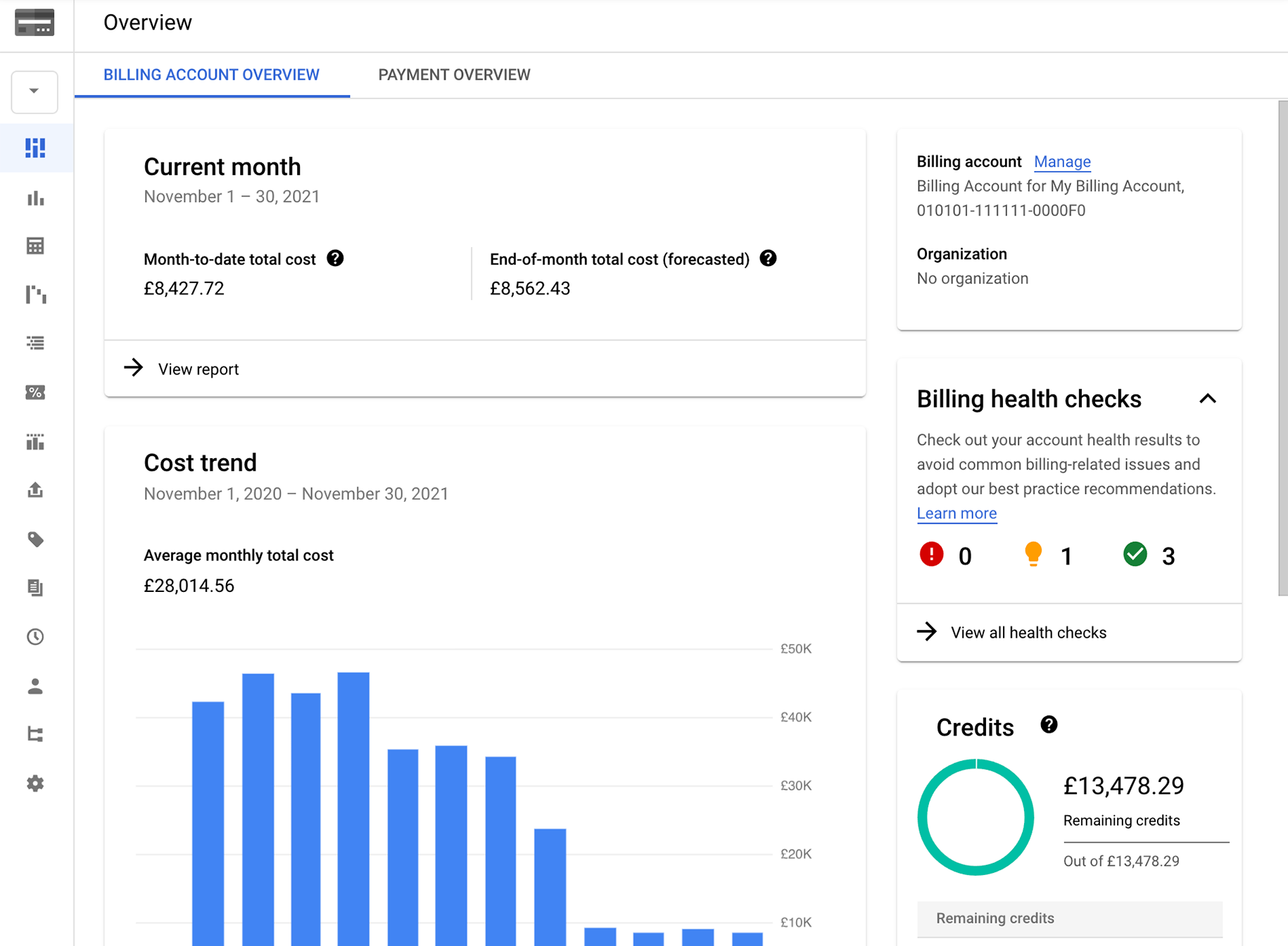
Google Cloud provides a set of native tools under the Cloud Billing umbrella for cost management on GCP. This includes the Cloud Billing Console (with cost reports and budget features), BigQuery billing export for advanced analysis, Cloud Scheduler and Recommender for cost optimization suggestions, and a newer FinOps Hub introduced to centralize these capabilities. By 2025, Google enhanced their cost management with features like real-time billing data streaming and AI-driven anomaly detection. The goal is to help GCP customers track and control spend in an automated way. For organizations leveraging Google Cloud Platform, these native tools form the first line of defense against surprise cloud bills.
Key Features:
- Cloud Billing Reports: GCP’s Billing Reports provide a visual breakdown of your GCP costs over time. You can filter by project, service, or label and see trends and monthly totals . This answers questions like “Which projects are incurring the most cost?” or “What’s our storage spend this month vs last month?” It’s a handy at-a-glance view directly in the Google Cloud Console. There’s also a Cost Table report for a detailed, invoice-like view of costs in tabular form.
- Budgets & Alerts: Similar to other clouds, Google Cloud lets you set budgets on your billing account or projects and configure alert thresholds (e.g., alert at 50%, 90%, 100% of budget). These send email notifications (or Pub/Sub messages for custom handling) when spend exceeds the limits, helping teams stay informed of potential overruns.
- Recommendations (Active Assist): Google’s Active Assist (Recommender) provides cost recommendations for certain resources. For example, it can recommend deleting idle VM instances, purchasing committed use discounts (CUDs) for compute if utilization is consistent, rightsizing VM machine types based on CPU/RAM usage, or removing unused IP addresses to save costs. These recommendations appear in the Recommender section of the console and are integrated with Cloud Billing. Google’s recent update unified Committed Use Discount analysis in a FinOps hub, showing ROI of commitments and offering both optimal and conservative purchase recommendations.
- Billing Data Export and BigQuery Analysis: One powerful feature is the ability to export detailed billing data to BigQuery in near real-time. This raw data can be queried to produce very fine-grained cost analyses and custom reports (for example, cost per environment label, or blending cloud costs with business data). Many GCP FinOps users leverage this to create tailored dashboards (often via Google Data Studio or Looker) for internal reporting.
- Anomaly Detection (AI-powered): In late 2024, Google introduced AI-driven cost anomaly detection natively. This means GCP can automatically monitor your spend and flag unusual spikes without requiring you to set static thresholds. Google’s approach is “curated” to reduce noise – they tuned the algorithm to only surface significant anomalies to users . This is currently in preview, and they plan to add alerting functionality to it as well. Essentially, GCP is baking in an automated “eyes on glass” for cost spikes, which is a boon for busy teams.
- Real-Time Billing and FinOps Hub: Google improved the speed and granularity of cost data. They started streaming billing data such that end-to-end latency is much lower (aiming for sub-24-hour latency for all charges). While not exactly real-time to the minute, this ensures yesterday’s costs are available today, reducing reliance on estimates. Google also launched a FinOps Hub in the console – a centralized place where FinOps practitioners can access all these tools (budgets, reports, anomalies, CUD analysis, etc.). It signals Google’s recognition of FinOps as a first-class concern.
Best For: Google’s native cost tools are best for teams primarily using Google Cloud Platform, especially if they want to manage costs within GCP without third-party tools. If you have many projects on GCP and need to allocate cost by project or team, the built-in labels and billing exports can handle that. It’s great for developers or small companies on GCP who just need to ensure they get budget alerts and see where costs are coming from. Also, organizations focusing on AI/ML workloads on GCP might leverage these tools plus new features for AI cost tracking (as Cloud FinOps expands to AI infrastructure). In general, if your cloud footprint is GCP-heavy and you prefer Google’s ecosystem (BigQuery, Data Studio) for analysis, the native tools will serve you well. Large enterprises on GCP often start with these and later consider augmenting with multi-cloud FinOps platforms if needed.
Pricing: Google Cloud’s cost management features are free to use. Creating budgets, viewing reports, and using the recommender carry no charge. Exporting billing data to BigQuery will incur the normal BigQuery storage/query costs (which are minor for most reporting queries). The new anomaly detection feature is also part of the platform at no extra cost (at least in preview). So cost governance on GCP doesn’t come with a direct price tag, making it accessible to all GCP customers.
Related article: Google Cloud Run Pricing in 2025: A Comprehensive Guide
5. Finout
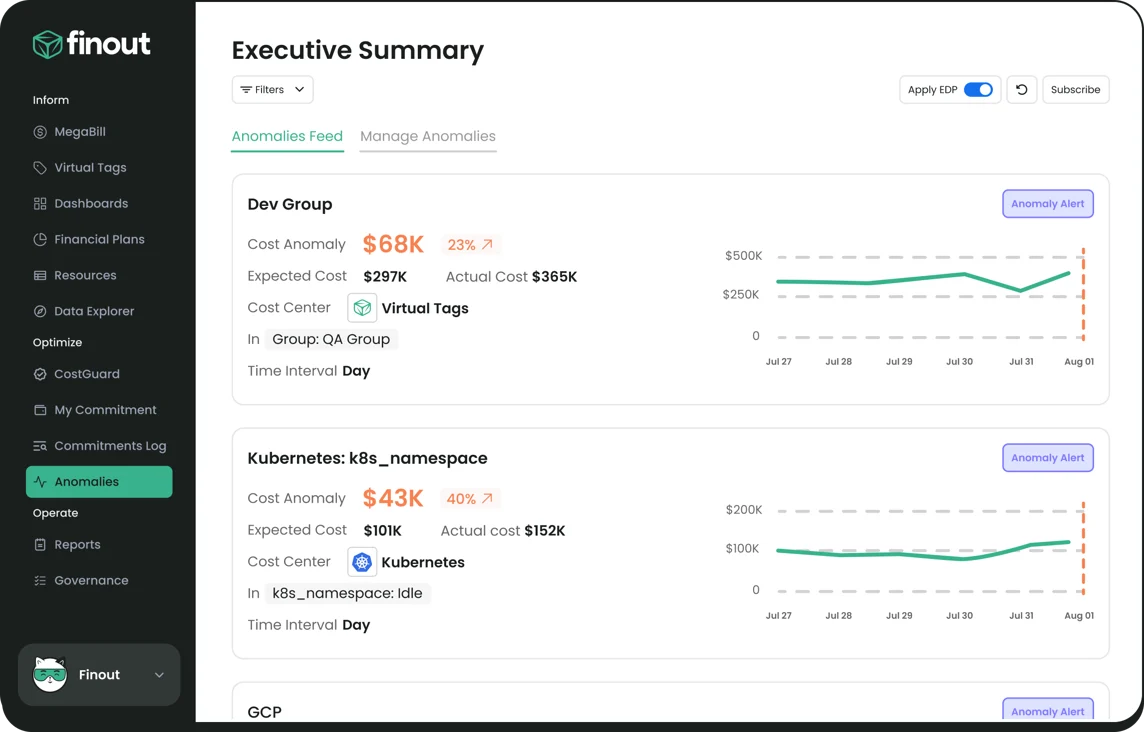
Finout is an enterprise-grade FinOps platform known for its ability to consolidate cloud spend from multiple sources into a single view. Think of Finout as creating a “mega-bill” that merges all your cloud and infrastructure bills so you can analyze them holistically . Founded in 2018, Finout has gained traction for enabling detailed cost management without requiring heavy engineering effort – it often markets itself as “Zero code” or “No tagging” cost management. Finout is a third-party SaaS tool, meaning it’s cloud-agnostic and works on top of AWS, GCP, Azure, Kubernetes, and even services like Snowflake or Stripe.
Key Features:
- MegaBill Unified View: Finout’s flagship feature is the MegaBill, which aggregates spending across all your providers and accounts into one unified dashboard. Instead of checking AWS, then Azure, then GCP bills separately, Finout lets you see total cloud cost, and drill down by source. This is extremely useful for multi-cloud environments or companies with many accounts (like a microservices architecture with many AWS accounts).
- Cost & Usage Tracking: Finout performs dual tracking of cost and usage. This means you not only see cost data, but also underlying usage metrics for resources (when available), helping you correlate spend with utilization. For example, you might see that a spike in cost coincided with a spike in API calls or data processed – Finout can present both dimensions.
- Virtual Tagging & Allocation: One of Finout’s strengths is virtual tagging and flexible cost allocation. Even if resources aren’t tagged in the cloud, Finout lets you define rules to categorize costs. For instance, you can create a virtual tag for “Team A” that includes certain AWS accounts, specific Kubernetes namespaces, and some SaaS costs – Finout will then produce a view of Team A’s total spend. It also handles shared cost allocation (like evenly spreading an overhead service’s cost across teams or by usage percentages). This ability to allocate costs precisely and flexibly is a boon for financial reporting and accountability.
- Governance and Anomaly Detection: Finout includes cost observability tools to detect anomalies and ensure financial governance . It can monitor spend patterns and alert you to unusual deviations (much like an APM tool but for cost). This helps prevent surprise bills. Finout’s platform often emphasizes preventing “cost incidents” by treating them similarly to uptime incidents.
- FinOps Integrations: Finout ingests data from not just the big 3 clouds, but also Kubernetes (it can take in data from Kubernetes cost metrics), and other services via APIs. It integrates with the FinOps Foundation’s open cost standard and other tools. The Finout interface allows you to query costs by various dimensions and produce reports that align with FinOps reporting needs (like showback reports for each product owner, etc.).
- Optimization Insights (CostGuard): While Finout primarily focuses on visibility, it does offer CostGuard, which provides waste detection and rightsizing recommendations without needing to instrument code . For example, it might identify an idle database instance or over-provisioned Kubernetes resources and recommend downsizing. It doesn’t automatically perform the action, but it highlights opportunities for savings – functioning as a smart adviser.
Best For: Finout is best for mid-size and enterprise companies that need full visibility and control over complex cloud spend. If you are running workloads across multiple clouds, multiple Kubernetes clusters, and maybe using third-party cloud services (like Snowflake, Databricks, etc.), Finout shines by unifying all that cost data. It’s particularly useful for FinOps teams that want granular allocation (chargeback) and are frustrated with incomplete tagging. With Finout, even if engineering teams didn’t tag everything perfectly, you can retroactively map costs via the platform’s rules. Finout is also well-suited for organizations aiming to understand unit economics, since it can integrate business metrics with cost – for instance linking customer IDs to cost if that data is available, to derive cost per customer. Companies that favor a self-service SaaS solution (rather than building a cost analysis on their own data warehouse) would prefer Finout. It’s often compared to CloudZero and Vantage in the cost visibility space; Finout tends to appeal to those who want a quick setup and strong multi-source integration.
Pricing: Finout provides an enterprise-grade FinOps solution using a transparent, fixed subscription model based on an organization's annual cloud spend limit. The model is designed to provide cost assurance by covering all features in the chosen plan and avoiding surprise costs.
Key Pricing Tiers (12-Month Contracts):
Finout offers three main plans, all featuring unlimited users:
- Business Plan: Costs $6,000.00 to manage up to $500,000 in annual AWS spend.
- Pro Plan: Costs $12,000.00 to manage up to $2 million in annual AWS spend.
- Enterprise Plan: Requires contacting sales for a private, custom offer to accommodate unlimited or specific needs.
Additional Cost Factors:
- Longer contracts (annual or multi-year) may be eligible for cost benefits or discounts.
- The advanced Cost-Per-Customer feature incurs an additional charge of $250 for the Business plan and $500 for the Pro plan (it is included in the Enterprise plan).
Finout consolidates costs across multiple providers (MegaBill) and claims to help organizations reduce cloud costs by 30% over a year.
Related article: Best Cloud Cost Optimization Tools [Complete list for 2026]
6. CloudZero
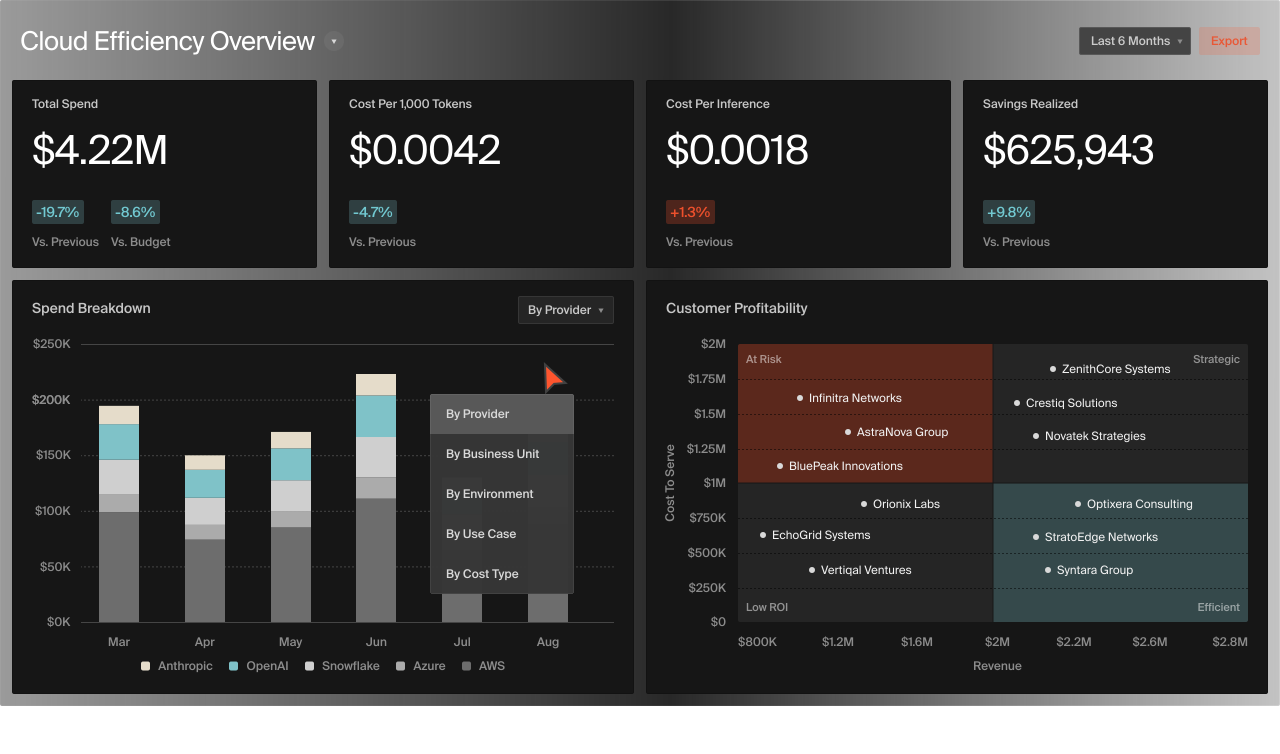
CloudZero is a FinOps platform focused on cloud cost intelligence and unit economics. Unlike traditional cost tools that behave like finance reporting, CloudZero is “built more like an observability tool than a conventional cost tool,” pulling in data from many sources and analyzing it in a business context. Founded in 2016, CloudZero pioneered the idea of empowering engineering teams with cost data relevant to their work (e.g., cost per deployment, cost per product feature) alongside the usual finance metrics. It’s a SaaS platform that integrates with AWS, Azure, GCP, Kubernetes, and services like Snowflake, offering real-time visibility and anomaly alerts. CloudZero often uses the term “Cost Intelligence” to describe its capabilities beyond basic cost management.
Key Features:
- Multi-Source Data Ingestion: CloudZero can ingest cost and usage data from multiple clouds and services (AWS, Azure, GCP, Kubernetes, serverless, Snowflake, Databricks, etc.). It even handles untaggable resources by using metadata and machine learning to allocate those costs. This ensures you get a complete picture of cloud spend across your tech stack, not just what’s neatly tagged.
- Cost Dimensions and Mapping: A hallmark of CloudZero is the concept of Cost Dimensions – customizable perspectives to slice costs. CloudZero automatically normalizes and breaks down cloud spend into meaningful metrics for both engineering and finance teams . For engineering, you might see cost per deployment, per environment, per microservice, or per product feature. For finance, you see cost per customer, per team, per department, or per unit (like cost per transaction). These dimensions are powerful: they allow each stakeholder to view cloud costs in the context that matters to them, without perfect tagging. CloudZero achieves this by allowing flexible rules (e.g., link certain AWS accounts to “Product A” or use naming conventions to group costs by feature).
- Real-Time Anomaly Alerts: CloudZero provides real-time cost anomaly detection, sending alerts via Slack, email, or webhook whenever something unusual happens. Importantly, these alerts come with context like “this feature’s cost just spiked”. That context (like which team or feature caused the anomaly) helps teams quickly triage and address cost issues. It’s akin to an APM alert for performance but for cost – enabling a more proactive FinOps practice.
- Pre-Built Dashboards and Reports: The platform includes out-of-the-box dashboards such as “Cost per Deployment”, “Cost per Customer”, “Cost per Team”, “Budget vs Actual”. These are accessible to engineering and finance users alike, so teams don’t have to wait for a monthly report – they can log in and see near real-time cost performance. CloudZero also supports scheduled reports and can integrate with BI tools or Slack for sharing cost insights routinely.
- FinOps Collaboration and Guidance: CloudZero often pairs customers with a FinOps expert (FinOps Certified Practitioner) to help them configure dimensions and interpret data . This service aspect means CloudZero isn’t just software, but a bit of a partner in helping organizations improve their FinOps maturity. They emphasize that engineering decisions are effectively “buying decisions”, and their platform helps engineers see the cost impact of their work. CloudZero also integrates with workflows (Jira, etc.) so teams can take action on cost insights.
- Discount Management: While CloudZero is more about visibility, it does help identify underutilized discounts (like unused RIs or Savings Plans) and track cost against commitments. It won’t purchase for you (not an automation tool), but it ensures you have the data to maximize usage of prepaid commitments.
Best For: CloudZero is best for product-led companies and SaaS businesses where understanding the cost of delivering specific products, features, or customer segments is crucial. If your organization wants to tie cloud spend directly to business value – for example, calculating gross margin per customer or per unit of product – CloudZero is tailored for that use case. It’s ideal for companies with complex or dynamic environments (microservices, Kubernetes, serverless) because CloudZero can make sense of those costs even if tagging is incomplete. CloudZero is also a great fit for FinOps teams that want to engage engineering; its engineer-friendly views (like cost per deployment) get dev teams interested and accountable, rather than cost being seen as just a finance concern. Mid-sized tech companies, tech-savvy enterprises, and startups scaling rapidly on cloud all form CloudZero’s customer base. Essentially, if you need actionable insight rather than just raw cost data – and you want both CFO and engineers to be looking at cost metrics – CloudZero is a strong choice. It’s frequently used by organizations aiming to achieve 99% cost allocation and to drive down COGS while still innovating quickly.
Public pricing for CloudZero is fairly limited, and most customers should expect a negotiated contract. That said, the AWS Marketplace listing gives a clear spend-based reference point: CloudZero On Demand is “sold in units of $1K/month AWS spend,” priced at $19 per unit per month on a 1-month term (with slightly lower effective rates on longer commitments). Overage is also listed as $19 per additional $1K/month of AWS spend above the contracted amount, charged monthly.
As a quick way to estimate from Marketplace: take your monthly AWS spend, divide by $1,000 to get the number of units, then multiply by $19. For example, $1M/year (~$83K/month) is ~83 units, which pencils out to roughly $1.6K/month at the Marketplace on-demand rate (before any contract discounts). Marketplace also shows a separate “CloudZero Custom / CloudZero Platform” line item with large contract totals, which suggests enterprise/custom packaging beyond the simple unit model.
Related article: Best Cloud Cost Optimization Tools [Complete list for 2026]
7. Cast AI
Cast AI is a FinOps and Cloud automation platform specialized in Kubernetes workloads. It goes beyond monitoring by using AI and automation to continuously optimize Kubernetes clusters for cost, performance, and security . Cast AI connects to your Kubernetes clusters on AWS, GCP, or Azure and automatically manages them to reduce cloud costs – for example, by rightsizing pods, scaling nodes in/out, and using Spot instances where possible. Founded in 2019, Cast AI has quickly become a leading tool for organizations running containers at scale, often touting 60%+ cost savings with its optimizations. It essentially acts as an “autopilot” for your K8s infrastructure, making it highly relevant for FinOps teams dealing with large Kubernetes environments.
Key Features
- Automated Rightsizing: Cast AI continuously analyzes workloads with machine learning and rightsizes them in real time. This means if a container requested more CPU/memory than it usually needs, Cast AI can adjust its resource limits/requests down to a more optimal level. It ensures each pod gets the best cost-performance ratio by not over-allocating resources. This is done without manual intervention, addressing a big pain point (engineers often over-provision to be safe, leading to waste).
- Real-Time Autoscaling: Cast AI provides advanced cluster autoscaling that continuously matches resources to demand. Unlike standard autoscalers, Cast AI’s scaling is very granular and fast, leveraging their AI predictions. It can scale the number of nodes up or down and also what types of nodes (e.g., launching different instance types) to meet current workload needs at lowest cost. This prevents overprovisioning and eliminates unnecessary running VMs when the load drops.
- Spot Instance Automation: A highlight is Cast’s automated use of spot instances (preemptible VMs) with safe fallback . It will intelligently replace on-demand nodes with cheaper spot instances whenever possible, and if a spot instance is about to be reclaimed by the cloud provider, Cast will automatically fall back to on-demand to ensure no downtime . Essentially, it manages the entire Spot lifecycle for K8s – something extremely hard to do manually. This alone yields huge savings as Spot prices can be ~70-90% lower than on-demand.
- Integrated Optimization (All-in-One): Cast AI’s platform unifies cost, performance, and even security optimization in one . For FinOps, cost is key – but Cast also checks that performance isn’t hurt (e.g., it won’t shrink resources below what’s needed) and can even monitor security best practices. This holistic automation ensures you’re not trading cost for reliability or security – it aims to improve all simultaneously.
- New Innovations – Live Migration: Notably, Cast AI introduced Container Live Migration for stateful workloads in 2025 . This is a groundbreaking feature allowing even databases or stateful apps in Kubernetes to be moved between nodes with zero downtime. The benefit to FinOps is you can always pack workloads onto the most cost-efficient nodes – even if something is stateful – because Cast can migrate it live rather than leaving a node underutilized due to an immovable workload. This technology effectively tackles one of Kubernetes’ toughest challenges (stateful mobility) and unlocks further cost savings by consolidating workloads without disruption .
- Support for Multi-Cloud K8s: Cast AI works across AWS EKS, Azure AKS, Google GKE, and even hybrid setups (like OpenShift on AWS) . So if you have Kubernetes clusters in different clouds, Cast can optimize all of them. This is great for consistency in FinOps practices.
- Analytics and Reporting: In addition to automation, Cast AI provides cost reports showing savings achieved, cluster utilization, and breakdowns by namespace or service (similar to Kubecost-style visibility). This keeps FinOps informed and helps justify the automation by quantifying savings.
Best For: Cast AI is best for organizations running substantial workloads on Kubernetes and seeking to dramatically cut costs via automation. If your cloud bill is heavily driven by EKS/AKS/GKE clusters, and managing those costs/scale is challenging, Cast AI is an ideal solution. It’s used by both scaling startups and large enterprises who have embraced containers. Engineering teams that are lean (i.e., they don’t have time to constantly tune clusters) benefit from Cast AI acting as an automated DevOps assistant. It’s also excellent for companies committed to using Spot instances and maximizing their Savings Plans/Reserved Instances – Cast AI automates those strategies on the fly. In FinOps terms, if you’re in the “Operate” phase and want continuous optimization rather than periodic reports, Cast AI is for you. It is particularly useful in cloud-native sectors like SaaS, gaming, AI platforms (lots of microservices), or any environment where workloads are dynamic and elasticity can be exploited for savings.
Pricing: Cast AI’s pricing is primarily subscription + usage-based (per CPU). The pricing page shows a Free plan at $0/month for Kubernetes cost/performance monitoring (connect up to 5 clusters) with items like real-time cost dashboards and 90-day data retention. The Growth plan starts at $1,000/month + $5 per CPU/month, and adds automated optimization/autoscaling (autoscale up to 2,000 CPUs, optimize unlimited clusters). There are also per-CPU add-ons, such as Infrastructure Optimization (+$4/CPU) and Runtime Security & Visibility (+$2/CPU). The Enterprise plan is custom-priced, includes unlimited CPU autoscaling and enterprise features like SSO, RBAC, and expanded support (24/7, dedicated channels/on-call). For the most current numbers and packaging, you’d verify directly on CAST AI’s pricing page.
Related article: Best FinOps Tools For Cloud Cost Management [2026 Edition]
8. Vantage
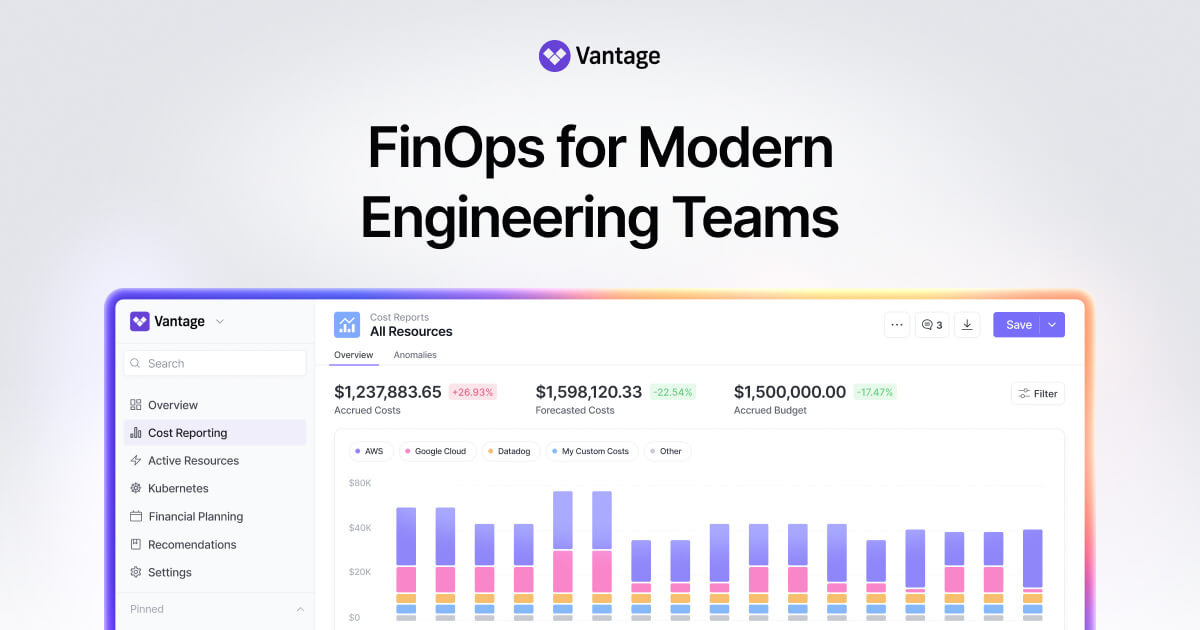
Vantage is a self-service cloud cost management platform that aims to give developers and finance teams simple yet powerful tools to analyze and optimize cloud spend. It’s like an easy-to-use layer on top of AWS, GCP, and Azure costs, with quick setup and out-of-the-box dashboards. Vantage (founded mid-2010s) has carved a niche especially among startups and mid-size companies that want better insight than native tools but with minimal complexity. It integrates with AWS, Azure, GCP, as well as services like Snowflake and Datadog, to provide a consolidated view. Vantage emphasizes quick onboarding (you can get started in minutes) and a developer-friendly experience to help engineers embrace FinOps .
Key Features:
- Fast & Easy Onboarding: Vantage prides itself on being extremely quick to set up – you can connect your cloud accounts and start seeing cost data in minutes, without lengthy configuration . There’s no heavy tagging prerequisite; it uses existing billing data and augmentations.
- Integrations Library: Vantage has integrations with 15+ platforms including AWS, Azure, GCP, Snowflake, Datadog, MongoDB, and more . This means it can pull cost data from not just clouds but also popular third-party services developers use, giving a more complete cost picture (similar in spirit to Finout’s multi-source, but with perhaps a simpler set of key integrations).
- Cost Reports & Dashboards: Vantage offers a variety of pre-built reports. You can configure cost reports with rule sets to slice and dice data in flexible ways . It provides detailed Kubernetes cost reports (for teams running K8s) and network flow reports that show networking costs by resource . It also has views to show data by team, by application, or even unit cost metrics (cost per API call, etc.) if you feed it the right data . Essentially, Vantage helps present cost data in any “slice” you need for FinOps analysis.
- Virtual Tags and Segments: Much like Finout, Vantage supports virtual tagging and hierarchical cost segments . You can group costs across providers, e.g., define a Segment for “Product XYZ” that includes an AWS account, specific GCP projects, and a Datadog service. This allows accurate cost attribution and showback in complex environments.
- Budgets, Alerts, and Anomaly Detection: Vantage includes budgeting tools and anomaly detection features to catch overspend early (for example, a sudden spike will trigger an alert, and you can set budgets on those segments or overall spend). It recently introduced a FinOps Agent (AI-driven) feature to interact with cost data via chat (leveraging LLMs like ChatGPT) , as well as FinOps-as-Code via a Terraform provider for managing cost configurations programmatically . These innovative features show Vantage adopting modern FinOps trends (AI and automation in analysis).
- Optimization (Autopilot): Vantage has a feature called Autopilot for AWS Savings Plans . This is an automation that will purchase AWS Savings Plans for you to optimize costs, based on your usage. Essentially, Vantage will handle commitment management to ensure you get discounted rates where it makes sense, charging a fee of 5% of savings for this service . This is an example of automation integrated into a primarily visibility-focused tool. Additionally, Vantage provides waste detection (like identifying idle resources), although it typically surfaces these as recommendations rather than performing deletions itself.
- Developer-Friendly Interface: Vantage’s UI is clean and aimed at engineers as much as finops folks. It also provides an API and even a command-line tool, meaning engineers can fetch cost data in their workflows. By offering “FinOps as Code” with Terraform and having Slack/MS Teams integrations , it meets developers where they are, which encourages adoption.
Best For: Vantage is best for teams that want a lightweight, user-friendly cost management tool without the complexity of enterprise solutions. It’s popular with startups and growing tech companies that are outgrowing spreadsheets and cloud native consoles but might find something like CloudHealth or Apptio Cloudability too heavy or costly. If you’re a cloud-focused MSP (Managed Service Provider) managing costs for multiple clients, Vantage’s multi-account support and quick setup are beneficial (in fact, Vantage has an offering specifically for MSPs). It’s also great for engineering-led FinOps efforts – if you want your developers to actually log in and explore cost data, Vantage’s simplicity is a big plus. Companies in the early to mid FinOps maturity stage, looking to establish cost visibility and start some optimization, would find Vantage fits well. Also, if budget is a concern, Vantage’s pricing (with free tier and low-cost tiers) makes it accessible (more on that next).
Pricing: Vantage offers simple, fixed-rate plans that scale with your cloud spend. They have a free Starter tier for up to $2,500/month in cloud spend – great for tiny startups. Then Pro at $30/month (up to $7.5k spend) , Business at $200/month (up to $20k spend), and Enterprise (custom) for spend beyond $20k/month. These tiers include unlimited users and increasing features (e.g., Business adds Kubernetes cost metrics, Enterprise adds things like RBAC and premium support). Notably, Autopilot (the SP purchase feature) is charged separately at 5% of savings achieved – and it’s optional. This pricing model is very transparent and budget-friendly; it doesn’t add to your cost problem since it’s fixed, not a cut of spend. It clearly targets the SMB and mid-market – large enterprises likely fall into a custom percent-of-spend model at the Enterprise level if spend is huge, but by then they’d evaluate if Vantage meets all their needs.
Related article: Best FinOps Tools For Cloud Cost Management [2026 Edition]
9. Spot by NetApp

Spot.io (by NetApp) is a FinOps solution centered on automation and AI to optimize cloud infrastructure costs. Spot (formerly Spotinst) gained fame by making it easy to leverage AWS Spot Instances (hence the name) to save massively on compute costs. Over time, Spot’s platform expanded to include a suite of products (such as Spot EC2 automation, Ocean for Kubernetes, Elastigroup for autoscaling groups, Eco for rightsizing and saving plans, etc.) all geared toward cost optimization. In essence, Spot provides tools that sit on top of AWS, Azure, and GCP and automate resource management – scaling, instance selection, provisioning – to reduce waste and ensure efficient utilization, all while maintaining application performance and availability.
Key Features:
- Spot Instance Automation: As the name suggests, Spot’s flagship capability is automatically running workloads on spare capacity (spot instances) where possible. It will identify workloads suitable for spot, provision spot instances, and manage the transitions . If a spot instance is terminated by the cloud provider, Spot’s automation (through Elastigroup/Ocean) will replace it seamlessly with another spot or on-demand as needed, ensuring continuity. This gives you the savings of spot (up to 90% cheaper) without the usual risk, essentially abstracting away the complexity of using spot instances.
- Cloud Resource Optimization: Beyond just spot VMs, Spot automates optimization for various resources: it can manage and optimize VM scaling (rightsizing VMs, turning off idle ones), handle Kubernetes cluster scaling via Spot Ocean (which optimizes K8s nodes and even rightsizes containers similar to Cast AI), and optimize storage or databases where possible. It’s an umbrella for infrastructure optimization services across compute, storage, and even CI/CD pipelines.
- Predictive Autoscaling: Spot uses AI algorithms to predict workload requirements and scale infrastructure up or down in real time. For example, if your daily traffic pattern is known, Spot can proactively add instances before peak and remove them after, preventing over-provisioning. This predictive scaling works in containerized environments (Ocean) and VM environments (Elastigroup), eliminating unnecessary spending due to over-allocation.
- Multi-Cloud Cost Visibility: Spot provides a unified dashboard to monitor and analyze cloud costs across AWS, Azure, GCP, and Kubernetes environments. While Spot is more about action, it does include cost reporting and analytics for the environments it manages, so you can see your spend and savings in one place.
- CI/CD Integration: Spot integrates with DevOps workflows – for instance, it can work with continuous deployment processes to ensure whenever you deploy, the infrastructure is efficiently managed. They promote how developers can just deploy code and Spot will handle the infrastructure optimization behind the scenes (e.g., choosing the right instance types or packing containers efficiently).
- Savings Recommendations & Eco: Spot’s Eco product (and other components) provide actionable insights and recommendations in addition to automatic actions . This includes rightsizing recommendations, identifying underutilized volumes, suggesting purchases of Reserved Instances or Savings Plans and even automating those (like a competitor ProsperOps does). Spot can automatically execute some of these: for example, Eco can automatically adjust storage or commit to savings plans if configured.
Best For: Spot is best for organizations that run significant infrastructure on cloud and want to aggressively optimize costs without manual intervention. If your AWS bill is huge and you haven’t fully exploited Spot instances or automated scaling, Spot can likely save you a lot. It’s used heavily in industries with variable or batch workloads (like data processing, CI/CD workloads, web apps with fluctuating traffic) because the more variability, the more savings potential via dynamic optimization. It’s also great for teams that don’t want to build complex auto-scaling and optimization logic themselves – Spot provides that as a service. Companies with large Kubernetes deployments also use Spot Ocean to reduce their K8s costs similarly to Cast AI. Essentially, if you are cloud-savvy and already doing some FinOps, Spot can take you to the next level by handling it automatically. It requires trust in automation, so it’s often adopted by forward-thinking DevOps/FinOps teams who are comfortable with SRE-like tools. Best for: cloud-native companies, SaaS providers at scale, online services with fluctuating loads, and any org where infrastructure makes up the bulk of cloud cost and thus is the prime target for optimization.
Pricing: Spot by NetApp typically operates on a percentage-of-savings or percentage-of-spend model. Historically, Spot (Spotinst) charged a cut of the difference between on-demand and spot prices realized – effectively a win-win model where if you saved $100, they might take $20 (20%). They’ve had various models: some products might be a small percentage of total cloud spend managed. For instance, taking 5% of your AWS bill that goes through them. The exact figure can depend on the product: e.g., Spot Eco for rightsizing might be X% of savings, Spot Ocean might be Y% of the k8s spend under management. As part of NetApp, they might also have enterprise license agreements. But generally, expect performance-based pricing – you pay in proportion to what Spot handles/saves. There might also be tiered or flat options for large commitments. They also have free trials and even free tiers for some tools. Overall, Spot’s pricing ensures you see value (if they don’t save you anything, you pay little).
Related article: Best FinOps Tools For Cloud Cost Management [2026 Edition]
The New Generation: Autonomous Cost Management
The trajectory of FinOps tools is clearly toward more autonomy and intelligence. The latest generation of platforms doesn’t just present data – they actively control the cloud environment to prevent waste before it happens. This is the era of Autonomous Cost Management. What defines this new generation?
- In-Place Resource Rightsizing: Traditionally, rightsizing (adjusting VM/machine sizes or container resources) was manual and often required restarting or redeploying workloads. New solutions can perform in-place rightsizing. For example, advanced Kubernetes optimizers adjust container CPU/RAM limits on the fly or use vertical pod autoscaling so that apps continuously get the “right” size over time. This eliminates the lengthy review cycles for rightsizing and ensures you’re always running as efficiently as possible. Cloudchipr’s automation and Cast AI’s platform both exemplify this by actively resizing resources without human intervention.
- Live Migration for Stateful Workloads: One of the most exciting developments is the ability to live-migrate even stateful applications (databases, stateful services) to more cost-effective infrastructure with zero downtime. This was traditionally very hard – stateful systems would be fixed to specific nodes due to data gravity. But technologies like Cast AI’s Container Live Migration now allow moving a running database from one VM to another seamlessly. Similarly, Cloudchipr’s platform is designed to optimize even persistent workloads (through creative scheduling or bursting). This means even components that used to be “off-limits” for automated optimization can now be rebalanced and consolidated to eliminate waste (for example, moving a lightly-used database off an expensive instance onto a shared one during off-peak hours).
- Real-Time Policy Enforcement: Autonomous platforms operate on a continuous feedback loop. They monitor metrics in real time and enforce policies immediately. If a dev team accidentally spins up a monster VM in dev, an autonomous system might downsize it within minutes or shut it off after hours per policy – preventing a surprise bill. These platforms often have a library of policies (e.g., no idle VM over X size for more than Y hours) that are enforced globally. Real-time enforcement is also evident in anomaly responses – rather than just alert, some systems could be configured to take action (like automatically disable a suspiciously expensive query or cap a serverless function’s concurrency if costs spike abnormally). We are moving to a world of “proactive cost governance”: not just detecting cost issues, but preventing them or fixing them instantly.
- AI-Driven Optimization: The use of AI in FinOps is increasing. Beyond anomaly detection, AI is being used to forecast usage patterns and pre-emptively optimize. For instance, AI models can predict tomorrow’s load and schedule down unused capacity overnight, or identify that a new deployment is likely over-provisioned based on similar past services. CloudZero’s notion of “Agentic FinOps” hints at AI surfacing recommendations you didn’t even know to ask for . Cloudchipr’s AI agents that can answer questions (“Why did our costs go up at 3 AM?”) are another example. In autonomous cost management, AI might directly drive actions – for example, automatically tuning a cluster’s configuration using reinforcement learning to minimize cost for a target performance.
- Integration with Dev Workflow: The new generation tools integrate tightly with how developers work. Whether it’s via Slack, GitHub actions, or CI/CD pipelines, they ensure cost management isn’t a separate silo. Some can inject cost checks into deployments (e.g., warning if a deployment would breach budget) or tag cost to specific feature releases. By being part of the workflow, cost optimization becomes a continuous aspect of software delivery, not an afterthought.
In summary, autonomous cost management tools act like an autopilot for your cloud – continuously tuning, cleaning up, and reallocating resources to match demand and policies. They aim to deliver “zero waste” cloud operations, where every dollar spent is either delivering value or immediately questioned by an AI. This is a big shift from the days of monthly reports and cleanup projects. It doesn’t mean humans are out of the loop – instead, human FinOps experts now define goals and guardrails, and the system takes care of execution. This empowers teams to move faster (engineering doesn’t have to manually comb for savings) while actually spending less.
Cloud providers themselves are starting to move this way (for example, GCP’s Active Assist can auto-recommend and even auto-delete some idle resources if you opt in, and AWS has some automation like auto-scaling and OpsActions). But third-party innovators are currently a step ahead in delivering holistic autonomy across all services and clouds.
Conclusion
As cloud environments grow more complex with multi-cloud architectures, Kubernetes, and AI workloads, effective cloud cost management has become mission-critical. While companies still waste around 30% of their cloud spend, the FinOps landscape in 2026 offers more sophisticated solutions than ever.
The evolution from native tools to autonomous platforms represents a fundamental shift in cloud financial operations. Native tools like AWS Cost Explorer, Azure Cost Management, and Google Cloud Billing provide essential starting points, but often fall short in delivering real-time insights and automated optimization for complex environments. Third-party platforms like Finout, CloudZero, Cast AI, Vantage, and Spot fill this gap with specialized strengths.
The future of FinOps lies in autonomous cost management - platforms that actively optimize your cloud in real time, not just report on costs. Tools like Cloudchipr represent this next generation, combining AI-powered insights with automated workflows that continuously rightsize resources, enforce policies, and eliminate waste with zero downtime.
Choosing the right tool depends on your cloud footprint, infrastructure complexity, team maturity, and automation needs. For organizations seeking continuous optimization beyond monthly reports, autonomous platforms that both analyze and optimize offer the most efficient path to FinOps excellence. The goal is no longer just visibility - it's achieving a self-optimizing cloud that maximizes value for every dollar spent.
CTA: Ready to move beyond dashboards and embrace truly autonomous cloud cost optimization? Experience the next evolution of cloud cost management - autonomous optimization with Cloudchipr. With Cloudchipr acting as your FinOps co-pilot, you can achieve continuous savings, zero downtime efficiency improvements, and FinOps excellence with far less effort. Don't just manage cloud costs - make your cloud self-optimizing. Get in touch with Cloudchipr for a demo and see how intelligent automation can transform your cloud financial operations.